> For the complete documentation index, see [llms.txt](https://docs.roboflow.com/llms.txt). Markdown versions of documentation pages are available by appending `.md` to page URLs; this page is available as [Markdown](https://docs.roboflow.com/agents/agents/roboflow-agent.md).

# Roboflow Agent

## About

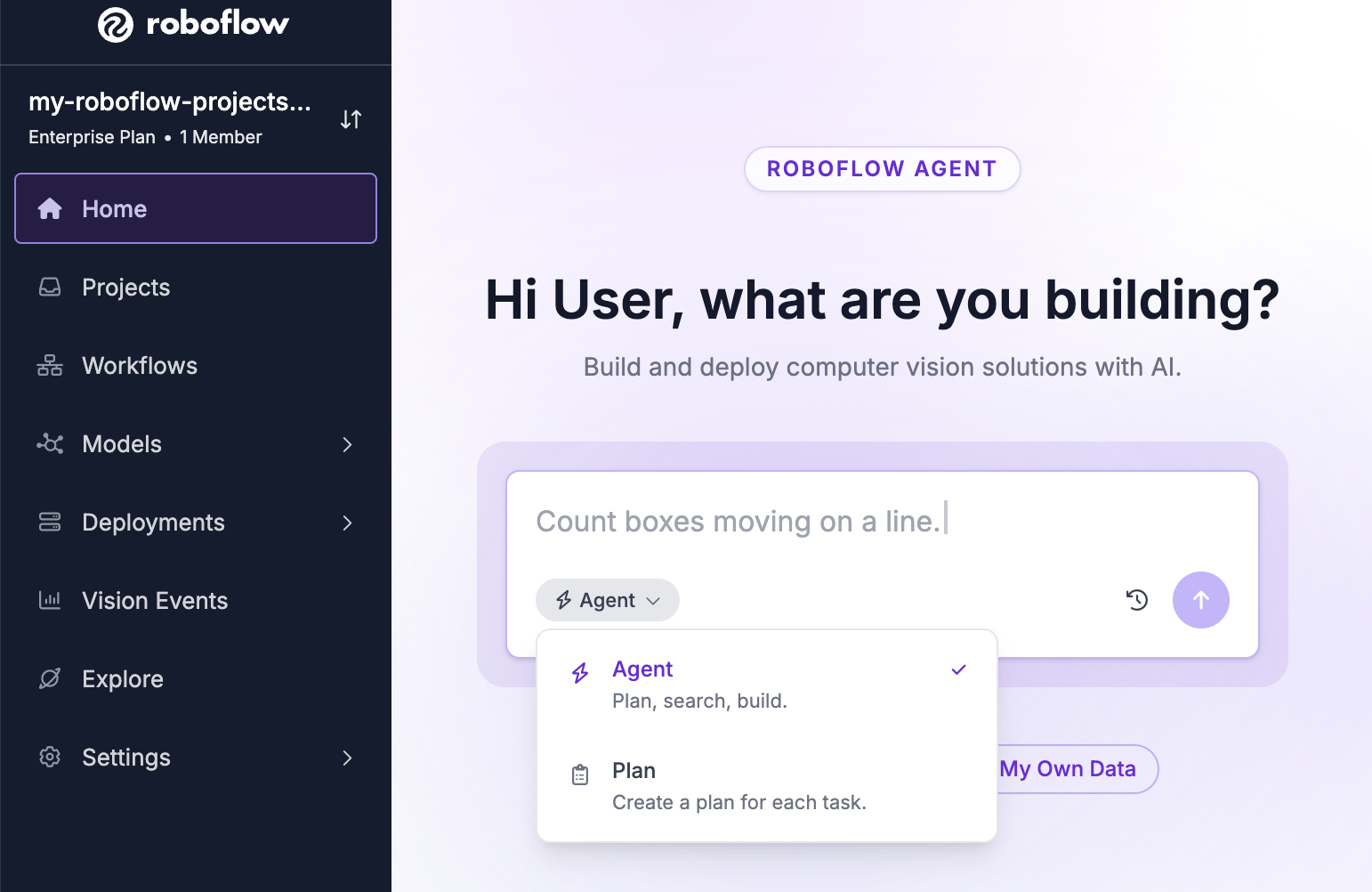
Roboflow Agent has access to your [Workspace](/platform/workspaces/key-concepts.md) and can create, edit, run, and debug [Workflows](https://docs.roboflow.com/workflows). You can also use it to set up [Rapid](https://docs.roboflow.com/models/rapid/rapid) models. Access the Agent by clicking "Agent" in the left sidebar of your workspace.

<figure><img src="/files/ovVaWQP7hz9ZIjSvd6W7" alt=""><figcaption></figcaption></figure>

### Capabilities

The Agent can:

* Build [Workflows](https://docs.roboflow.com/workflows) from a natural language description, run them, and auto-fix failures (up to three retries per turn). All input modes are supported: image URLs, RTSP streams, local video, and webcam.
* Understand attached images and videos. You can attach, drag-and-drop, or paste an image or short video into the chat. The Agent analyzes your media to understand what it contains, builds a Workflow informed by it, then re-runs the Workflow on that same media to verify the result.
* Set up and manage [Rapid](https://docs.roboflow.com/models/rapid/rapid) models.
* Manage datasets on request: [rebalance a project's train, validation, and test splits](https://docs.roboflow.com/datasets/versions/dataset-versions/create-a-dataset-version#readjusting-train-validation-test-splits) or [merge projects](https://docs.roboflow.com/datasets/manage/merge-datasets) into a new one. Both run as background tasks you can track in the Activity Center.
* Start a [model training](https://docs.roboflow.com/models/train/train-a-model#train-from-the-agent) run from a project tab. The "Train" button opens the full training flow (engine, architecture, and version steps) inside the tab, and prepares the dataset export for you.
* Organize open Workflows, Rapid models, usage views, and plans into tabs. Use the "+" tab to reopen closed items or create new ones. Follow-up conversations inherit artifacts from previous chats.
* Open a project tab with a "Dataset" section that [groups the project's images by labeling stage](https://docs.roboflow.com/datasets/annotate/annotate/team-collaboration#browse-labeling-work-from-the-agent) (Unassigned, Annotating, Review, Dataset). Open any image in the annotation editor, move a job to its next stage, and approve or reject images under review.
* Open a zone editor to draw detection zones on a Workflow's input image.
* React to UI events: diagnose Rapid training failures, investigate Workflow run errors (via an "Investigate" prompt above the chat input), and continue automatically when a Rapid source Workflow is ready.
* Open a "Historical Usage" tab showing your Workspace's [Credit Usage Dashboard](/platform/billing-and-plans/credits/view-credit-usage.md) with the filters matching your question (timeframe, feature, attribution, cumulative/daily, credits/dollars). The Agent keeps the tab in sync as the conversation continues. Requires the "View Billing" permission.
* Set up [Vision Events](https://docs.roboflow.com/deployment/monitoring-and-analytics/vision-events) in your Workflows. When building a Workflow that runs a model, the Agent adds a Vision Events block and configures it with the right [Use Case](https://docs.roboflow.com/deployment/monitoring-and-analytics/vision-events/use-cases), creating one if needed.
* Open a project tab with a "Settings" section, where you can turn [Active Learning](https://docs.roboflow.com/deployment/monitoring-and-analytics/active-learning) on or off for that project and edit its collection limits and conditions.
* Answer questions about your edge devices with read-only access to your [Deployment Manager](https://docs.roboflow.com/deployment/self-hosted/enterprise/deployment-manager) fleet, configuration, telemetry, logs, events, and streams. Ask about device status or stream errors (ex: "which devices are offline?", "why did this stream error?") instead of clicking through the Deployment Manager. Device credentials are never shared with the Agent.

## HTTP API

The Agent API lets you interact with the Roboflow AI agent through `api.roboflow.com`. You can send natural-language instructions to create or edit [Workflows](https://docs.roboflow.com/workflows/build/create-a-workflow), then publish them when ready. All edits are saved as drafts until you explicitly publish.

Authentication is via [API key](https://docs.roboflow.com/reference/platform/rest-api/authenticate-with-the-rest-api). If you use a [Scoped API Key](https://docs.roboflow.com/reference/authentication/authentication/scoped-api-keys) with folder restrictions, the agent will only be able to access Workflows within that folder scope.

### Chat

<mark style="color:green;">`POST`</mark> `/:workspace/agent/chat`

Send a message to the AI agent. The agent can create new Workflows, edit existing ones, and answer questions about your workspace. Workflow changes are saved as drafts.

You can start a new conversation or continue an existing one by passing `conversation_id`.

**Headers**

| Name         | Value              |
| ------------ | ------------------ |
| Content-Type | `application/json` |

**Body**

<table data-search="false"><thead><tr><th>Name</th><th>Type</th><th>Description</th><th data-type="checkbox">Required</th></tr></thead><tbody><tr><td><code>api_key</code></td><td>string</td><td>Workspace API key.</td><td>true</td></tr><tr><td><code>message</code></td><td>string</td><td>The instruction or question for the agent.</td><td>true</td></tr><tr><td><code>conversation_id</code></td><td>string</td><td>ID of an existing conversation to continue. Omit to start a new conversation.</td><td>false</td></tr><tr><td><code>mode</code></td><td>string</td><td><code>agent</code> (default) or <code>plan</code>. In plan mode the agent outlines what it would do without making changes.</td><td>false</td></tr></tbody></table>

**Example Request**

```bash
curl -X POST "https://api.roboflow.com/my-workspace/agent/chat" \
  -H "Content-Type: application/json" \
  -d '{
    "api_key": "'"$ROBOFLOW_API_KEY"'",
    "message": "Build me a workflow that detects cars and counts them"
  }'
```

**Response**

```json
{
  "text": "I created a workflow called 'Car Counter' that ...",
  "workflows": [
    {
      "id": "wf_abc123",
      "name": "Car Counter",
      "url": "car-counter",
      "specification": { ... }
    }
  ],
  "conversation_id": "conv_xyz789"
}
```

| Field             | Description                                                                                                       |
| ----------------- | ----------------------------------------------------------------------------------------------------------------- |
| `text`            | The agent's response text.                                                                                        |
| `workflows`       | Workflows created or modified during this turn. Each includes `id`, `name`, `url`, and the draft `specification`. |
| `conversation_id` | The conversation ID. Pass this back in subsequent requests to continue the conversation.                          |

Required scopes: `workflow:create` and `workflow:update`.

### Publish a Workflow

<mark style="color:green;">`POST`</mark> `/:workspace/agent/workflows/:workflowUrl/publish`

Deploys the latest draft version of a Workflow that was created or edited by the agent. If there is no unpublished draft, the endpoint returns `400`.

**Example Request**

```bash
curl -X POST "https://api.roboflow.com/my-workspace/agent/workflows/car-counter/publish?api_key=$ROBOFLOW_API_KEY"
```

**Response**

```json
{
  "workflowId": "wf_abc123",
  "workflowUrl": "car-counter",
  "versionId": "v-1700000000",
  "status": "published"
}
```

Required scope: `workflow:update`.

### List Conversations

<mark style="color:green;">`GET`</mark> `/:workspace/agent/conversations`

Returns all agent conversations in the workspace.

**Query**

<table data-search="false"><thead><tr><th>Name</th><th>Type</th><th>Description</th><th data-type="checkbox">Required</th></tr></thead><tbody><tr><td><code>api_key</code></td><td>string</td><td>Workspace API key.</td><td>true</td></tr><tr><td><code>source</code></td><td>string</td><td>Filter by origin: <code>api</code> or <code>web</code>.</td><td>false</td></tr><tr><td><code>workflow</code></td><td>string</td><td>Filter by Workflow URL slug. Only returns conversations that reference this Workflow.</td><td>false</td></tr></tbody></table>

**Example Request**

```bash
curl "https://api.roboflow.com/my-workspace/agent/conversations?api_key=$ROBOFLOW_API_KEY&source=api"
```

**Response**

```json
{
  "conversations": [
    {
      "id": "conv_xyz789",
      "name": "Car Counter",
      "source": "api",
      "workflowIds": ["wf_abc123"],
      "created_on": "2026-05-14T20:00:00.000Z",
      "updated_on": "2026-05-14T20:05:00.000Z"
    }
  ]
}
```

Required scope: `workflow:read`.

### Get a Conversation

<mark style="color:green;">`GET`</mark> `/:workspace/agent/conversations/:id`

Returns the full conversation including all messages.

**Example Request**

```bash
curl "https://api.roboflow.com/my-workspace/agent/conversations/conv_xyz789?api_key=$ROBOFLOW_API_KEY"
```

**Response**

```json
{
  "id": "conv_xyz789",
  "name": "Car Counter",
  "type": "agent",
  "source": "api",
  "created_on": "2026-05-14T20:00:00.000Z",
  "updated_on": "2026-05-14T20:05:00.000Z",
  "workflowIds": ["wf_abc123"],
  "messages": [
    {
      "id": "msg_1",
      "role": "user",
      "parts": [{ "type": "text", "text": "Build me a workflow that detects cars" }]
    },
    {
      "id": "msg_2",
      "role": "assistant",
      "parts": [{ "type": "text", "text": "I created a workflow called ..." }]
    }
  ]
}
```

Required scope: `workflow:read`.

### Error Responses

All endpoints return errors as `{ "error": "..." }` with an appropriate HTTP status code.

| Status | Meaning                                                                                            |
| ------ | -------------------------------------------------------------------------------------------------- |
| `400`  | Bad request (missing `message`, no draft to publish, etc.)                                         |
| `401`  | API key missing or invalid.                                                                        |
| `402`  | Insufficient credits.                                                                              |
| `403`  | Insufficient scopes, Workflow outside folder scope, or agent features disabled for this workspace. |
| `404`  | Workflow or conversation not found.                                                                |
| `500`  | Internal server error.                                                                             |

When agent features are disabled at the workspace level, chat and publish endpoints return `403` with `"error_type": "AGENT_DISABLED"`.
