> For the complete documentation index, see [llms.txt](https://docs.roboflow.com/llms.txt). Markdown versions of documentation pages are available by appending `.md` to page URLs; this page is available as [Markdown](https://docs.roboflow.com/agents/roboflow-agent.md).

# Roboflow Agent

## About

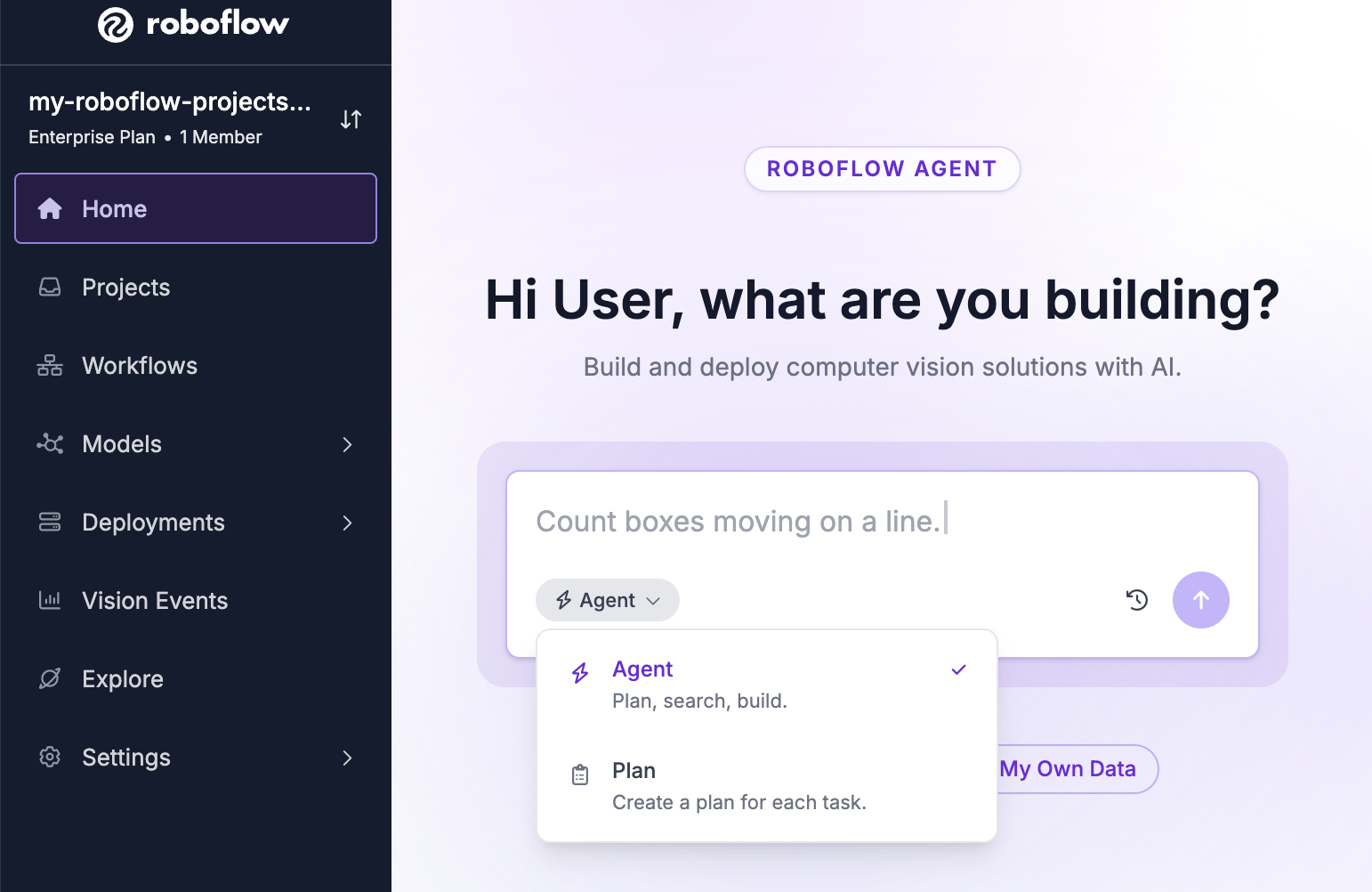
Roboflow Agent has access to your [Workspace](/platform/workspaces/key-concepts.md) and can create, edit, run, and debug [Workflows](https://docs.roboflow.com/workflows). You can also use it to set up [Rapid](https://docs.roboflow.com/models/rapid/rapid) models. Access the Agent by clicking "Agent" in the left sidebar of your workspace.

<figure><img src="/files/ovVaWQP7hz9ZIjSvd6W7" alt=""><figcaption></figcaption></figure>

### Capabilities

The Agent can:

* Build [Workflows](https://docs.roboflow.com/workflows) from a natural language description, run them, and auto-fix failures. All input modes are supported: image URLs, RTSP streams, local video, and webcam.
* Watch a video preview while it runs. The Agent tells you when the preview is still starting up and when the stream ends or fails. For webcam and RTSP previews it keeps about the last 2.5 minutes of results, so you can ask what it saw without stopping the stream.
* Understand attached images and videos. You can attach, drag-and-drop, or paste an image or short video into the chat. The Agent analyzes your media to understand what it contains, builds a Workflow informed by it, then re-runs the Workflow on that same media to verify the result. Videos must be MP4 or MOV and under 100 MB. Images must be under 15 MB. An attached video is saved to your Workspace like any other uploaded video, so you can find it and delete it later.
* Set up and manage [Rapid](https://docs.roboflow.com/models/rapid/rapid) models.
* Manage datasets on request: [rebalance a project's train, validation, and test splits](https://docs.roboflow.com/datasets/versions/dataset-versions/create-a-dataset-version#readjusting-train-validation-test-splits) or [merge projects](https://docs.roboflow.com/datasets/manage/merge-datasets) into a new one. Both run as background tasks you can track in the [Background Tasks](#background-tasks) panel.
* [Create a Project](https://docs.roboflow.com/datasets/create-and-upload/create-a-project#create-a-project-from-the-agent) from the "+" tab. Click "New Model" on the "Create a New Asset" page, pick a project type, and fill in the rest of the form. The tab turns into the new Project when it is created.
* Start a [model training](https://docs.roboflow.com/models/train/train-a-model#train-from-the-agent) run from a project tab. The "Train" button opens the full training flow (engine, architecture, and version steps) inside the tab, and prepares the dataset export for you.
* Organize open Workflows, Rapid models, usage views, projects, and plans into tabs. Drag a tab to reorder it. Use the "+" tab to reopen closed items or create new ones. Follow-up conversations inherit artifacts from previous chats.
* Open one of your models from the "+" tab. Pick one under "Recents", or search to see every model in your Workspace. The model stays with the conversation, so it reopens after you reload.
* Open a project tab with a "Dataset" section that [groups the project's images by labeling stage](https://docs.roboflow.com/datasets/annotate/annotate/team-collaboration#browse-labeling-work-from-the-agent) (Unassigned, Annotating, Review, Dataset). Open any image in the annotation editor, move a job to its next stage, and approve or reject images under review.
* Open a zone editor to draw detection zones on a Workflow's input image.
* React to UI events: diagnose Rapid training failures, investigate Workflow run errors (via an "Investigate" prompt above the chat input), and continue automatically when a Rapid source Workflow is ready.
* Open a "Historical Usage" tab showing your Workspace's [Credit Usage Dashboard](/platform/billing-and-plans/credits/view-credit-usage.md) with the filters matching your question (timeframe, feature, attribution, cumulative/daily, credits/dollars). The Agent keeps the tab in sync as the conversation continues. Requires the "View Billing" permission.
* Set up [Vision Events](https://docs.roboflow.com/deployment/monitoring-and-analytics/vision-events) in your Workflows. When building a Workflow that runs a model, the Agent adds a Vision Events block and configures it with the right [Use Case](https://docs.roboflow.com/deployment/monitoring-and-analytics/vision-events/use-cases), creating one if needed.
* Open a project tab with a "Settings" section, where you can turn [Active Learning](https://docs.roboflow.com/deployment/monitoring-and-analytics/active-learning) on or off for that project and edit its collection limits and conditions.
* Answer questions about your [Vision Events](https://docs.roboflow.com/deployment/monitoring-and-analytics/vision-events) data (ex: "how many failures last week?", "which cameras produce the most defects?"). The Agent counts events, tracks pass and fail rates over time, and can sum, average, or find the minimum, maximum, or number of unique values of numeric fields. Totals can be grouped by any field your [Use Case](https://docs.roboflow.com/deployment/monitoring-and-analytics/vision-events/use-cases) records, including custom metadata, or bucketed by day or week (buckets use UTC). If a question reaches past your workspace's [retention window](https://docs.roboflow.com/deployment/monitoring-and-analytics/vision-events#data-retention), the Agent tells you the earliest date it can query instead of answering zero. Requires the "View Vision Events" permission. See [Query Events](https://docs.roboflow.com/deployment/monitoring-and-analytics/vision-events/query-events).
* Draft, preview, and schedule Vision Events [Summary Reports](https://docs.roboflow.com/deployment/monitoring-and-analytics/vision-events/summary-reports) from a plain description of the digest you want (ex: "a weekly Friday morning digest of pass and fail counts by line"). The Agent builds the report from fields your events actually send, shows a preview from your real data, and can email it immediately or on the schedule you choose.
* Answer questions about your edge devices with read-only access to your [Deployment Manager](https://docs.roboflow.com/deployment/self-hosted/enterprise/deployment-manager) fleet, configuration, telemetry, logs, events, and streams. Ask about device status or stream errors (ex: "which devices are offline?", "why did this stream error?") instead of clicking through the Deployment Manager. Device credentials are never shared with the Agent.

### Background Tasks

Long jobs the Agent starts keep running while you chat: model training, auto-labeling, dataset version generation, project merges, class remaps, and split rebalances. A pill above the chat box counts the running ones. Click it, or click "Background Tasks" in the left menu, to open a panel that lists them under "Running" and "Finished". Click a task to open the page it created.

The Agent tells you in the chat when a task finishes, even if you closed the tab and came back later. Only jobs started from inside a conversation appear here. A training you start elsewhere in the app or through the API does not, and you track it in the Activity Center instead.

## HTTP API

The Agent API lets you interact with the Roboflow AI agent through `api.roboflow.com`. You can send natural-language instructions to create or edit [Workflows](https://docs.roboflow.com/workflows/build/create-a-workflow), then publish them when ready. All edits are saved as drafts until you explicitly publish.

Authentication is via [API key](https://docs.roboflow.com/reference/platform/rest-api/authenticate-with-the-rest-api). If you use a [Scoped API Key](https://docs.roboflow.com/reference/authentication/authentication/scoped-api-keys) with folder restrictions, the agent will only be able to access Workflows within that folder scope.

### Chat

<mark style="color:green;">`POST`</mark> `/:workspace/agent/chat`

Send a message to the AI agent. The agent can create new Workflows, edit existing ones, and answer questions about your workspace. Workflow changes are saved as drafts.

You can start a new conversation or continue an existing one by passing `conversation_id`.

**Headers**

| Name         | Value              |
| ------------ | ------------------ |
| Content-Type | `application/json` |

**Body**

<table data-search="false"><thead><tr><th>Name</th><th>Type</th><th>Description</th><th data-type="checkbox">Required</th></tr></thead><tbody><tr><td><code>api_key</code></td><td>string</td><td>Workspace API key.</td><td>true</td></tr><tr><td><code>message</code></td><td>string</td><td>The instruction or question for the agent.</td><td>true</td></tr><tr><td><code>conversation_id</code></td><td>string</td><td>ID of an existing conversation to continue. Omit to start a new conversation.</td><td>false</td></tr><tr><td><code>mode</code></td><td>string</td><td><code>agent</code> (default) or <code>plan</code>. In plan mode the agent outlines what it would do without making changes.</td><td>false</td></tr></tbody></table>

**Example Request**

```bash
curl -X POST "https://api.roboflow.com/my-workspace/agent/chat" \
  -H "Content-Type: application/json" \
  -d '{
    "api_key": "'"$ROBOFLOW_API_KEY"'",
    "message": "Build me a workflow that detects cars and counts them"
  }'
```

**Response**

```json
{
  "text": "I created a workflow called 'Car Counter' that ...",
  "workflows": [
    {
      "id": "wf_abc123",
      "name": "Car Counter",
      "url": "car-counter",
      "specification": { ... }
    }
  ],
  "conversation_id": "conv_xyz789"
}
```

| Field             | Description                                                                                                       |
| ----------------- | ----------------------------------------------------------------------------------------------------------------- |
| `text`            | The agent's response text.                                                                                        |
| `workflows`       | Workflows created or modified during this turn. Each includes `id`, `name`, `url`, and the draft `specification`. |
| `conversation_id` | The conversation ID. Pass this back in subsequent requests to continue the conversation.                          |

Required scopes: `workflow:create` and `workflow:update`.

### Publish a Workflow

<mark style="color:green;">`POST`</mark> `/:workspace/agent/workflows/:workflowUrl/publish`

Deploys the latest draft version of a Workflow that was created or edited by the agent. If there is no unpublished draft, the endpoint returns `400`.

**Example Request**

```bash
curl -X POST "https://api.roboflow.com/my-workspace/agent/workflows/car-counter/publish?api_key=$ROBOFLOW_API_KEY"
```

**Response**

```json
{
  "workflowId": "wf_abc123",
  "workflowUrl": "car-counter",
  "versionId": "v-1700000000",
  "status": "published"
}
```

Required scope: `workflow:update`.

### List Conversations

<mark style="color:green;">`GET`</mark> `/:workspace/agent/conversations`

Returns all agent conversations in the workspace.

**Query**

<table data-search="false"><thead><tr><th>Name</th><th>Type</th><th>Description</th><th data-type="checkbox">Required</th></tr></thead><tbody><tr><td><code>api_key</code></td><td>string</td><td>Workspace API key.</td><td>true</td></tr><tr><td><code>source</code></td><td>string</td><td>Filter by origin: <code>api</code> or <code>web</code>.</td><td>false</td></tr><tr><td><code>workflow</code></td><td>string</td><td>Filter by Workflow URL slug. Only returns conversations that reference this Workflow.</td><td>false</td></tr></tbody></table>

**Example Request**

```bash
curl "https://api.roboflow.com/my-workspace/agent/conversations?api_key=$ROBOFLOW_API_KEY&source=api"
```

**Response**

```json
{
  "conversations": [
    {
      "id": "conv_xyz789",
      "name": "Car Counter",
      "source": "api",
      "workflowIds": ["wf_abc123"],
      "created_on": "2026-05-14T20:00:00.000Z",
      "updated_on": "2026-05-14T20:05:00.000Z"
    }
  ]
}
```

Required scope: `workflow:read`.

### Get a Conversation

<mark style="color:green;">`GET`</mark> `/:workspace/agent/conversations/:id`

Returns the full conversation including all messages.

**Example Request**

```bash
curl "https://api.roboflow.com/my-workspace/agent/conversations/conv_xyz789?api_key=$ROBOFLOW_API_KEY"
```

**Response**

```json
{
  "id": "conv_xyz789",
  "name": "Car Counter",
  "type": "agent",
  "source": "api",
  "created_on": "2026-05-14T20:00:00.000Z",
  "updated_on": "2026-05-14T20:05:00.000Z",
  "workflowIds": ["wf_abc123"],
  "messages": [
    {
      "id": "msg_1",
      "role": "user",
      "parts": [{ "type": "text", "text": "Build me a workflow that detects cars" }]
    },
    {
      "id": "msg_2",
      "role": "assistant",
      "parts": [{ "type": "text", "text": "I created a workflow called ..." }]
    }
  ]
}
```

Required scope: `workflow:read`.

### Error Responses

All endpoints return errors as `{ "error": "..." }` with an appropriate HTTP status code.

| Status | Meaning                                                                                            |
| ------ | -------------------------------------------------------------------------------------------------- |
| `400`  | Bad request (missing `message`, no draft to publish, etc.)                                         |
| `401`  | API key missing or invalid.                                                                        |
| `402`  | Insufficient credits.                                                                              |
| `403`  | Insufficient scopes, Workflow outside folder scope, or agent features disabled for this workspace. |
| `404`  | Workflow or conversation not found.                                                                |
| `500`  | Internal server error.                                                                             |

When agent features are disabled at the workspace level, chat and publish endpoints return `403` with `"error_type": "AGENT_DISABLED"`.

## MCP Server

Connect your AI agent to the [MCP Server](/agents/mcp-server.md) and it can hand work to Roboflow Agent with these tools:

<table data-search="false"><thead><tr><th width="290">Tool</th><th>Description</th></tr></thead><tbody><tr><td><code>agent_chat</code></td><td>Chat with the Roboflow AI agent.</td></tr><tr><td><code>agent_chat_result</code></td><td>Collect the result of a run that was still working.</td></tr><tr><td><code>agent_conversations_list</code></td><td>List agent conversations in the workspace.</td></tr><tr><td><code>agent_conversation_get</code></td><td>Get one conversation with its message history.</td></tr><tr><td><code>agent_workflow_publish</code></td><td>Publish the latest agent-edited draft of a Workflow.</td></tr></tbody></table>
