> For the complete documentation index, see [llms.txt](https://docs.roboflow.com/llms.txt). Markdown versions of documentation pages are available by appending `.md` to page URLs; this page is available as [Markdown](https://docs.roboflow.com/datasets/annotate/annotate/annotation-insights.md).

# Annotation Insights

## About

{% hint style="info" %}
Annotation Insights are a **premium** feature.

For up-to-date information on our plans and their associated features, see our [pricing page](https://roboflow.com/pricing).
{% endhint %}

Annotation Insights show statistics on annotation jobs for projects in a workspace. You can view insights by date, labeler, and project.

For example, you can find:

1. How many images someone annotated in a given time frame;
2. How many rejection events occurred during the review stage, including images that were later approved;
3. The first-pass acceptance rate for reviewed images (the percentage approved without ever being rejected);
4. How many bounding boxes were drawn for a project;
5. How many images were model-assisted or marked as null;
6. Time spent labeling, and more.

## Web App

### View Annotation Insights

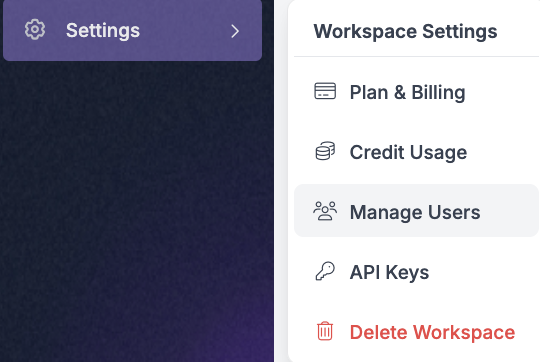
To view Annotation Insights "Settings", then "Manage Users" in the Roboflow sidebar:

<figure><img src="/files/OAITQTCG2M4JfCmjzaxi" alt=""><figcaption></figcaption></figure>

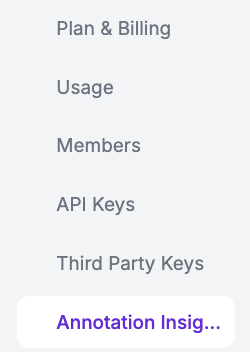
Then, click "Annotation Insights":

<figure><img src="/files/QWAprrwhwbyTLyB2ffeZ" alt=""><figcaption></figcaption></figure>

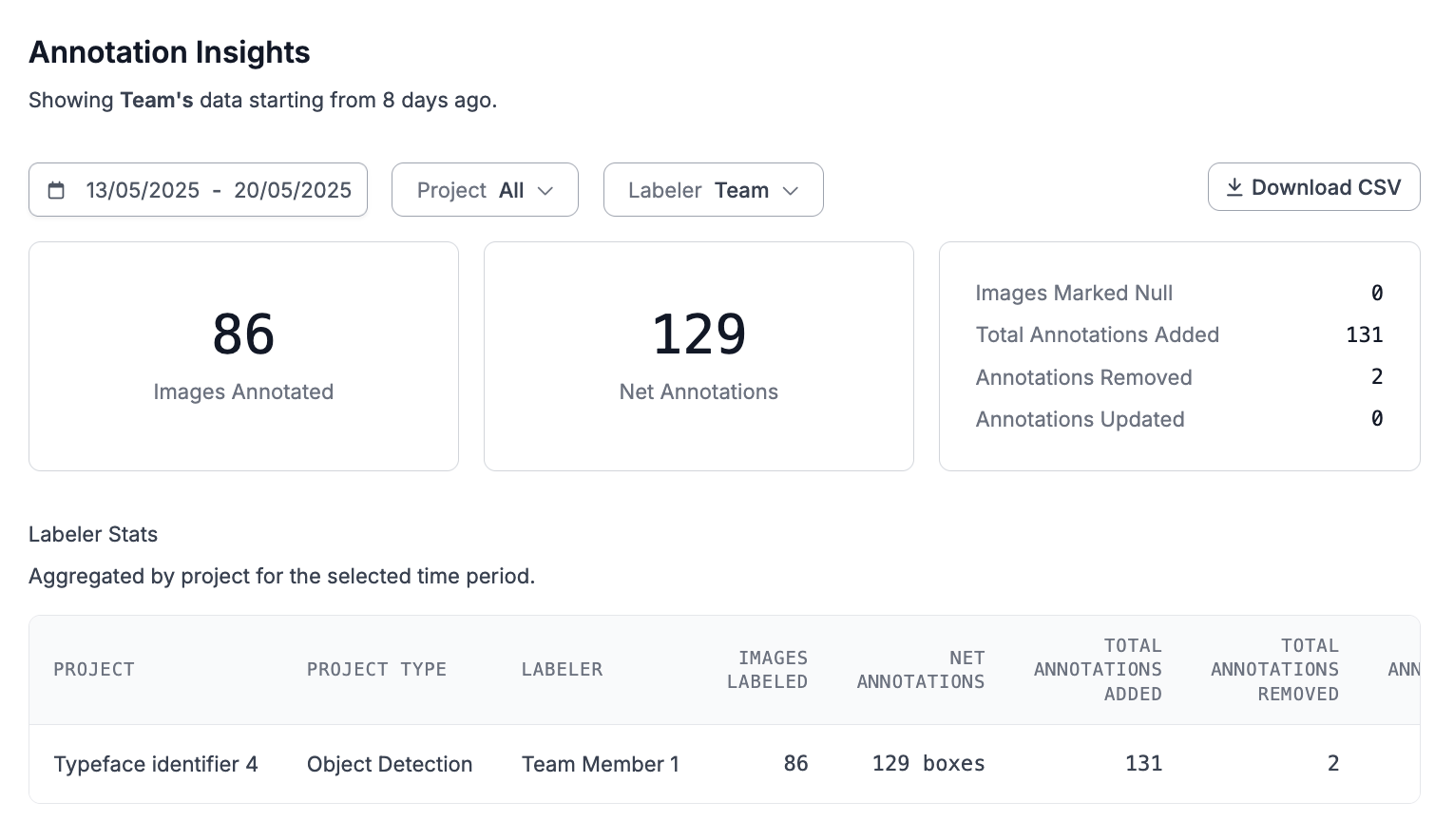
You will then be taken to the Annotation Insights dashboard:

<figure><img src="/files/zsXJaTRKZOnCyquEUQh4" alt=""><figcaption></figcaption></figure>

On the dashboard, you can see aggregate information about the number of annotations created, updated, and removed over a given time period. You can also see a breakdown by project.

### Labeler Statistics

The dashboard table breaks annotation activity down per labeler and project.

| Column                                                                              | Description                                                                 |
| ----------------------------------------------------------------------------------- | --------------------------------------------------------------------------- |
| "Images Labeled"                                                                    | Images the labeler annotated, including images marked as having no objects. |
| "Net Annotations"                                                                   | Annotations added minus annotations removed.                                |
| "Total Annotations Added", "Total Annotations Removed", "Total Annotations Updated" | Counts of the annotation changes the labeler made.                          |
| "Model Assisted"                                                                    | Images the labeler annotated using model-assisted labeling.                 |
| "Marked Null"                                                                       | Images the labeler marked as having no objects.                             |

When annotation review is enabled for the Workspace, the table also shows review statistics:

| Column          | Description                                                                                                                                                                              |
| --------------- | ---------------------------------------------------------------------------------------------------------------------------------------------------------------------------------------- |
| "Approved"      | Images approved during review.                                                                                                                                                           |
| "Rejected"      | The total number of rejection events. Every rejection counts, including images that are later corrected and approved.                                                                    |
| "Approval Rate" | First-pass acceptance, the percentage of reviewed images approved without ever being rejected. An image that is rejected and later approved does not count toward first-pass acceptance. |

{% hint style="info" %}
"Rejected" counts rejection events, not the images currently in a rejected state. An image that is rejected, corrected, and re-approved still adds to the total, so the count reflects every time work is sent back for revision.
{% endhint %}

### Filtering and Export

You can filter results by:

* Date range
* Project
* Labeler (either the whole team, or select members)

You can also export results as a CSV.

## HTTP API

### Annotation Insights

Roboflow provides statistics on annotations associated with your workspace and projects. You can view annotation insights in the Roboflow dashboard and through the REST API.

<mark style="color:blue;">On August 1st, 2023, we improved how annotation metrics are tracked. The Annotation Insights v2 endpoint provides annotation data from August 1st, 2023 and later.</mark>

{% tabs %}
{% tab title="REST API" %}
To retrieve annotation insights for a workspace, make a GET request to the following endpoint:

```url
https://api.roboflow.com/${WORKSPACE}/stats
```

This endpoint accepts the following URL parameters:

| Parameter   | Description                                                                                                                                  | Required |
| ----------- | -------------------------------------------------------------------------------------------------------------------------------------------- | -------- |
| `api_key`   | <a href="https://docs.roboflow.com/reference/rest-api/rest-api/authenticate-with-the-rest-api" class="button primary">API Authentication</a> | Yes      |
| `startDate` | Start date in `YYYY-MM-DD` format. Data available from `2023-08-01` onward.                                                                  | Yes      |
| `endDate`   | End date in `YYYY-MM-DD` format.                                                                                                             | Yes      |
| `project`   | Project slug (dataset URL) to filter results.                                                                                                | Optional |
| `userId`    | User ID to filter results.                                                                                                                   | Optional |

Example response:

```json
{
    "data": [
        {
            "approved": 73,
            "boxesDrawn": 127,
            "imagesLabeled": 73,
            "projectId": "projectId123",
            "projectName": "My CV Project",
            "markedNull": 8,
            "modelAssisted": 1,
            "rejected": 2,
            "labelerId": "labelerId123",
            "workspaceId": "workspaceId123",
            "approvalRate": 97.26
        },
        {
            "approved": 0,
            "boxesDrawn": 10,
            "imagesLabeled": 5,
            "projectId": "projectId123",
            "projectName": "My CV Project",
            "markedNull": 0,
            "modelAssisted": 0,
            "rejected": 0,
            "labelerId": "labelerId456",
            "workspaceId": "workspaceId123",
            "approvalRate": null
        }
    ],
    "labelers": [
        {
            "displayName": "Lenny",
            "email": "lenny@roboflow.foo",
            "id": "labelerId123"
        },
        {
            "displayName": "Dana",
            "email": "dana@roboflow.foo",
            "id": "labelerId456"
        }
    ],
    "stats": {
        "numImagesLabeled": 78,
        "numBoxesDrawn": 137,
        "numImagesMarkedNull": 8,
        "totalImagesUsingModelAssist": 1,
        "approvalRate": 97.26
    }
}
```

{% endtab %}
{% endtabs %}

#### Annotation Insights Data Structure

This endpoint returns a payload with the following structure:

* `data`: Per-labeler metrics grouped by project. Each object represents one labeler's activity on a single project.
  * `projectId`: ID of the project (from `session.datasetId`).
  * `projectName`: Project name, resolved via `getProjectsByIds`.
  * `projectType`: Type of project (e.g., `"object-detection"`).
  * `labelerId`: Unique ID of the labeler.
  * `workspaceId`: ID of the workspace this session belongs to.
  * `imagesLabeled`: Count of images where the labeler created, edited, deleted annotations, or marked them null.
  * `boxesDrawn`: Net number of annotations created (equals `boxesAdded - boxesRemoved`).
  * `markedNull`: Number of images explicitly marked as null by the labeler.
  * `modelAssisted`: Count of images where model assist was used.
  * `approved`: Count of images that were approved.
  * `rejected`: Count of rejection events for this labeler/project pairing. Each rejection is counted independently, even if the image was later approved.
  * `approvalRate`: First-pass acceptance rate - the percentage of reviewed images that were approved without ever being rejected. Returns `null` when no images were reviewed.
  * `netBoxesAdded`: Total of the number of new boxes created within each session (see note below)
  * `netBoxesUpdated`: Currently equivalent to `boxesUpdated` (included for consistency).
  * `boxesAdded`: Total number of annotations created.
  * `boxesRemoved`: Total number of annotations deleted.
  * `boxesUpdated`: Total number of annotations edited.
* `labelers`: Metadata for each labeler ID present in `data`.
  * Derived from unique `labelerId`s.
  * `id`: Labeler’s user ID.
  * `displayName`: Name from the user profile.
  * `email`: Email address.
    * For system labelers (e.g., `autolabelservice`), returns placeholder values.
* `meta`: Supplementary metadata.
  * `notices`: Array of disclaimers.
    * Currently includes a single item noting that metrics are available only after August 1, 2023.
* `stats`: Aggregated workspace-level totals across all sessions.
  * `numImagesLabeled`: Total count of unique labeled images.
  * `numBoxesDrawn`: Net annotations created across all sessions.
  * `numImagesMarkedNull`: Images marked null at least once.
  * `totalImagesUsingModelAssist`: Images labeled with model assistance.
  * `numBoxesAdded`: Total number of annotations created.
  * `numBoxesRemoved`: Total number of annotations deleted.
  * `numBoxesUpdated`: Total number of annotations edited.
  * `netBoxesAdded`: `numBoxesAdded - numBoxesRemoved`.
  * `netBoxesUpdated`: `numBoxesUpdated` (included for naming symmetry).
  * `approvalRate`: Aggregate first-pass acceptance rate across all labelers and projects - the percentage of reviewed images approved without ever being rejected. Returns `null` when no images were reviewed.

{% hint style="info" %}
Because `data[].imagesLabeled` , in the per-labeler counts, records each session separately, the same image can be counted more than once if it was labeled on multiple days or by multiple labelers. The overall `stats.numImagesLabeled` field, however, is derived from `combinedData` and counts each unique image only once across the date range. This difference often explains why the total image count from the API may not exactly match what the UI displays, depending on which metric the UI uses (per-session vs. unique images).
{% endhint %}

{% hint style="info" %}
`netBoxesAdded`: For each session, Roboflow counts boxes added (boxes that are present at the time the session ends; if a box is added, then removed before the session ends, it will not be included in the count) within that one session. The `netBoxesAdded` stat totals the net box additions (they do not match later deletions). It therefore equals the sum of “Total of the number of new boxes created within each session,” not the dataset’s final box count.
{% endhint %}

### Annotation Insights (Legacy Endpoint)

{% hint style="danger" %}
This endpoint will soon be deprecated. Please upgrade to the new endpoint: Annotation Stats v2
{% endhint %}

Roboflow provides statistics on annotations associated with your workspace and projects. You can view annotation insights in the Roboflow dashboard and through the REST API.

{% tabs %}
{% tab title="REST API" %}
To retrieve annotation insights for a workspace, make a GET request to the following endpoint:

```url
https://api.roboflow.com/workspace-stats
```

This endpoint accepts the following URL parameters:

* `api_key`: API key for the workspace from which to retrieve statistics.
* `start`: Retrieve statistics starting from this date (accepts a number in milliseconds).
* `end`: Retrieve statistics ending from this date (accepts a number in milliseconds).
* `includeTicks`: When true, include graphing ticks.
* `projectId`: Retrieve data only for the specified project.
* `rawData`: When true, returns raw (un-aggregated) data for unique images labeled.
* `limit`: The number of records to return. `rawData` must be `true`.
* `offset`: Offset of records to be returned. `rawData` must be `true`.

This endpoint returns a payload with the following structure:

```json
{
    "data": {
        "last_updated": "2023-01-01T20:07:21.057Z",
        "data": [
            {
                "projectId": "project123",
                "projectName": "My CV Project",
                "total_time_spent_annotating_minutes": 24.09,
                "total_images_labeled": 10,
                "total_boxes_created": 0,
                "seconds_per_image": 31,
                "num_images_marked_null": 0,
                "acceptance_rate": 0
            }
        ],
        "labelers": [
            {
                "id": "labelerId123",
                "displayName": "Lenny Raccoon",
                "email": "lenny@roboflow.foo"
            }
        ],
        // if includeTicks=true
        "ticks": [
            {
                start_ms": 1656929228959,
                "end_ms": 1660867628959,
                "values": {
                    "labelerId123": {
                        "total_time_spent_annotating_minutes": 133.38,
                        "total_images_labeled": 983,
                        "total_boxes_created": 1432,
                        "seconds_per_image": 0
                    }
                }
            }
        ]
    }
}
```

{% endtab %}
{% endtabs %}