# Self-Hosted Deployment

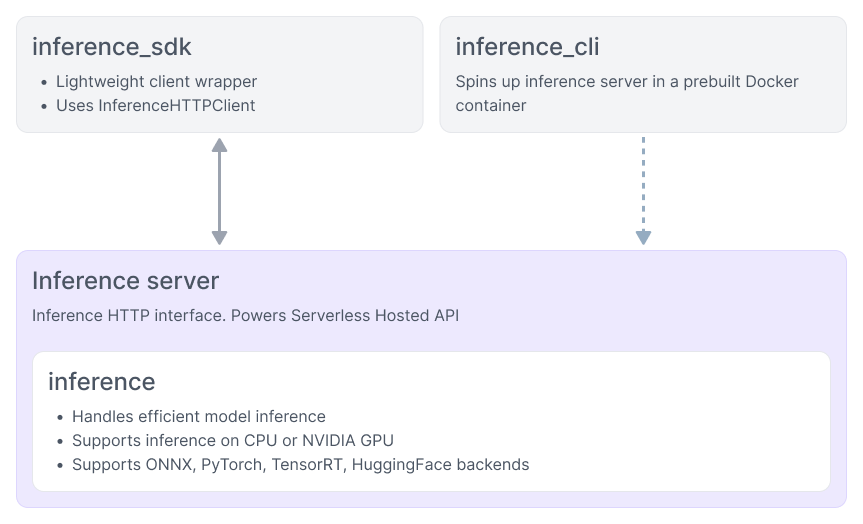
You can deploy models and Workflows on your own hardware with Roboflow Inference, our edge inference server. This is ideal if you need your models to run in real time on the edge.

You will need an internet connection to set up a model on your hardware. You will also need a persistent internet connection if you are deploying models on devices managed by [Device Manager](/deploy/device-manager.md).

Refer to the [Roboflow Inference installation guide](https://inference.roboflow.com/install/) to learn how to set up Inference on your computer. Then, see our guide on [How to Deploy a Workflow](/workflows/deploy-a-workflow.md) on an edge device.

{% hint style="info" %}
TensorRT-optimized model packages for private models are only available on [Enterprise plans](/deploy/enterprise-deployment.md) when running Inference outside the Roboflow platform. Public models include TensorRT packages on all plans.
{% endhint %}


---

# Agent Instructions: Querying This Documentation

If you need additional information that is not directly available in this page, you can query the documentation dynamically by asking a question.

Perform an HTTP GET request on the current page URL with the `ask` query parameter:

```
GET https://docs.roboflow.com/deploy/self-hosted-deployment.md?ask=<question>
```

The question should be specific, self-contained, and written in natural language.
The response will contain a direct answer to the question and relevant excerpts and sources from the documentation.

Use this mechanism when the answer is not explicitly present in the current page, you need clarification or additional context, or you want to retrieve related documentation sections.
