> For the complete documentation index, see [llms.txt](https://docs.roboflow.com/llms.txt). Markdown versions of documentation pages are available by appending `.md` to page URLs; this page is available as [Markdown](https://docs.roboflow.com/models/supported-models/glm-ocr.md).
# GLM-OCR
Use GLM-OCR for image OCR through our Serverless Cloud API
GLM-OCR is an OCR model based on the GLM vision-language model family. It transcribes text from an image and is well-suited for documents, signs, and labels with mixed layouts. We support GLM-OCR through our [Serverless Cloud API](https://docs.roboflow.com/deployment/roboflow-cloud/serverless-api), [Dedicated Deployments](https://docs.roboflow.com/deployment/roboflow-cloud/dedicated-deployments), and [self-hosted Inference](https://docs.roboflow.com/deployment/self-hosted/self-hosted).
## GLM-OCR API
GLM-OCR runs through the shared `/infer/lmm` endpoint. Call it through the HTTP endpoint directly with `curl`, or with the [`inference-sdk`](https://docs.roboflow.com/reference/inference/inference-sdk) wrapper.
{% tabs %}
{% tab title="HTTP (curl)" icon="webhook" %}
{% stepper %}
{% step %}
### Get your API Key
Create a Roboflow account, find your key on the [Roboflow API settings page](https://app.roboflow.com/settings/api) and make it available to your shell:
```bash
export ROBOFLOW_API_KEY="your-key-here"
```
{% endstep %}
{% step %}
### Run the model
Call the `/infer/lmm` endpoint with `curl`:
```bash
curl --location 'https://serverless.roboflow.com/infer/lmm' \
--header 'Content-Type: application/json' \
--header "Authorization: Bearer $ROBOFLOW_API_KEY" \
--data '{
"image": {"type": "url", "value": "https://media.roboflow.com/inference/license_plate_1.jpg"},
"model_id": "glm-ocr",
"prompt": "OCR",
"max_new_tokens": 128
}'
```
{% endstep %}
{% endstepper %}
{% endtab %}
{% tab title="SDK (Python)" icon="python" %}
{% stepper %}
{% step %}
### Get your API Key
Create a Roboflow account, find your key on the [Roboflow API settings page](https://app.roboflow.com/settings/api) and make it available to your shell:
```bash
export ROBOFLOW_API_KEY="your-key-here"
```
{% endstep %}
{% step %}
### Install the dependencies
This package calls the model:
```bash
pip install -U inference-sdk supervision
```
{% endstep %}
{% step %}
### Run the model
Run GLM-OCR on an image containing text:
```python
import os
import supervision as sv
from inference_sdk import InferenceHTTPClient, InferenceConfiguration
image = sv.load_image_from_url("https://media.roboflow.com/inference/license_plate_1.jpg")
client = InferenceHTTPClient(
api_url="https://serverless.roboflow.com",
api_key=os.environ["ROBOFLOW_API_KEY"],
).configure(InferenceConfiguration(api_key_transport="header"))
result = client.infer_lmm(
image,
model_id="glm-ocr",
prompt="OCR",
max_new_tokens=128,
)
print(result["response"])
```
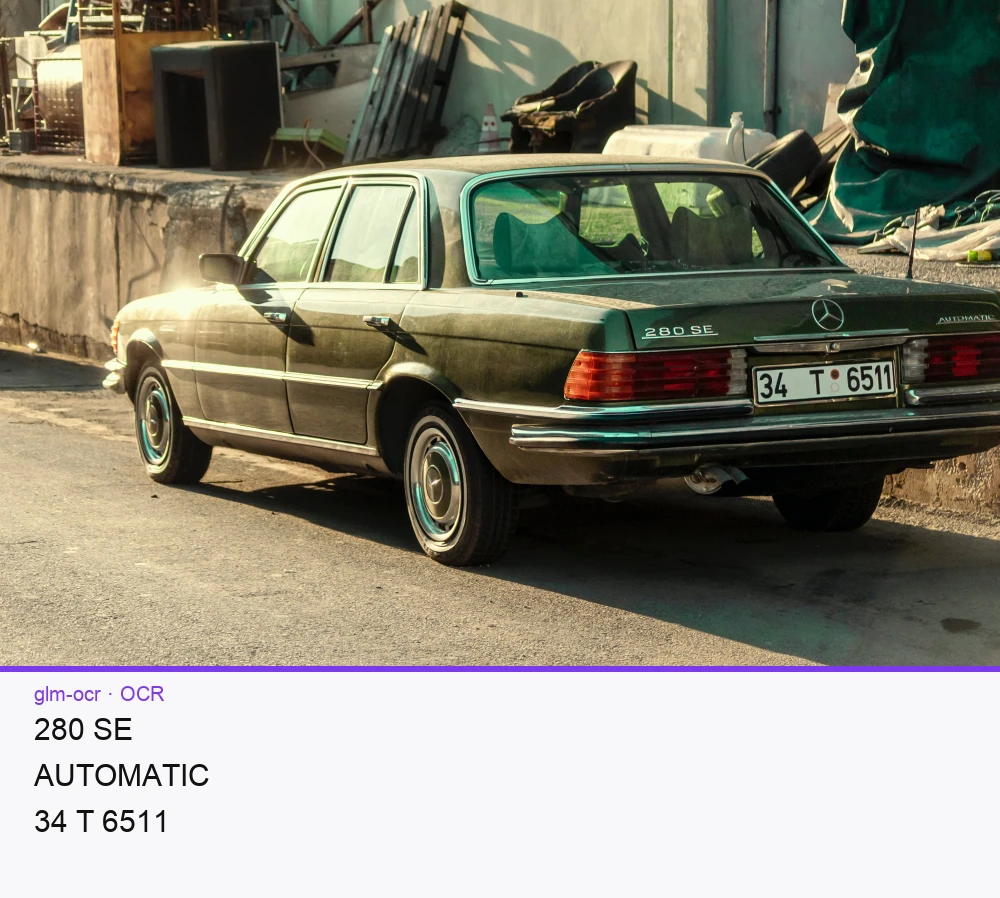
The code above prints the recognized text to the terminal:
```
280 SE
AUTOMATIC
34 T 6511
```
{% endstep %}
{% endstepper %}
{% endtab %}
{% endtabs %}
## GLM-OCR inference speed
Latency measured with [Roboflow Inference](https://docs.roboflow.com/deployment/self-hosted/self-hosted) on 1x NVIDIA L4, batch size 1, generating exactly 128 tokens with greedy decoding from a fixed prompt. Latency scales with output length, so use tokens/sec to estimate other lengths.
Alias
Latency, 128 tokens (ms)
Tokens/sec
glm-ocr
1850
69
{% hint style="info" %}
Set `api_url` to match your deployment target:
* `https://serverless.roboflow.com` for the Serverless Cloud API.
* `http://localhost:9001` for a local [Inference](https://docs.roboflow.com/deployment/self-hosted/self-hosted) server.
* Your [Dedicated Deployment](https://docs.roboflow.com/deployment/roboflow-cloud/dedicated-deployments) URL for a private endpoint.
{% endhint %}
## Run GLM-OCR with self-hosted Inference
GLM-OCR also runs on an [Inference](https://docs.roboflow.com/deployment/self-hosted/self-hosted) server you host yourself.
{% hint style="warning" %}
Self-hosted GLM-OCR requires a GPU and an Inference build with `inference-models` support enabled (`USE_INFERENCE_MODELS=true`).
{% endhint %}
Start a local server:
```bash
pip install inference-cli
inference server start # serves http://localhost:9001
```
Then call the shared multimodal endpoint with a recognition prompt. GLM-OCR accepts custom prompts, so you can steer it toward serial numbers, labels, or document text:
```python
import os
from inference_sdk import InferenceHTTPClient
client = InferenceHTTPClient(
api_url="http://127.0.0.1:9001",
api_key=os.environ["ROBOFLOW_API_KEY"],
)
result = client.infer_lmm(
inference_input="./serial_number.png",
prompt="Text Recognition:",
model_id="glm-ocr",
)
print(result["response"])
```
## Further reading
* [GLM-OCR on Hugging Face](https://huggingface.co/zai-org/GLM-OCR)
* [How to detect text in images with OCR](https://blog.roboflow.com/ocr-api/)