> For the complete documentation index, see [llms.txt](https://docs.roboflow.com/llms.txt). Markdown versions of documentation pages are available by appending `.md` to page URLs; this page is available as [Markdown](https://docs.roboflow.com/models/supported-models/paligemma2.md).
# PaliGemma 2
Use Google's PaliGemma 2 vision-language model through our Serverless Cloud API
PaliGemma 2 is Google's vision-language model. It accepts an image and a text prompt and returns a text response. We support PaliGemma 2 through our [Serverless Cloud API](https://docs.roboflow.com/deployment/roboflow-cloud/serverless-api), [Dedicated Deployments](https://docs.roboflow.com/deployment/roboflow-cloud/dedicated-deployments), and [self-hosted Inference](https://docs.roboflow.com/deployment/self-hosted/self-hosted).
## PaliGemma 2 API
{% stepper %}
{% step %}
### Get your API Key
Create a Roboflow account, find your key on the [Roboflow API settings page](https://app.roboflow.com/settings/api) and make it available to your shell:
```bash
export ROBOFLOW_API_KEY="your-key-here"
```
{% endstep %}
{% step %}
### Install the dependencies
Install the [Inference SDK](https://docs.roboflow.com/deployment/self-hosted/self-hosted):
```bash
pip install -U inference-sdk supervision
```
{% endstep %}
{% step %}
### Run the model
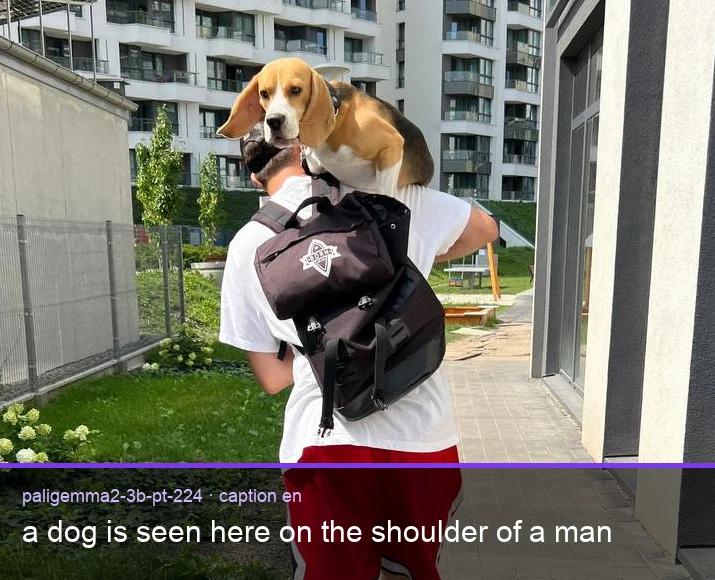
The sample calls the pretrained `paligemma2-3b-pt-224` checkpoint with a caption prompt.
```python
import os
import supervision as sv
from inference_sdk import InferenceHTTPClient, InferenceConfiguration
image = sv.load_image_from_url("https://media.roboflow.com/quickstart/dog.jpeg")
client = InferenceHTTPClient(
api_url="https://serverless.roboflow.com",
api_key=os.environ["ROBOFLOW_API_KEY"],
).configure(InferenceConfiguration(api_key_transport="header"))
result = client.infer_lmm(
image,
model_id="paligemma2-3b-pt-224",
prompt="caption en",
max_new_tokens=64,
)
print(result["response"])
```
{% endstep %}
{% endstepper %}
The code above prints the model response to the terminal:
```
a dog is seen here on the shoulder of a man
```
## PaliGemma 2 inference speed
Latency measured with [Roboflow Inference](https://docs.roboflow.com/deployment/self-hosted/self-hosted) on 1x NVIDIA L4, batch size 1, generating exactly 128 tokens with greedy decoding from a fixed prompt. Latency scales with output length, so use tokens/sec to estimate other lengths.
Alias
Latency, 128 tokens (ms)
Tokens/sec
paligemma2-3b-pt-224
3986
32
{% hint style="info" %}
Set `api_url` to match your deployment target:
* `https://serverless.roboflow.com` for the Serverless Cloud API.
* `http://localhost:9001` for a local [Inference](https://docs.roboflow.com/deployment/self-hosted/self-hosted) server.
* Your [Dedicated Deployment](https://docs.roboflow.com/deployment/roboflow-cloud/dedicated-deployments) URL for a private endpoint.
{% endhint %}
You can train your own PaliGemma 2 checkpoint on Roboflow and call it by its per-model `{workspace}/{model-slug}` ID (see [Versions, Trainings, and Models](/models/versions-trainings-and-models.md)). See the [Inference documentation](https://docs.roboflow.com/deployment/self-hosted/self-hosted) for additional prompt formats and supported checkpoints.
## PaliGemma 1 (legacy)
The original PaliGemma release is still loadable through the [`inference`](https://docs.roboflow.com/deployment/self-hosted/self-hosted) package on your own hardware. New projects should use PaliGemma 2 above; this section is kept for existing integrations.
Install the package:
```bash
pip install "inference[transformers]"
```
Use `inference-gpu[transformers]` on a GPU machine.
### Visual question answering
```python
from PIL import Image
from inference.models.paligemma.paligemma import PaliGemma
model = PaliGemma("paligemma-3b-mix-224", api_key="YOUR_API_KEY")
image = Image.open("image.jpeg")
result = model.predict(image, "How many dogs are in this image?")
print(result)
```
### Object detection
PaliGemma emits detections as `` tokens rather than JSON, so the response has to be parsed before it can be visualized. Prompt with `detect ; ` and decode the tokens into boxes:
```python
import re
from typing import List, Optional, Tuple
import numpy as np
import supervision as sv
_DETECT_RE = re.compile(r"(.*?)" + r"" * 4 + r"\s*([^;<>]+)? ?(?:; )?")
def from_pali_gemma(
response: str,
resolution_wh: Tuple[int, int],
class_list: Optional[List[str]] = None,
) -> sv.Detections:
width, height = resolution_wh
xyxy_list, class_name_list = [], []
while response:
match = _DETECT_RE.match(response)
if not match:
break
groups = list(match.groups())
before = groups.pop(0)
name = groups.pop()
y1, x1, y2, x2 = [int(value) / 1024 for value in groups[:4]]
y1, x1, y2, x2 = map(round, (y1 * height, x1 * width, y2 * height, x2 * width))
content = match.group()
if before:
response = response[len(before):]
content = content[len(before):]
xyxy_list.append([x1, y1, x2, y2])
class_name_list.append(name.strip())
response = response[len(content):]
class_name = np.array(class_name_list)
class_id = (
np.array([class_list.index(name) for name in class_name])
if class_list is not None
else None
)
return sv.Detections(
xyxy=np.array(xyxy_list),
class_id=class_id,
data={"class_name": class_name},
)
classes = ["person", "car", "backpack"]
response = model.predict(image, "detect person; car; backpack")[0]
detections = from_pali_gemma(response, resolution_wh=image.size, class_list=classes)
```
Pass the resulting `sv.Detections` to [supervision](https://supervision.roboflow.com/) annotators to draw the boxes.