For the complete documentation index, see llms.txt. This page is also available as Markdown.

Deployment Manager

edge hardware पर deploy किए गए computer vision models को manage और monitor करें।

के बारे में

Roboflow Deployment Manager आपको edge devices पर computer vision models को आसानी से सेट अप, deploy, और manage करने देता है। अपने model को train करने और workflow बनाने के बाद, यह deployments को scale करने के लिए एक all-in-one solution प्रदान करता है।

आप Deployment Manager का उपयोग निम्न के लिए कर सकते हैं:

  1. के साथ नए devices सेट अप करें Roboflow Inference server.

  2. Deployment में उपयोग के लिए camera streams configure करें।

  3. Deploy करें Workflows को edge पर।

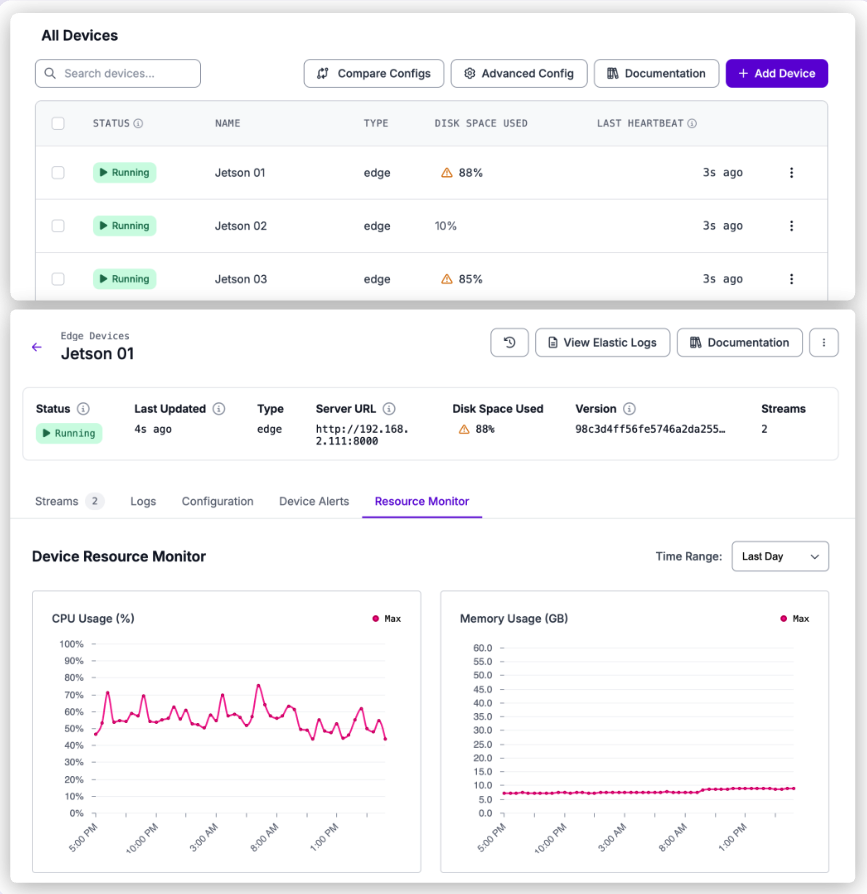
  4. deployed edge devices के लिए logs, stream status, और telemetry मॉनिटर करें।

मुख्य आवश्यकताएँ:

Deployment Manager, Roboflow-supported hardware के लिए बनाया गया है:

  • समर्थित: Roboflow के माध्यम से खरीदा गया hardware

  • असमर्थित (अपने जोखिम पर उपयोग करें): NVIDIA Jetson, Debian-based Linux पर NVIDIA GPUs के साथ चलने वाली x86 machines

  • अभी समर्थित नहीं: Mac या Windows-based systems

Setup और ongoing operation के लिए devices का internet से connected होना चाहिए, तथा remote management और monitoring के लिए Roboflow तक continuous access होना चाहिए।

Edge Services

Inference server के साथ-साथ, कोई device अतिरिक्त Roboflow Services. उन्हें device के Configuration tab से add और configure करें, जैसा कि में वर्णित है डिवाइस कॉन्फ़िगरेशन अपडेट करें.

  • इवेंट स्टोर device पर inference events store करता है, automatic retention और optional cloud backup के साथ।

  • OPC UA सर्वर OPC UA tags के रूप में data को PLCs और SCADA systems के लिए प्रकाशित करता है।

  • PLC रिले Allen-Bradley, Modbus TCP, या Siemens S7 के माध्यम से PLC tags को पढ़ता और लिखता है।

  • RTSP सिम्युलेटर testing के लिए uploaded video file को RTSP source के रूप में stream करता है।

प्रत्येक service device के address पर अपनी अलग HTTP API प्रदान करती है। देखें Services उनके साझा base URL, authentication, और error-shape rules के लिए।

Guides

सेट अप करना

को follow करें सेट अप करना guides का क्रमबद्ध पालन करें ताकि device online आए और Workflows चला सके।

Guide
विवरण

समर्थित hardware, cameras, network, और outbound traffic requirements।

एक नया edge device provision करें और उसे अपने account के साथ register करें।

एक camera stream configure करें जो Workflow चलाता है।

connectivity, disk, और FPS issues के लिए email alerts सक्षम करें।

यह निर्धारित करें कि deploy-affecting changes कब प्रभावी होंगी।

Changes करना

The Changes करना guides setup के बाद devices और streams को update, reconfigure, और remove करने का तरीका बताती हैं।

Guide
विवरण

device settings, service versions, और additional services को manage करें।

cloud से IP addressing, gateway, DNS, और hostname सेट करें।

exposure, gain, focus, और अन्य AI1 camera settings को live tune करें।

GigE Basler या Lucid camera को एक persistent static IP असाइन करें।

अटके हुए camera links को recover करने के लिए PoE port को power-cycle करें।

चल रही stream को अस्थायी रूप से pause करें और बाद में resume करें।

Triggered stream के विरुद्ध on demand एक Workflow चलाएँ।

एक stream और उसकी configuration को स्थायी रूप से हटाएँ।

failure के बाद device की configuration recover करें।

जिस device का आप अब उपयोग नहीं करते, उसे स्थायी रूप से हटाएँ।

device API keys कैसे generate, scope, और revoke की जाती हैं।

Monitoring

The Monitoring guides दिखाती हैं कि stream status, logs, resources, और Event Store health कैसे जाँची जाए।

Guide
विवरण

stream का status, latest frame, और Workflow details देखें।

Roboflow services से logs search, filter, और download करें।

disk, memory, CPU, GPU, और service container health मॉनिटर करें।

Event Store usage, backup progress, और history मॉनिटर करें।

HTTP API

Deployment Manager API आपको अपने Roboflow Deployment Manager (RFDM) devices को programmatically मॉनिटर और manage करने देती है।

सभी endpoints यहाँ के अंतर्गत mounted हैं /:workspace/devices/v2 public API host पर (https://api.roboflow.com). Read endpoints के लिए आवश्यक है scoped API key के साथ device:read scope; जो endpoints device को बदलते हैं, उनके लिए आवश्यक है device:update. जिन Workspace API keys के पास explicit scopes list नहीं है, उन्हें implicitly सभी scopes मिलते हैं (legacy behavior); जिन keys में explicit scopes array हो, उसमें संबंधित scope शामिल होना चाहिए।

Deployment Manager API के साथ, आप यह कर सकते हैं:

Optional edge services (Event Store, PLC Relay, RTSP Simulator, OPC UA Server) अपनी खुद की HTTP APIs device के address पर प्रदान करते हैं, बजाय इसके कि api.roboflow.com. वे Roboflow API key स्वीकार नहीं करते, और उनकी authentication तथा error shapes नीचे दी गई सभी चीज़ों से अलग हैं। देखें Services.

प्रमाणीकरण

सभी endpoints workspace API key को निम्न में से किसी एक के माध्यम से स्वीकार करते हैं:

  • Query string: ?api_key=YOUR_API_KEY

  • Header: Authorization: Bearer YOUR_API_KEY

Device-scoped API keys

किसी विशिष्ट device के लिए बनाए गए API keys (उदाहरण के लिए, install के दौरान RFDM द्वारा) केवल उसी device तक सीमित होते हैं। वे केवल उन routes को call कर सकते हैं जिनका :deviceId path parameter key के bound device के बराबर हो। उन्हें workspace-wide list और create endpoints पर, तथा किसी भी 403 path पर :deviceId जो मेल नहीं खाता,

Cross-workspace isolation

एक workspace API key केवल अपने workspace से संबंधित devices को पढ़ या modify कर सकती है। किसी अन्य workspace के owned device id के लिए requests वापस करती हैं 404भले ही id अन्यथा मान्य हो।

Errors

Status
अर्थ

400

अमान्य query parameter (unknown time_period, malformed cursor या date, invalid direction, आदि) या अमान्य request body।

401

API key अनुपस्थित या अमान्य है।

403

किसी अलग device को target करने वाली Device-scoped API key, workspace-wide list/create routes, duplication के दौरान किसी अन्य workspace से source device, या कोई feature-gated request अस्वीकृत (उदाहरण के लिए, AI1 creation या offline_mode workspace के लिए सक्षम नहीं है)।

404

Device, stream, config, या source device नहीं मिला। किसी अन्य workspace के owned device ids के लिए read requests भी 404 लौटाती हैं।

429

Rate limit पार हो गया। Logs प्रति IP प्रति मिनट 5 requests और वैश्विक रूप से प्रति मिनट 50 requests तक सीमित हैं; telemetry reads प्रति device प्रति मिनट 60 requests तक सीमित हैं, और 10 सेकंड में 10-request burst के साथ।

Error responses दो शैलियों में से एक का उपयोग करती हैं:

  • Handler-level errors (आमतौर पर handlers से स्वयं आने वाले 400, 403, 404, और 429) लौटाते हैं { "error": "<message>" }.

  • Authentication और workspace-validation failures (आमतौर पर 401) एक structured error object लौटाती हैं: { "error": { "message": "...", "status": 401, "type": "OAuthException", "hint": "..." } }.

Logs rate limiter अतिरिक्त रूप से एक plain string body (JSON नहीं) लौटाता है जब यह एक 429.

Devices की सूची और प्राप्ति

Devices की सूची

Workspace में पंजीकृत प्रत्येक device की सूची बनाएँ। Device-scoped API keys इस endpoint को call नहीं कर सकतीं और प्राप्त करती हैं 403.

आवश्यक scope: device:read

List Devices

get

List every device registered in the workspace. Device-scoped API keys cannot call this endpoint and receive 403.

Authorizations
AuthorizationstringRequired

Roboflow API key passed as a Bearer token.

Path parameters
workspacestringRequired

Workspace ID (URL slug).

Responses
200

Devices in the workspace.

application/json
get/{workspace}/devices/v2

उदाहरण अनुरोध

उदाहरण प्रतिक्रिया

The status फ़ील्ड है online यदि पिछले 5 मिनट के भीतर heartbeat प्राप्त हुआ हो, offline यदि उससे पुराना हो, या unknown यदि कभी कोई heartbeat रिकॉर्ड नहीं किया गया हो। नए provision किए गए devices अपनी पहली heartbeat से पहले सूची में दिखाई देते हैं; तब तक status है unknown और monitoring से प्राप्त अधिकांश fields null.

Device प्राप्त करें

id के अनुसार एक single device प्राप्त करें। लौटाता है 404 यदि device मौजूद नहीं है या किसी अलग workspace का है।

आवश्यक scope: device:read

Get a Device

get

Retrieve a single device by ID.

Authorizations
AuthorizationstringRequired

Roboflow API key passed as a Bearer token.

Path parameters
workspacestringRequired

Workspace ID (URL slug).

deviceIdstringRequired

Device ID.

Responses
200

The device.

application/json
idstringOptional
namestring · nullableOptional
statusstring · enumOptional

online if a heartbeat was received within the last 5 minutes, offline if older, unknown if no heartbeat has ever been recorded.

Possible values:
last_heartbeatstring · date-time · nullableOptional
platformstring · nullableOptional
platform_releasestring · nullableOptional
platform_versionstring · nullableOptional
architecturestring · nullableOptional
hostnamestring · nullableOptional
rfdm_versionstring · nullableOptional

Version of the Roboflow Device Manager running on the device.

typestring · nullableOptional

Device type reported by the device (for example "jetson").

tagsstring[]Optional
created_atstring · date-time · nullableOptional
get/{workspace}/devices/v2/{deviceId}

उदाहरण अनुरोध

Response body list endpoint के single item से मेल खाती है (किसी में wrapped नहीं), data array)।

Device बनाएँ

अपने workspace में एक नया device बनाएँ और उसे install करने के लिए आवश्यक identifiers लौटाएँ। Device-scoped API keys इस endpoint को call नहीं कर सकतीं और प्राप्त करती हैं 403.

आवश्यक scope: device:update

Create a Device

post

Create a new device in the workspace and return the identifiers needed to install it. Device-scoped API keys cannot call this endpoint and receive 403. Requires the device:update scope.

Authorizations
AuthorizationstringRequired

Roboflow API key passed as a Bearer token.

Path parameters
workspacestringRequired

Workspace ID (URL slug).

Body
device_namestringRequired

Human-readable name for the device. For AI1 devices that are not duplicating an existing device and do not specify a workflow_id, the slugified name must contain at least one alphanumeric character, otherwise the request returns 400.

device_typestringOptional

Device type. Common values are "ai1" and "edge"; any custom string is also accepted. AI1 creation requires the workspace to have the deviceAio feature enabled.

workflow_idstringOptional

Optional initial workflow assignment. For AI1 devices it seeds the default aione stream.

tagsstring[]Optional

Tags to attach to the device. Must be an array of non-empty strings; duplicates are removed and entries are trimmed.

offline_modebooleanOptional

Only valid for AI1 devices, and only if the workspace has the roboflowLiteMode feature.

sourceDeviceIdstringOptional

Duplicate an existing device's config instead of generating a fresh one. The source device must belong to the same workspace.

Responses
201

Device created.

application/json
deviceIdstringRequired

ID of the newly-created device.

installIdstringRequired

Short-lived install token. Feed it into GET /devices/v2/{installId}/install.sh from the device to bootstrap RFDM.

offlineProvisioningQrPayloadstringOptional

Returned only for AI1 devices created in offline mode. Encodes the QR payload used by the offline RFDM provisioner.

post/{workspace}/devices/v2

उदाहरण अनुरोध

उदाहरण प्रतिक्रिया

प्राप्त installId का उपयोग Roboflow Deployment Manager installer के साथ device bootstrap करने के लिए करें।

AI1 devices पर नोट्स

  • सेटिंग device_type से "ai1" workspace में deviceAio feature सक्षम होना आवश्यक है, अन्यथा request लौटाती है 403.

  • offline_mode केवल उन workspaces पर AI1 devices के लिए मान्य है जिनमें roboflowLiteMode. अन्य संयोजन लौटाते हैं 400 या 403.

  • उन AI1 devices के लिए जो किसी मौजूदा device की duplicate नहीं हैं और कोई workflow_id, निर्दिष्ट नहीं करते, slugified device_name में कम से कम एक alphanumeric character होना चाहिए, अन्यथा request लौटाती है 400.

  • जब AI1 + offline mode लागू होता है, response में एक offlineProvisioningQrPayload field भी शामिल होती है, जो offline provisioning के लिए QR payload encode करती है।

Duplication पर नोट्स

जब sourceDeviceId प्रदान किया जाता है, तो नया device source device की config की copy से बनाया जाता है। source device का request के समान workspace से संबंधित होना चाहिए, अन्यथा request लौटाती है 403. एक गैर-मौजूद sourceDeviceId लौटाता है 404.

Device Config

Get Workspace Default Config

workspace-level default device configuration लौटाता है। यह base default config है जिसमें workspace का config patch (यदि कोई हो) merge किया गया है। नए device को provision करते समय इसे template के रूप में उपयोग करें, इससे पहले कि आप POST /:workspace/devices/v2.

आवश्यक scope: device:read

यह एक workspace-wide endpoint है। Device-scoped API keys प्राप्त करेंगी 403 क्योंकि path में कोई :deviceId नहीं है।

उदाहरण अनुरोध

उदाहरण प्रतिक्रिया

  • config -- merged परिणाम (base default + workspace patch)।

  • patch -- workspace का stored patch। खाली object {} यदि workspace में कोई custom patch नहीं है।

Config प्राप्त करें

device की वर्तमान runtime configuration लौटाता है। Response shape Roboflow Deployment Manager (RFDM) config spec से मेल खाती है।

आवश्यक scope: device:read

Get Device Config

get

Returns the device's current runtime configuration. The response includes per-service environment_variables and any integration credentials embedded in the config; treat the body as sensitive.

Authorizations
AuthorizationstringRequired

Roboflow API key passed as a Bearer token.

Path parameters
workspacestringRequired

Workspace ID (URL slug).

deviceIdstringRequired

Device ID.

Responses
200

The current device configuration.

application/json

Full RFDM configuration document.

Other propertiesanyOptional
get/{workspace}/devices/v2/{deviceId}/config

उदाहरण अनुरोध

Response पूरी configuration document है और इसमें निम्न top-level fields शामिल हैं (लेकिन केवल इन्हीं तक सीमित नहीं):

  • device_id, device_name

  • workspace_id

  • version, last_updated, last_updated_at, created_at

  • config (device का runtime config tree, जिसमें device_type, stream, और offline_mode)

  • services (per-service container definitions, जिनमें image, volumes, और environment_variables)

  • environment_variables (top-level environment variables, अतिरिक्त रूप से per-service वाले, जो services)

  • production_mode, last_automatic_update, updated, updated_by, $schema, id

RFDM द्वारा लिखे गए अतिरिक्त fields भी दिखाई दे सकते हैं। Response shape को open-ended मानें और केवल उन्हीं fields पर निर्भर करें जिनकी आपको आवश्यकता है।

लौटाता है 404 यदि device मौजूद नहीं है या आपके workspace का नहीं है, या यदि उसके लिए कोई configuration stored नहीं है।

Config History

किसी device के लिए पिछली configuration revisions की सूची बनाएँ, सबसे नई पहले।

आवश्यक scope: device:read

List Config Revisions

get

List prior configuration revisions for a device, newest first.

Authorizations
AuthorizationstringRequired

Roboflow API key passed as a Bearer token.

Path parameters
workspacestringRequired

Workspace ID (URL slug).

deviceIdstringRequired

Device ID.

Query parameters
limitinteger · min: 1 · max: 500Optional

Number of revisions to return. Clamped to 1-500.

Default: 10
cursorstringOptional

Opaque pagination cursor from a previous response. Pass back next_cursor to fetch the next page.

Responses
200

A page of revisions, newest first.

application/json
get/{workspace}/devices/v2/{deviceId}/config/history

उदाहरण अनुरोध

उदाहरण प्रतिक्रिया

एक malformed cursor लौटाता है 400 के साथ {"error": "Invalid cursor format"}.

Device Commands

आप web app से शुरू किए गए actions (उदा: device restart करना, stream pause करना, cameras के लिए scan करना) commands के रूप में queue किए जाते हैं। device उन्हें अपने अगले poll पर उठाता है।

Pending Commands प्राप्त करें

device के लिए प्रतीक्षा कर रहे commands लौटाता है, सबसे पुराने पहले। पढ़ने से वे हटते नहीं हैं: एक command queued रहती है जब तक device रिपोर्ट नहीं करता कि उसने उसे चला लिया, इसलिए command के बीच में restart हुआ device उसे फिर से देखता है। 5 मिनट से अधिक पहले queued किए गए commands expire हो जाते हैं और कभी deliver नहीं किए जाते, क्योंकि उन्हें बाद में चलाना आपकी माँग से मेल नहीं खाएगा।

आवश्यक scope: device:read

Get Pending Commands

get

Returns the commands queued for a device, oldest first. The read does not remove commands: each one stays queued until the device acknowledges it. Commands queued more than 5 minutes ago expire and are not returned.

Authorizations
AuthorizationstringRequired

Roboflow API key passed as a Bearer token.

Path parameters
workspacestringRequired

Workspace ID (URL slug).

deviceIdstringRequired

Device ID.

Responses
200

The commands waiting for the device.

application/json
get/{workspace}/devices/v2/{deviceId}/commands

Command Queue करें

किसी device के लिए command queue करें ताकि वह अपने अगले poll पर उसे चला सके। API से यह वही करता है जो web app तब करती है जब आप device restart करते हैं या stream शुरू करते हैं।

आवश्यक scope: device:update

Queue a Command

post

Queue a command for a device. The device runs it on its next poll. This is the API equivalent of the actions you start from the web app.

Authorizations
AuthorizationstringRequired

Roboflow API key passed as a Bearer token.

Path parameters
workspacestringRequired

Workspace ID (URL slug).

deviceIdstringRequired

Device ID.

Body
actionstring · enumRequired

What the device should do. An action outside this list returns 400.

Example: restartPossible values:
Responses
200

The command was queued.

application/json
idstringOptional

Command ID, used to match the device's acknowledgement.

Example: cmd_abc
post/{workspace}/devices/v2/{deviceId}/commands

Device Streams

Streams की सूची

किसी device पर configure की गई हर stream की सूची बनाएँ।

आवश्यक scope: device:read

List Streams

get

List every stream configured on a device, including streams that are set up in the device config but have not reported in yet, which are returned with a provisioning status. Credentials are stripped from URLs and known credential-bearing object keys are removed from each stream's source.

Authorizations
AuthorizationstringRequired

Roboflow API key passed as a Bearer token.

Path parameters
workspacestringRequired

Workspace ID (URL slug).

deviceIdstringRequired

Device ID.

Responses
200

Streams configured on the device.

application/json
get/{workspace}/devices/v2/{deviceId}/streams

उदाहरण अनुरोध

उदाहरण प्रतिक्रिया

Source sanitization

The source field को लौटाए जाने से पहले हमेशा sanitizer से pass किया जाता है:

  • यदि source एक URL है, तो कोई भी userinfo (scheme://user:pass@host/...) हटा दिया जाता है। उदाहरण के लिए, rtsp://admin:password@192.168.1.100:554/live बन जाता है rtsp://192.168.1.100:554/live.

  • यदि स्रोत एक ऑब्जेक्ट है, तो वे कुंजियाँ जिनका लोअरकेस नाम है पासवर्ड, पासवर्ड, सीक्रेट, api_key, apikey, auth, authorization, टोकनया access_token को प्रतिक्रिया से हटा दिया जाता है। अन्य सभी कुंजियाँ सुरक्षित रहती हैं।

  • एरे और नेस्टेड ऑब्जेक्ट्स को रिकर्सिव रूप से सैनिटाइज़ किया जाता है।

स्ट्रीम प्राप्त करें

एकल स्ट्रीम प्राप्त करें। लौटाता है 404 यदि स्ट्रीम डिवाइस पर मौजूद नहीं है, या यदि डिवाइस मौजूद नहीं है या आपका वर्कस्पेस का हिस्सा नहीं है।

आवश्यक scope: device:read

Get a Stream

get

Retrieve a single stream on a device. A stream that exists only in the device config is returned as a provisioning entry. Returns 404 when the stream exists neither live nor in the config.

Authorizations
AuthorizationstringRequired

Roboflow API key passed as a Bearer token.

Path parameters
workspacestringRequired

Workspace ID (URL slug).

deviceIdstringRequired

Device ID.

streamIdstringRequired

Stream ID.

Query parameters
includestring · enumOptional

Set to status_events to attach the stream's 20 most recent lifecycle events from the last 7 days.

Possible values:
Responses
200

The stream.

application/json
idstring · nullableOptional
namestring · nullableOptional
statusstring · nullableOptional

Stream status reported by the streams service (for example "running", "stopped", or transitional states). Streams that exist in the device config but have not reported in yet are returned with status "provisioning".

provisioningbooleanOptional

True when the stream is in the config but has not reported in yet.

modestring · enum · nullableOptional

"triggered" for streams that run their Workflow only when triggered, "continuous" for streams that run all the time. Null when the stream has no config entry.

Possible values:
pipeline_idstring · nullableOptional
workflow_idstring · nullableOptional
sourceone ofOptional

Sanitized source descriptor. URL userinfo is stripped; object keys named password, passwd, secret, api_key, apikey, auth, authorization, token, or access_token are removed.

string · nullableOptional
or
objectOptional
or
configured_sourceone of · nullableOptional

Source taken from the device config, sanitized the same way as source. Filled in for provisioning streams that have no live source yet, and null otherwise.

string · nullableOptional
or
objectOptional
or
started_atstring · date-time · nullableOptional
last_event_atstring · date-time · nullableOptional
camera_fpsnumber · nullableOptional

Camera frame rate reported by the device heartbeat.

inference_fpsnumber · nullableOptional

Inference pipeline frame rate reported by the device heartbeat.

sharpnessnumber · nullableOptional

Image sharpness score reported by the device heartbeat.

errorstring · nullableOptional
get/{workspace}/devices/v2/{deviceId}/streams/{streamId}

उदाहरण अनुरोध

Response body list endpoint के single item से मेल खाती है (किसी में wrapped नहीं), data array)।

पाइपलाइन स्थिति रिपोर्ट करें

डिवाइस द्वारा चलाई जा रही inference पाइपलाइनों की रिपोर्ट करें। प्रत्येक रिपोर्ट की गई पाइपलाइन संबंधित स्ट्रीम को अपडेट करती है, साथ ही उसके FPS और sharpness मेट्रिक्स को भी। डिवाइस कॉन्फ़िग में घोषित स्ट्रीम को उसकी stream key से मिलाया जाता है, इसलिए जैसे ही डिवाइस उसे रिपोर्ट करता है, वह provisioning के रूप में दिखना बंद कर देता है।

RFDM इसे उन डिवाइसों पर पोस्ट करता है जो device-manager कंटेनर के बिना चलते हैं। जो डिवाइस वह कंटेनर चलाते हैं, वे वही डेटा अपनी healthcheck में रिपोर्ट करते हैं, इसलिए उन्हें इस endpoint की आवश्यकता नहीं होती।

आवश्यक scope: device:update

Report Pipeline Status

post

Report the inference pipelines a device is running. Each reported pipeline updates the matching stream, including its FPS and sharpness metrics. A stream that was declared in the device config is matched by its stream key and stops showing as provisioning. Devices running the device-manager container report the same data inside their healthcheck instead.

Authorizations
AuthorizationstringRequired

Roboflow API key passed as a Bearer token.

Path parameters
workspacestringRequired

Workspace ID (URL slug).

deviceIdstringRequired

Device ID.

Body
timestampone ofOptional

When the status was measured, as a Unix timestamp in seconds or an ISO 8601 string. Defaults to the time the request is received.

Example: 2026-04-28T10:00:00Z
integerOptional
or
stringOptional
Responses
200

The reported pipelines were applied.

application/json
successbooleanOptionalExample: true
updatedintegerOptional

How many reported pipelines had a pipeline_id.

Example: 1
post/{workspace}/devices/v2/{deviceId}/pipelines-status

आप inference server का भी पोस्ट कर सकते हैं /inference_pipelines/list प्रतिक्रिया अपरिवर्तित, जैसे {"success": true, "data": {"pipelines": [...]}}. यदि उस बॉडी में "success": falseहै, तो डिवाइस अपनी पाइपलाइनों की सूची बनाने में विफल रहा, इसलिए अनुरोध no-op है और मौजूदा streams को वैसे ही छोड़ देता है।

Device Logs और Telemetry

लॉग्स

पृष्ठीकृत डिवाइस लॉग्स लौटाता है।

आवश्यक scope: device:read

Get Device Logs

get

Returns paginated device logs. Rate-limited to 5 requests per minute per IP and 50 per minute globally.

Authorizations
AuthorizationstringRequired

Roboflow API key passed as a Bearer token.

Path parameters
workspacestringRequired

Workspace ID (URL slug).

deviceIdstringRequired

Device ID.

Query parameters
limitinteger · min: 1 · max: 1000Optional

Number of log entries to return. Clamped to 1-1000.

Default: 100
start_timestring · date-timeOptional

ISO 8601 timestamp lower bound. Returns 400 if not parseable.

end_timestring · date-timeOptional

ISO 8601 timestamp upper bound. Returns 400 if not parseable.

servicestringOptional

Comma-separated list of service names to filter by.

severitystringOptional

Comma-separated list of severity levels to filter by (for example "INFO,WARN,ERROR").

cursorstring · date-timeOptional

Pass back next_cursor from the previous response to fetch the next page (older logs). Returns 400 if not parseable.

Responses
200

A page of logs.

application/json
get/{workspace}/devices/v2/{deviceId}/logs

उदाहरण अनुरोध

रेट सीमा: प्रति वर्कस्पेस प्रति मिनट 120 अनुरोध। लॉग पढ़ने और लॉग ingest के लिए अलग rate-limit buckets उपयोग होते हैं, इसलिए लॉग्स के लिए polling आपके ingest quota के विरुद्ध नहीं गिना जाएगा (और इसके विपरीत भी)।

उदाहरण प्रतिक्रिया

रेट सीमाएँ

यह endpoint निम्न सीमा तक rate-limited है प्रति IP address प्रति मिनट 5 अनुरोध और वैश्विक रूप से प्रति मिनट 50 अनुरोध. अतिरिक्त अनुरोध लौटाते हैं 429.

टेलीमेट्री

यह एक निश्चित समय-खिड़की के भीतर bucket किए गए डिवाइस के लिए समेकित hardware metrics (CPU, memory, disk, GPU) और प्रति-स्ट्रीम FPS लौटाता है।

आवश्यक scope: device:read

Get Device Telemetry

get

Returns device health data: hardware metrics (CPU, memory, disk, GPU, network) bucketed across the requested time window, plus Docker and NTP health, per-service container status, per-stream FPS, hardware, and network interfaces. Rate-limited to 60 requests per minute per device with a 10-request burst over 10 seconds.

Authorizations
AuthorizationstringRequired

Roboflow API key passed as a Bearer token.

Path parameters
workspacestringRequired

Workspace ID (URL slug).

deviceIdstringRequired

Device ID.

Query parameters
time_periodstring · enumOptional

Time window to aggregate over.

Default: 24hPossible values:
includestringOptional

Comma-separated sections to return: metrics, system_status, services, service_history, stream_fps, hardware, network_interfaces. Every section except service_history is returned by default, and service_history implies services. Smaller requests return faster. An unknown section returns 400 with the valid values.

Default: metrics,system_status,services,stream_fps,hardware,network_interfaces
Responses
200

Aggregated telemetry buckets.

application/json

Sections are selected with the include query parameter. Every section except service_history is returned by default.

time_periodstring · enumOptionalPossible values:
bucket_intervalstringOptional

Human-readable bucket size (for example "30 MINUTE", "4 HOUR").

fill_interval_secondsintegerOptional
services_truncatedbooleanOptional

Present when the service query hit its cap. Gaps in service history may come from the cap rather than a real outage.

stream_fps_truncatedbooleanOptional

Present when the stream FPS query hit its row cap, so some buckets are missing.

get/{workspace}/devices/v2/{deviceId}/telemetry

उदाहरण अनुरोध

बकेट आकार प्रति समय अवधि स्थिर है:

time_period

bucket_interval

fill_interval_seconds

1h

2 मिनट

120

24h

30 मिनट

1800

7d

4 घंटे

14400

14d

8 घंटे

28800

उदाहरण प्रतिक्रिया

जिस अनुरोधित विंडो में कोई telemetry नहीं मिला, वे buckets भी वापस लौटाए जाते हैं, और प्रत्येक मेट्रिक फ़ील्ड को null.

रेट सीमाएँ

यह endpoint प्रति डिवाइस निम्न सीमा तक rate-limited है प्रति मिनट 60 अनुरोध और अतिरिक्त 10 सेकंड में 10 अनुरोध burst limiter। अतिरिक्त अनुरोध लौटाते हैं 429। वही per-device telemetry quota डिवाइस के telemetry ingest path के साथ साझा की जाती है, इसलिए दुरुपयोगपूर्ण reads उसी डिवाइस के ingest को प्रभावित कर सकती हैं।

Device Events

डिवाइस और स्ट्रीम lifecycle घटनाएँ लौटाता है (उदाहरण के लिए device boots, stream starts और stops, errors, config changes)।

आवश्यक scope: device:read

Get Device Events

get

Returns device and stream lifecycle events (for example device boots, stream starts and stops, errors, config changes).

Authorizations
AuthorizationstringRequired

Roboflow API key passed as a Bearer token.

Path parameters
workspacestringRequired

Workspace ID (URL slug).

deviceIdstringRequired

Device ID.

Query parameters
limitinteger · min: 1 · max: 1000Optional

Number of events to return. Clamped to 1-1000.

Default: 100
entity_typestringOptional

Filter to events for a single entity type (for example "device", "stream").

entity_idstringOptional

Filter to events for a single entity ID.

eventstringOptional

Filter to events with this event name.

start_timestring · date-timeOptional

ISO 8601 timestamp lower bound. Returns 400 if not parseable.

end_timestring · date-timeOptional

ISO 8601 timestamp upper bound. Returns 400 if not parseable.

cursorstringOptional

Opaque pagination cursor from a previous response. Pass back next_cursor or prev_cursor. Malformed cursors return 400.

directionstring · enumOptional

Pagination direction. Other values return 400.

Default: backwardPossible values:
Responses
200

A page of events.

application/json
get/{workspace}/devices/v2/{deviceId}/events

उदाहरण अनुरोध

उदाहरण प्रतिक्रिया

The device_timestamp, server_timestamp, और event_end_timestamp फ़ील्ड इस प्रकार स्वरूपित हैं YYYY-MM-DD HH:MM:SS[.SSS] UTC में। इस API के अन्य timestamps की तरह इन्हें ISO-8601 में सामान्यीकृत नहीं किया जाता।

event_end_timestamp को epoch-zero स्ट्रिंग के रूप में भी लौटाया जा सकता है "1970-01-01 00:00:00.000" (इसके बजाय null) जब event का कोई दर्ज किया गया end timestamp न हो।

अंतिम अपडेट

क्या यह उपयोगी था?