> For the complete documentation index, see [llms.txt](https://docs.roboflow.com/llms.txt). Markdown versions of documentation pages are available by appending `.md` to page URLs; this page is available as [Markdown](https://docs.roboflow.com/deployment/ja/serufuhosuto/self-hosted.md).

# セルフホストデプロイメント

[推論](https://github.com/roboflow/inference) は、オープンソースのコンピュータビジョン展開ハブです。モデルと Workflow を提供し、ビデオストリームを管理し、CPU と GPU 向けに推論を最適化します。ローカル処理、レイテンシーとリソースの制御、またはオフライン展開が必要な場合は、セルフホストしてください。Apache 2.0 ライセンスのコアは、Roboflow のホスト型 API も支えています。

{% hint style="info" %}
セルフホスティングとは、インフラを自分で管理することを意味します。代わりに Roboflow にサーバーを運用してもらいたい場合は、 [専用デプロイメント](/deployment/ja/roboflow-cloud/dedicated-deployments.md) または [サーバーレスホスト型 API](/deployment/ja/roboflow-cloud/serverless-api.md)と、完全な [オプションの比較](/deployment/ja/choosing-a-deployment.md).
{% endhint %}

## 方法を選ぶ

自分のハードウェアでモデルを実行する方法は 3 つあります。ほとんどのプロジェクトでは Inference Server を使用します。

<table data-view="cards" data-search="false"><thead><tr><th></th><th></th><th data-hidden data-card-cover data-type="image">カバー画像</th><th data-hidden data-card-target data-type="content-ref"></th></tr></thead><tbody><tr><td><strong>Inference Server</strong></td><td>HTTP 経由でモデルと Workflow を提供する Docker コンテナです。</td><td><a href="/files/838ae8798b247a391e42d16a05102335bde1d8d6">/files/838ae8798b247a391e42d16a05102335bde1d8d6</a></td><td><a href="/pages/131499957d989b00f99c697baf47b854d3dde050">/pages/131499957d989b00f99c697baf47b854d3dde050</a></td></tr><tr><td><strong>Inference Library</strong></td><td>この <code>inference</code> は、プロセス内でモデルを実行するための Python パッケージです。</td><td><a href="/files/fb7f1ebe31f1b0e7149c425e917fe5ef31c2ad20">/files/fb7f1ebe31f1b0e7149c425e917fe5ef31c2ad20</a></td><td><a href="/pages/5fa10b455a3ac5694fe82b4d383e7211a543c812">/pages/5fa10b455a3ac5694fe82b4d383e7211a543c812</a></td></tr><tr><td><strong>その他の SDK</strong></td><td>Web ブラウザ、iOS、または組み込みデバイス上でモデルを実行します。</td><td><a href="/files/f288df42833e683d7589fd74ad2657d38e0e9456">/files/f288df42833e683d7589fd74ad2657d38e0e9456</a></td><td><a href="/pages/164a481217e36f9bf504bba5aaf3203ca9818e8f">/pages/164a481217e36f9bf504bba5aaf3203ca9818e8f</a></td></tr></tbody></table>

1 つ以上のクライアントや言語で予測が必要な場合、モデルをアプリケーションの依存関係から分離したい場合、またはエッジデバイスに展開する場合は、サーバーを使用してください。

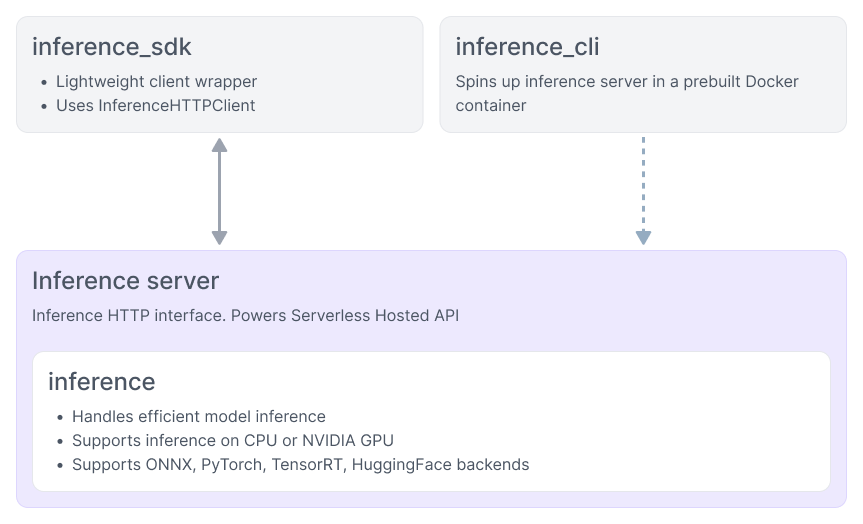
<figure><img src="/files/cb0613f17787926c0a1acb2c62649b9d8acda071" alt="Roboflow Inference architecture diagram"><figcaption><p>Inference がアプリケーション、モデル、Roboflow プラットフォームの間にどのように位置するか</p></figcaption></figure>

## モデルをローカルで実行

ほとんどのプロジェクトでは、Docker で Inference Server を実行し、 `inference-sdk`を使ってリクエストを送信します。この SDK は、アプリケーションを Inference Server に接続する Python HTTP クライアントです。Python プロセス内で直接モデルを読み込み、実行する必要がある場合は Inference Library を使用してください。どちらの方法でも同じ `model_id` の値を使用するため、後から切り替えることができます。

### モデル ID

この `model_id` パラメータは次のいずれかです：

* 1 つの [事前学習済みモデルのエイリアス](/models/ja/pretrained-aliases.md)、例えば `rfdetr-small` または `rfdetr-large`
* 独自の [Roboflow でファインチューニングしたモデル](broken://spaces/wdr4k0gUcsVnXVoafYcQ/pages/dd1254244d46c8fa71cd9317c75ba4469789d568)、例えば `my-project/1`
* 1 つの [Universe モデル](https://docs.roboflow.com/datasets/universe/universe/find-a-model-on-universe)、例えば `soccer-players-xy9vk/2`

ファインチューニング済みモデルと Universe モデルには [API キー](https://docs.roboflow.com/reference/authentication/authentication/find-your-roboflow-api-key).

{% tabs %}
{% tab title="Inference Server" icon="docker" %}

### インストール

サーバーを次のコマンドで起動します： [Inference CLI](https://docs.roboflow.com/reference/inference/inference-cli)。ハードウェアを検出し、安全なデフォルト設定で適切な Docker イメージを取得します：

```bash
pip install inference-cli && inference server start
```

次に HTTP クライアントをインストールします：

```bash
pip install inference-sdk
```

ハードウェア要件、デバイス別ガイド、および手動の `docker run` コマンドについては、 [Inference Server をインストール](/deployment/ja/serufuhosuto/inference-server/install.md)。同じクライアントは次の環境でも動作します： [サーバーレスホスト型 API](/deployment/ja/roboflow-cloud/serverless-api.md) および [専用デプロイメント](/deployment/ja/roboflow-cloud/dedicated-deployments.md)：変更するのは `api_url` だけです。

### 推論を実行

```python
from inference_sdk import InferenceHTTPClient

image = "https://media.roboflow.com/inference/people-walking.jpg"
client = InferenceHTTPClient(
    api_url="http://localhost:9001",  # あなたのセルフホストサーバー
    api_key="YOUR_API_KEY",
)
results = client.infer(image, model_id="rfdetr-small")
```

を `api_url` <http://localhost:9001> `https://serverless.roboflow.com` に [サーバーレスホスト型 API](/deployment/ja/roboflow-cloud/serverless-api.md) を使うには、他のコード変更なしで置き換えてください。 [Inference SDK リファレンス](https://docs.roboflow.com/reference/inference/inference-sdk) の詳細をご覧ください。

### 結果を可視化

インストール [Supervision](https://supervision.roboflow.com):

```bash
pip install -U supervision
```

```python
import supervision as sv
from inference_sdk import InferenceHTTPClient

image = sv.load_image_from_url("https://media.roboflow.com/inference/people-walking.jpg")

client = InferenceHTTPClient(
    api_url="http://localhost:9001",
    api_key="YOUR_API_KEY",
)
results = client.infer(image, model_id="rfdetr-medium")

detections = sv.Detections.from_inference(results)

annotated_image = sv.BoxAnnotator().annotate(scene=image, detections=detections)
annotated_image = sv.LabelAnnotator().annotate(scene=annotated_image, detections=detections)

sv.plot_image(annotated_image)
```

{% endtab %}

{% tab title="Inference Library" icon="python" %}

### インストール

次の `inference` パッケージを自分の Python 環境にインストールします：

```bash
pip install inference
```

NVIDIA GPU がある場合は、 `inference-gpu` の代わりにインストールし、インデックス URL を OS にインストールされている CUDA のバージョンに合わせます：

```bash
pip install --extra-index-url https://download.pytorch.org/whl/cu124 inference-gpu
```

詳細は [Inference Library](/deployment/ja/serufuhosuto/inference-library.md) で、バックエンドの追加機能と GPU セットアップの詳細を確認してください。

### 推論を実行

```python
from inference import get_model

image = "https://media.roboflow.com/inference/people-walking.jpg"
model = get_model(model_id="rfdetr-small")
results = model.infer(image)
```

`get_model()` は初回使用時にモデルの重みをダウンロードしてキャッシュし、その後ローカルで推論を実行します。 [Inference Python Package リファレンス](https://docs.roboflow.com/reference/inference/inference-python) の詳細をご覧ください。

### 結果を可視化

インストール [Supervision](https://supervision.roboflow.com):

```bash
pip install -U supervision
```

```python
import supervision as sv
from inference import get_model

image = sv.load_image_from_url("https://media.roboflow.com/inference/people-walking.jpg")

model = get_model(model_id="rfdetr-medium")
results = model.infer(image)[0]

detections = sv.Detections.from_inference(results)

annotated_image = sv.BoxAnnotator().annotate(scene=image, detections=detections)
annotated_image = sv.LabelAnnotator().annotate(scene=annotated_image, detections=detections)

sv.plot_image(annotated_image)
```

{% endtab %}
{% endtabs %}

![検出結果で注釈を付けた歩行中の人々](https://storage.googleapis.com/com-roboflow-marketing/inference/people-walking-annotated.jpg)

{% hint style="warning" %}
API キーを外部ユーザーに公開しないよう注意してください。公開フロントエンドアプリに埋め込まず、代わりに自分のバックエンドを経由してリクエストをプロキシしてください。
{% endhint %}

次の方法で [Workflow](https://docs.roboflow.com/workflows) をサーバー上または自分のプロセス内で同じように実行できます： [Workflow をデプロイ](https://docs.roboflow.com/workflows/deploy/deploy-a-workflow).

{% hint style="info" %}
プライベートモデル向けの TensorRT 最適化済みモデルパッケージは、 [Enterprise プラン](/deployment/ja/serufuhosuto/enterprise.md) で Inference を Roboflow プラットフォーム外で実行する場合にのみ利用できます。公開モデルには、すべてのプランで TensorRT パッケージが含まれます。
{% endhint %}
