> For the complete documentation index, see [llms.txt](https://docs.roboflow.com/llms.txt). Markdown versions of documentation pages are available by appending `.md` to page URLs; this page is available as [Markdown](https://docs.roboflow.com/deployment/ko/self-hosted/enterprise/deployment-manager/making-changes/delete-a-device.md).
# 장치 삭제
더 이상 사용하지 않는 장치를 배포 관리자에서 영구적으로 제거합니다.
더 이상 사용하지 않는 장치는 Deployment Manager 웹 인터페이스에서 제거할 수 있습니다.
:warning: 장치를 제거하면 영구적으로 삭제됩니다. 이후 다시 Deployment Manager에서 해당 장치를 사용하려면 장치에 대해 Deployment Manager 설정 과정을 다시 진행해야 합니다.
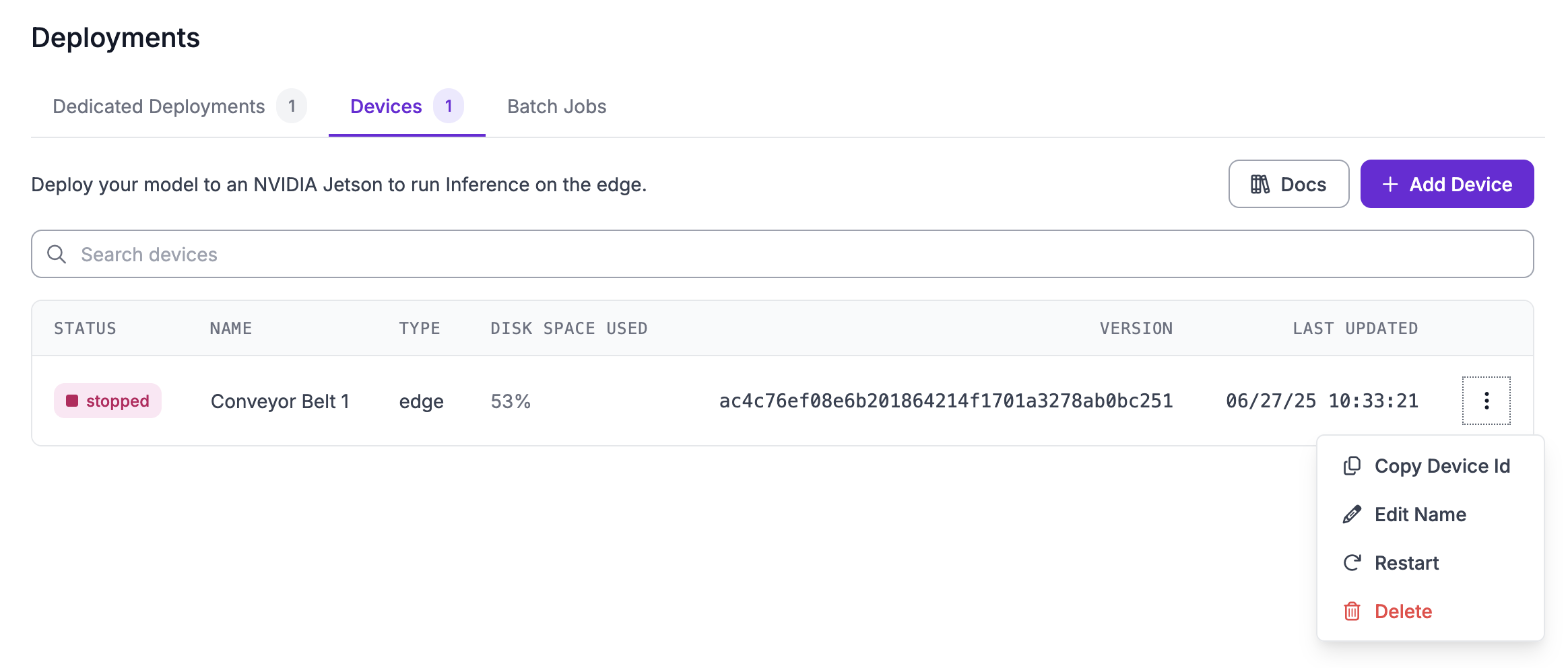
계정에서 장치를 제거하려면 왼쪽 사이드바에서 "배포"를 클릭한 다음 "에지 장치" 탭을 선택하세요. Deployment Manager에서 제거하려는 장치 옆의 세 개 점을 클릭한 다음 "삭제"를 클릭하세요:
그런 다음 Deployment Manager에서 장치를 제거하려는지 확인하라는 메시지가 표시됩니다:
계정에서 제거하려는 장치의 이름을 입력한 다음 "장치 삭제"를 클릭하세요. 이 작업은 영구적입니다.