> For the complete documentation index, see [llms.txt](https://docs.roboflow.com/llms.txt). Markdown versions of documentation pages are available by appending `.md` to page URLs; this page is available as [Markdown](https://docs.roboflow.com/deployment/ko/self-hosted/enterprise/deployment-manager/setting-up/set-up-device-alerts.md).
# 장치 알림 설정
장치 연결성, 디스크 사용량, 카메라 FPS, 추론 FPS 문제에 대한 이메일 알림을 구성합니다.
Roboflow 배포 관리자는 기기가 예상대로 작동하지 않을 수 있을 때 이메일 알림을 보낼 수 있습니다. 예를 들어 다음과 같은 경우:
* 기기가 Roboflow Cloud와의 연결을 잃음
* 디스크 사용량이 비정상적으로 높아 기기 성능에 영향을 줄 수 있음
* 특정 스트림의 카메라 FPS가 너무 낮아짐
* 특정 스트림의 추론 FPS가 너무 낮아짐
* 하나의 [PLC 릴레이](/deployment/ko/self-hosted/enterprise/deployment-manager/services/plc-relay.md) 서비스가 PLC와의 연결을 잃음
* 하나의 [OPC UA 서버](/deployment/ko/self-hosted/enterprise/deployment-manager/services/opc-ua-server.md) 서비스가 세션 한도에 도달하여 새 클라이언트를 거부함
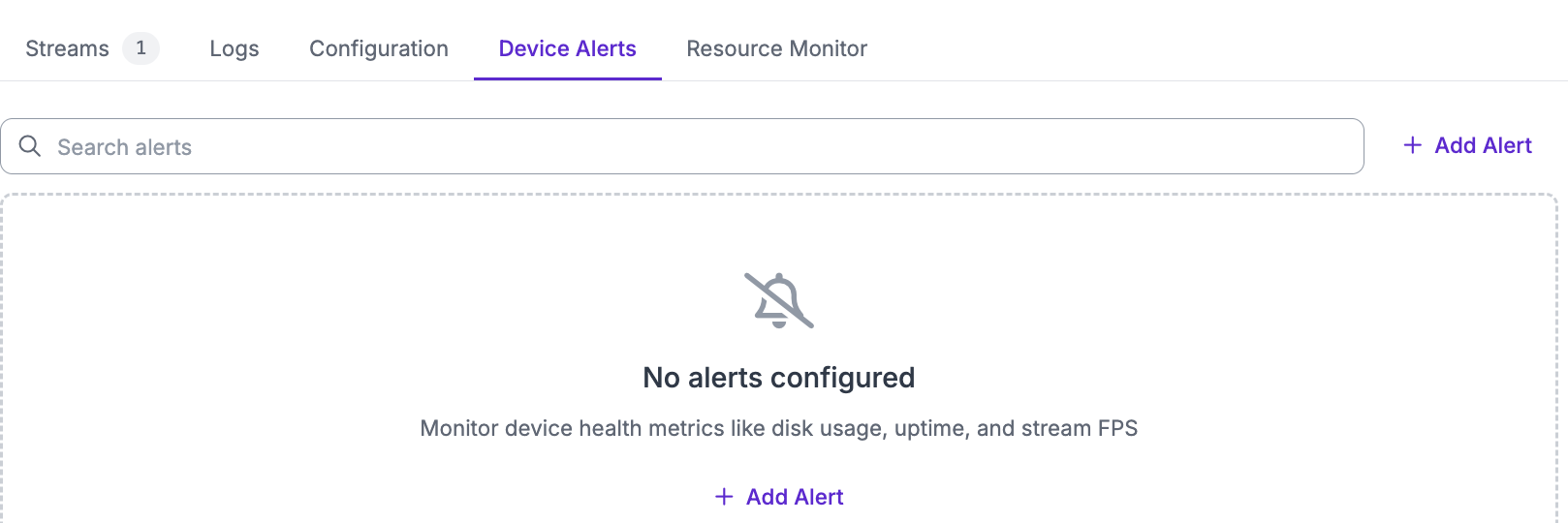
기기 알림을 설정하려면 Deployment Manager 대시보드에서 특정 기기의 페이지로 이동하세요. 그런 다음 "Device Alerts" 탭으로 이동하여 "Add Alert"를 클릭하세요.
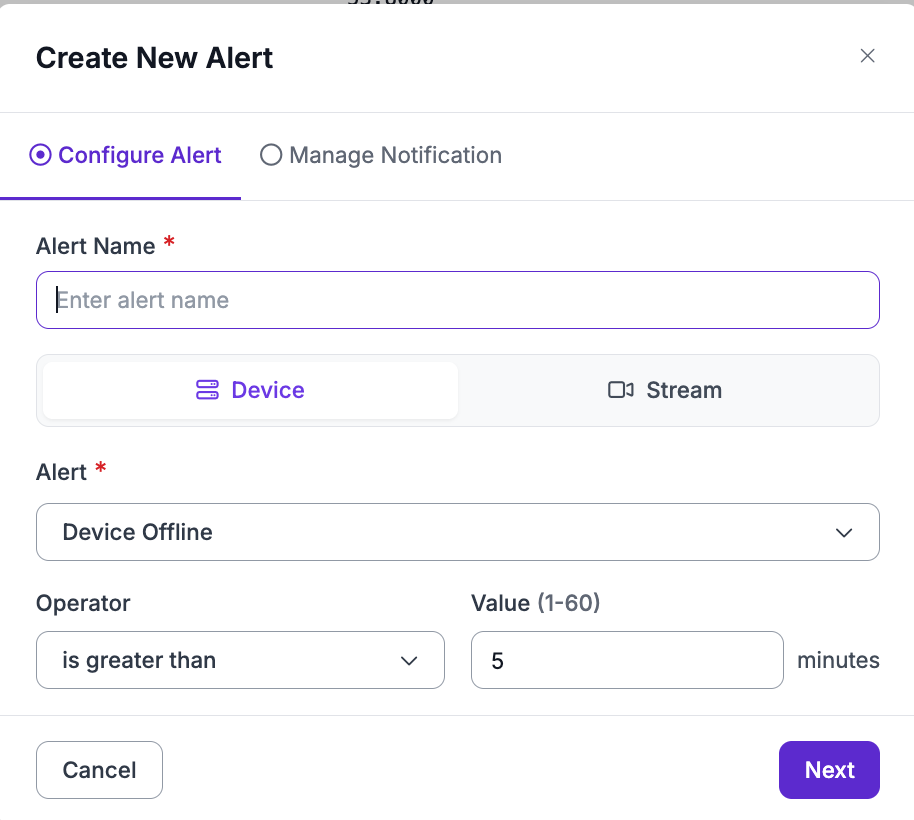
열리는 모달에서 원하는 알림을 구성하세요
Camera FPS, Inference FPS, 및 Sharpness 알림의 경우, 5\~60분 범위의 선택적 "Duration (Minutes)"를 설정할 수 있습니다. 그러면 알림은 조건이 그 시간 동안 유지될 때만 발생합니다(예: Camera FPS가 10분 동안 1 미만). 따라서 짧은 하락이나 재시작은 이메일을 보내지 않습니다. 첫 번째 측정값에서 알림을 받으려면 비워 두세요. 일시 중지되거나 중단된 스트림은 이러한 알림을 보내지 않습니다.
"Add Condition"을 클릭하여 하나의 알림에 최대 다섯 개의 조건을 추가할 수 있습니다. 두 개 이상의 조건이 있는 경우 "Alert When"을 사용하여 조건이 어떻게 결합될지 선택하세요. "Any Condition Holds"는 충족되는 각 조건마다 이메일을 보냅니다. "All Conditions Hold"는 모든 조건이 동시에 충족될 때만 이메일을 한 번 보냅니다(예: 추론 FPS가 10 미만이고 디스크 사용량이 90% 초과). 예외 및 오류 이벤트 수는 "All Conditions Hold" 알림의 일부가 될 수 없습니다.
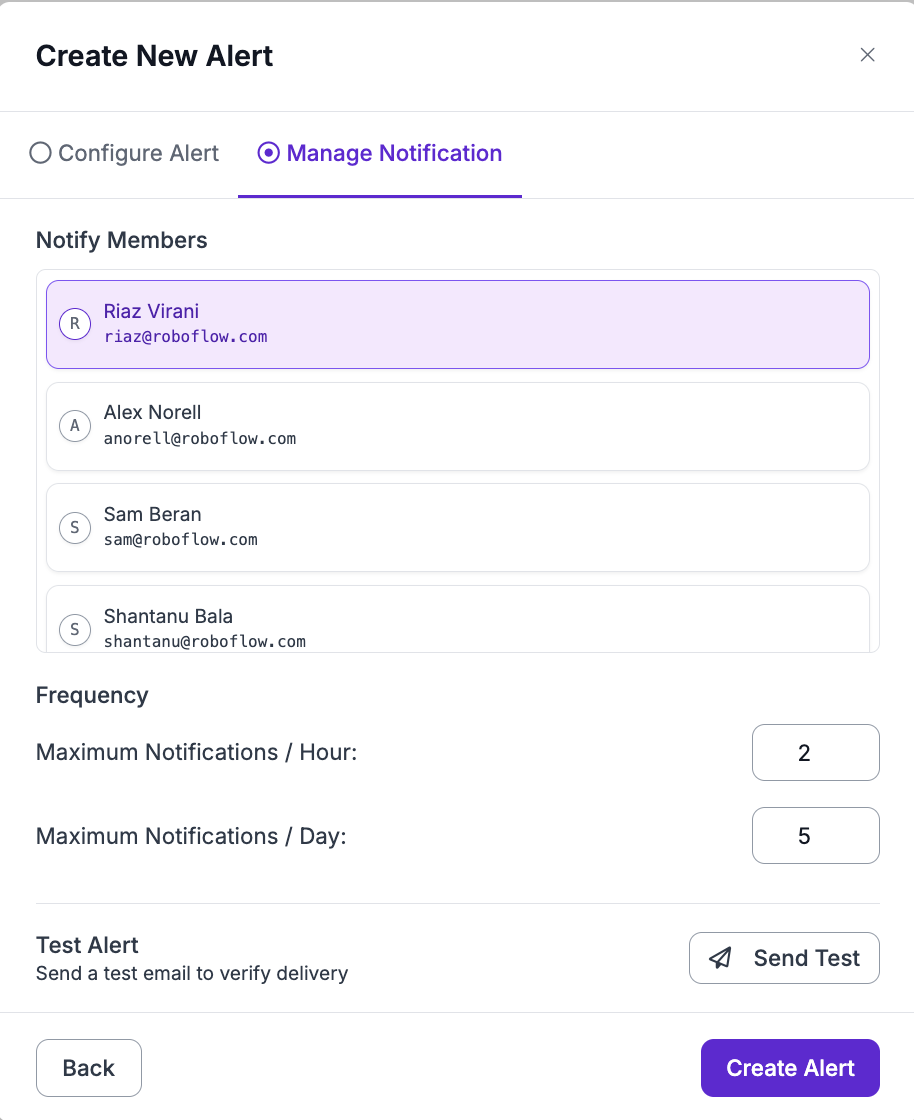
그런 다음 "Manage Notification"을 클릭하면 수신자와 알림 빈도를 구성하고 테스트 알림을 보낼 수 있습니다.
그런 다음 "Create Alert"를 클릭하면 알림 목록에서 해당 알림을 볼 수 있습니다.