> For the complete documentation index, see [llms.txt](https://docs.roboflow.com/llms.txt). Markdown versions of documentation pages are available by appending `.md` to page URLs; this page is available as [Markdown](https://docs.roboflow.com/deployment/self-hosted/inference-server/architecture.md).
# Inference Architecture
How Roboflow Inference is architected - request routing, parallelization, microservice and appliance patterns, capabilities, and why Docker is recommended.
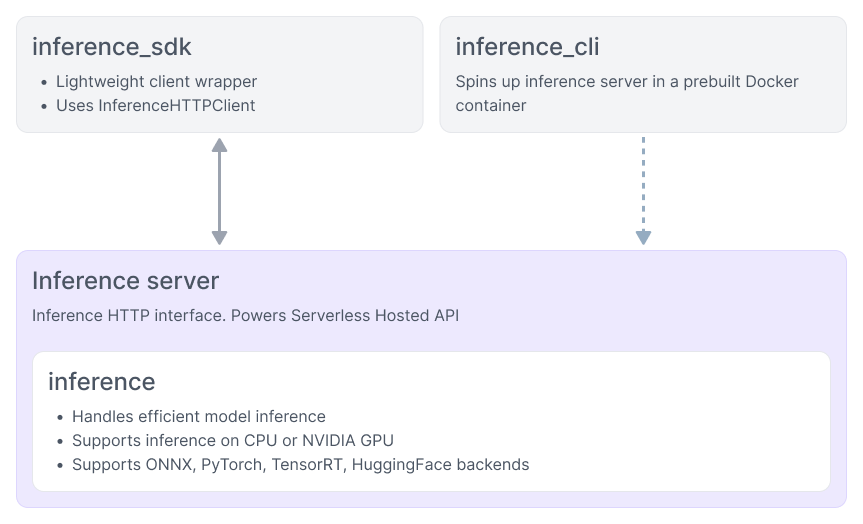
Inference is best run in server mode. It also supports a [native Python interface](/deployment/self-hosted/inference-library.md), though see [why we recommend Docker](#why-docker). You interact with it over a REST API, most often through [the Inference SDK](https://docs.roboflow.com/reference/inference/inference-sdk), or from a web browser (the [Roboflow app](https://app.roboflow.com) can optionally act as a frontend for a locally hosted Inference server).
Inference orchestrates getting predictions through a model, or a series of models, and processing the results. It multithreads automatically to parallelize workloads and efficiently use the available GPU and CPU cores, and it dynamically adapts to variable processing rates when consuming video streams so the host machine is not overloaded.
Inference talks to Roboflow services to retrieve model weights and Workflow definitions and to keep track of model results for later evaluation, but all of the computation is done locally, which means it can run offline.
One Inference server can handle multiple clients and streams.
Where Inference sits between your application, models, and the Roboflow platform
## Inference as a microservice
The most common way to use Inference is as a small part of a larger system, producing a response that is consumed by downstream code. That response sometimes represents the prediction from a model (for example a set of detections containing objects' categorization, location, and size in an image) but it can also represent the result of post-processing logic (like the pass/fail state of an inspection), an aggregation (like the count of unique objects seen over the past hour), or a visualization.
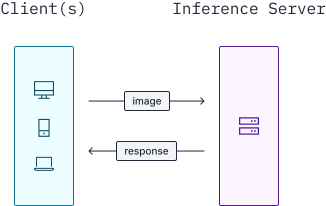
For image workloads, the input is passed in as a parameter and the response is returned synchronously.
Inference as a microservice
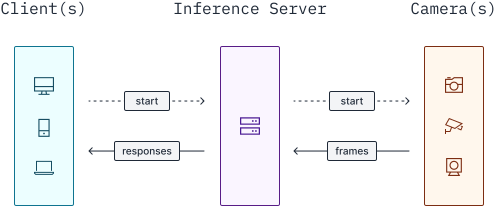
For video streams, the server starts a persistent video worker that runs until the session ends. Client applications receive processed frames and prediction data through WebRTC.
Inference Server video streaming
Example microservice use cases:
* Tagging user-uploaded images on a website
* Determining if a machine is set up correctly before allowing it to turn on
* Blurring faces in a video
* Detecting mismatched wiring in a finished circuit board
* Inspecting a manufactured good to ensure it matches the spec
* Validating that an object is defect and blemish free
* Counting the number of pills in an image
## Inference as an appliance
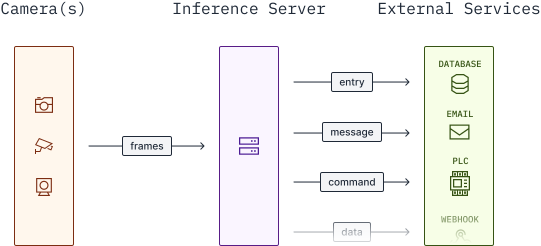
Inference can also be treated as an autonomous agent that continuously consumes and processes a video stream and performs downstream actions, such as updating a database, sending notifications, firing webhooks, or signaling hardware. In this pattern the full logic of the system is defined in a [Workflow](https://docs.roboflow.com/workflows) and the output is pushed to external systems.
Inference as an appliance
Example appliance use cases:
* Stopping a conveyor belt if a jam has occurred
* Collecting highway traffic analytics
* Flagging suspicious activity in a security camera feed
* Updating an inventory system as vehicles enter or leave a yard
* Sounding an alarm when a scrap heap overflows
* Cataloguing retail customers' wait time over the course of a day
## What the server handles for you
| Capability | What it does |
| ----------------------------- | -------------------------------------------------------------------------------------------------------------------------------------------------------------------------------------------------------------------------------------------------------------------------------------- |
| **Model serving** | Runs object detection, image classification, instance segmentation, keypoint detection, image embedding, OCR, visual question answering, and more. See [supported models](https://docs.roboflow.com/models/supported-models/supported-models). |
| **Image processing** | Applies the same pre- and post-processing methods models use during training, efficiently, so accuracy is preserved without unnecessary latency. |
| **Video stream management** | Spawns separate threads to process video streams so the model always gets the most recent frame possible. |
| **Workflows** | Runs a declared computation graph that pipes and parallelizes data through models, logic, integrations, and custom code. |
| **HTTP server, SDK, and CLI** | An HTTP API for use as a microservice, plus a [Python SDK](https://docs.roboflow.com/reference/inference/inference-sdk) and [CLI](https://docs.roboflow.com/reference/inference/inference-cli) for driving it. |
| **Speed** | Automatic parallelization via multiprocessing, hardware acceleration, and dynamic batching, plus optional TensorRT quantization and device-specific layer fusion on supported GPUs. |
| **Offline cache** | Pulls down models and Workflow definitions and stores them locally so the server can operate in [offline mode](/deployment/self-hosted/enterprise/offline-mode.md). |
| **Insights** | Connects to the Roboflow platform to upload outlier data, expose stats and telemetry, and feed downstream data sinks. See [Model Monitoring](/deployment/monitoring-and-analytics/model-monitoring.md) and [Active Learning](/deployment/monitoring-and-analytics/active-learning.md). |
| **Portability** | Runs on macOS development machines, cloud servers, and tiny edge devices. Swap the Docker tag and the same code runs on another platform. |
| **Extensibility** | Open source under Apache 2.0. Add custom models, Workflow blocks, and backends, or use dynamic Python blocks to bridge gaps between blocks. |
## Why Docker
We highly recommend using the Docker container to run Inference. Machine learning dependencies are sensitive to minor changes in their environment; if they are not isolated into a deterministic environment, your system is likely to break when you update your operating system or drivers, update the dependencies of your application code, apply security patches, or set up a new machine. The images ensure that library versions are compatible with each other, packages are compiled to take advantage of the GPU, and security patches are applied.
Docker also gives you portability. You can decide later to serve multiple clients from a single large server, or to upgrade from a CPU to a GPU, without refactoring your application code.
The exception is hardware where a container cannot reach the accelerator, such as [MPS on macOS](/deployment/self-hosted/inference-server/install/mac.md), where running outside Docker is the only way to get acceleration.