> For the complete documentation index, see [llms.txt](https://docs.roboflow.com/llms.txt). Markdown versions of documentation pages are available by appending `.md` to page URLs; this page is available as [Markdown](https://docs.roboflow.com/reference/authentication/authentication/sign-in-with-roboflow-getting-started.md).
# Sign In With Roboflow (Getting Started)
Let users sign in to your application with their Roboflow account using OAuth 2.1 and PKCE.
You can build applications that authenticate users with their Roboflow account using the OAuth 2.1 authorization code flow with PKCE. This lets your app act on behalf of a Roboflow user, scoped to only the permissions they approve.
OAuth access tokens work on `api.roboflow.com` with `Authorization: Bearer`. See [Authenticate with the REST API](/reference/platform/rest-api/authenticate-with-the-rest-api.md) for details.
For endpoint tables, visibility, errors, and a runnable sample app, see [Sign In With Roboflow (Developer Reference)](/reference/authentication/authentication/sign-in-with-roboflow-developer-reference.md).
## Create an OAuth App
To register your application:
{% stepper %}
{% step %}
### Open Developer Settings
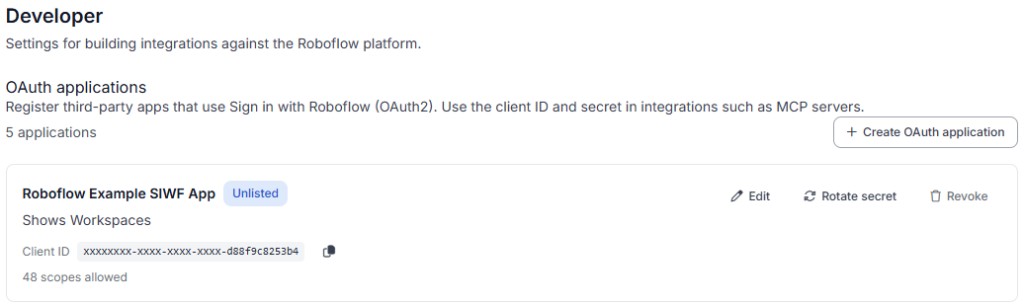
Go to **Workspace Settings > Developer** in your Roboflow dashboard at [app.roboflow.com](https://app.roboflow.com).
{% endstep %}
{% step %}
### Create a new OAuth app
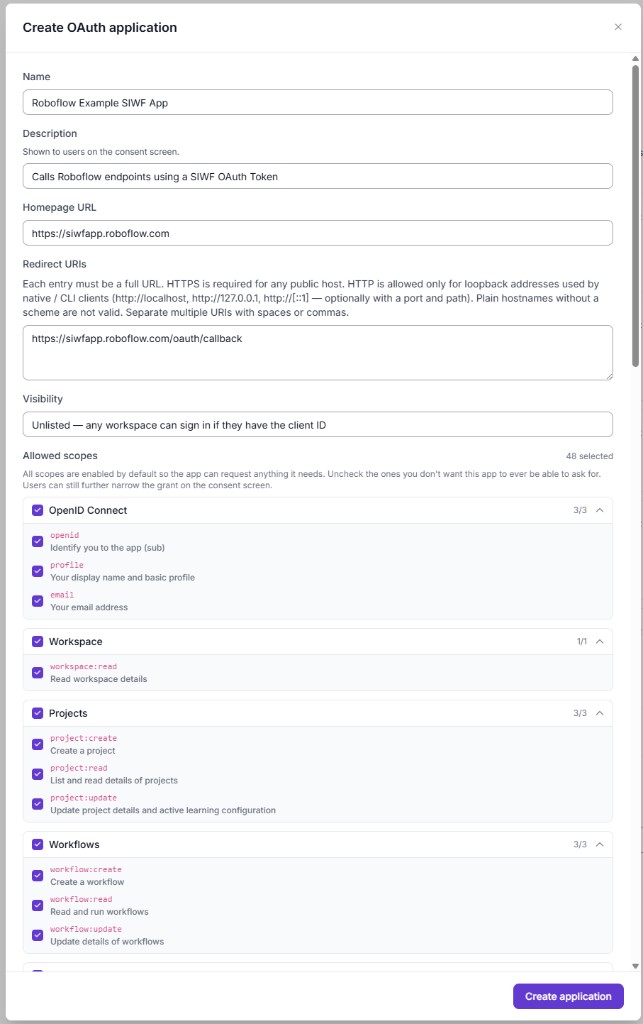
Click **Create OAuth App** (or **New app**) and fill in:
| Field | Description |
| --------------------------------- | ------------------------------------------------------------------------------------------------------------------------------------------------------------------------------------------------------------------------------------------------------------- |
| **Name** | Display name on the consent screen and in your OAuth apps list |
| **Homepage URL** | Your product URL (shown on consent; informational) |
| **Redirect URIs** | One or more callback URLs (must match your code exactly) |
| **Token endpoint authentication** | How the client sends its secret to the token endpoint: `client_secret_post` (secret in the request body, default) or `client_secret_basic` (secret in the HTTP Basic Authorization header). Most MCP gateways (Azure, TrueFoundry) use `client_secret_basic`. |
| **Allowed scopes** | Every scope you will request at sign-in |
| **Visibility** | **Internal**, **Unlisted**, or **Public** - see [Developer Reference - Visibility](/reference/authentication/authentication/sign-in-with-roboflow-developer-reference.md#visibility) |
You will receive a **Client ID** and **Client Secret** (`rfcs_…`). The secret is shown only once, so store it securely on your server.
{% endstep %}
{% endstepper %}
### Redirect URI examples
| Redirect URI | Typical use |
| -------------------------------------- | ------------------------------------------ |
| `http://localhost:3001/oauth/callback` | Local dev on port 3001 |
| `http://127.0.0.1:3001/oauth/callback` | Same as above if your app uses `127.0.0.1` |
| `https://yourapp.com/oauth/callback` | Production |
HTTPS is required for public hosts. HTTP is allowed only for loopback (`localhost`, `127.0.0.1`, `::1`).
## Authorization Flow
Roboflow uses the authorization code grant with PKCE (Proof Key for Code Exchange). PKCE is required for all clients.
{% stepper %}
{% step %}
### Generate a PKCE code verifier and challenge
Create a random `code_verifier` (43–128 characters) and derive a `code_challenge` from it using SHA-256:
```python
import hashlib, base64, secrets
code_verifier = secrets.token_urlsafe(32)
code_challenge = base64.urlsafe_b64encode(
hashlib.sha256(code_verifier.encode()).digest()
).rstrip(b"=").decode()
```
{% endstep %}
{% step %}
### Redirect the user to authorize
Send the user to the Roboflow authorization endpoint:
```
https://app.roboflow.com/oauth/authorize?
client_id=YOUR_CLIENT_ID&
redirect_uri=https://yourapp.com/callback&
response_type=code&
scope=openid profile email workspace:read&
code_challenge=YOUR_CODE_CHALLENGE&
code_challenge_method=S256&
state=YOUR_STATE_VALUE
```
Use a cryptographically random `state` and verify it on callback. Store `code_verifier` server-side until you exchange the code.
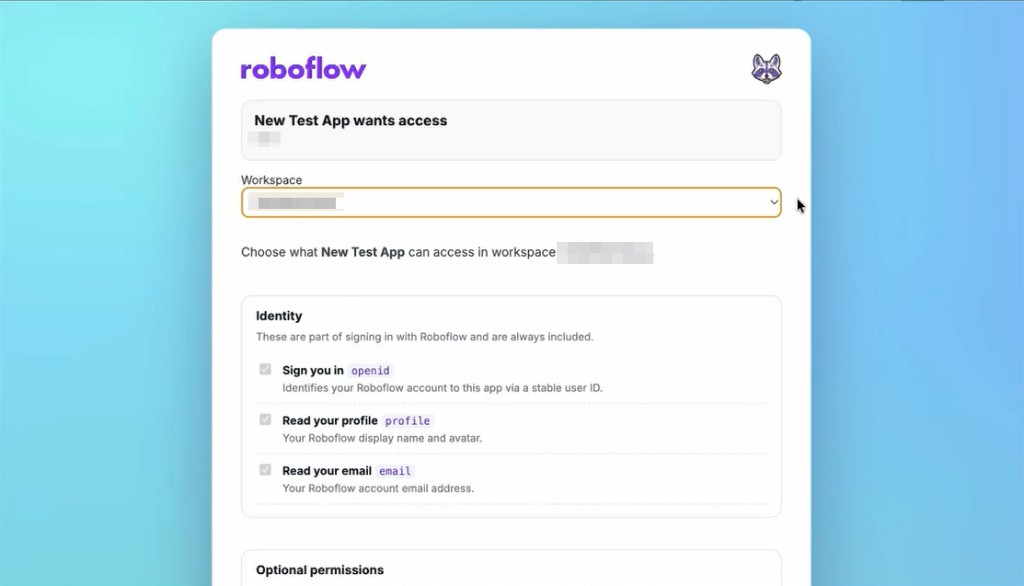
The user sees a consent screen with the permissions your app requested.
After they approve, Roboflow redirects to your `redirect_uri` with `code` and `state`.
{% endstep %}
{% step %}
### Exchange the code for tokens
On your server (never in the browser), POST to the token endpoint:
```bash
curl -X POST https://app.roboflow.com/oauth/token \
-H "Content-Type: application/x-www-form-urlencoded" \
-d "grant_type=authorization_code" \
-d "client_id=YOUR_CLIENT_ID" \
-d "client_secret=YOUR_CLIENT_SECRET" \
-d "code=AUTHORIZATION_CODE" \
-d "redirect_uri=https://yourapp.com/callback" \
-d "code_verifier=YOUR_CODE_VERIFIER"
```
The response includes:
* `access_token` - call Roboflow APIs (valid for 1 hour, or 24 hours for MCP clients)
* `refresh_token` - get new access tokens (valid for 30 days)
* `id_token` - JWT with identity claims (when `openid` is requested)
{% endstep %}
{% endstepper %}
## Using OAuth Tokens
Once you have an access token, send it in the `Authorization` header:
```bash
curl -H "Authorization: Bearer rfoa_..." https://api.roboflow.com/
```
## Validate a Token
If you hold an opaque `rfoa_` access token and need to check its status or expiry without client credentials, call the validate endpoint:
```bash
curl -H "Authorization: Bearer rfoa_..." https://app.roboflow.com/oauth/validate
```
Response (always HTTP 200):
```json
{
"active": true,
"exp": 1893456000,
"workspace_url": "your-workspace",
"scopes": ["workspace:read", "project:read"]
}
```
An expired or revoked token returns `{ "active": false, "exp": null, ... }` instead of an HTTP error, so callers can distinguish a dead token from an unreachable auth server.
## Refresh a Token
Access tokens expire after 1 hour (24 hours for MCP clients). Use the refresh token to get a new one:
```bash
curl -X POST https://app.roboflow.com/oauth/token \
-H "Content-Type: application/x-www-form-urlencoded" \
-d "grant_type=refresh_token" \
-d "client_id=YOUR_CLIENT_ID" \
-d "client_secret=YOUR_CLIENT_SECRET" \
-d "refresh_token=YOUR_REFRESH_TOKEN"
```
## Revoke a Token
To revoke an access or refresh token:
```bash
curl -X POST https://app.roboflow.com/oauth/revoke \
-H "Content-Type: application/x-www-form-urlencoded" \
-d "token=TOKEN_TO_REVOKE"
```
## User Info
Retrieve profile information for the authenticated user (requires `openid`):
```bash
curl -H "Authorization: Bearer rfoa_..." https://app.roboflow.com/oauth/userinfo
```
## Available Scopes
Your app can request any combination of the following scopes. Each scope must also be enabled on your OAuth app's **Allowed scopes** list.
### Identity Scopes
| Scope | Description |
| --------- | ------------------------------------------------------ |
| `openid` | Required. Returns a stable user ID in the `sub` claim. |
| `profile` | Read the user's display name and avatar. |
| `email` | Read the user's email address. |
### API Scopes
| Scope | Description |
| --------------------- | ------------------------------------- |
| `workspace:read` | Read workspace details, list projects |
| `project:create` | Create projects |
| `project:read` | Read project details |
| `project:update` | Update project settings |
| `image:create` | Upload images |
| `image:read` | Read and download images |
| `image:tag` | Add and remove image tags |
| `image:annotate` | Create and update annotations |
| `model:infer` | Run inference |
| `model:deploy` | Deploy models |
| `model:manage` | Manage model settings |
| `model-eval:read` | Read model evaluation results |
| `workflow:create` | Create Workflows |
| `workflow:read` | Read Workflows |
| `workflow:update` | Update Workflows |
| `version:create` | Create dataset versions |
| `version:read` | Read dataset versions |
| `version:update` | Update dataset versions |
| `training-job:create` | Start training jobs |
| `folder:create` | Create project folders |
| `folder:read` | Read project folders |
| `folder:update` | Update project folders |
| `folder:delete` | Delete project folders |
Additional scopes
| Scope | Description |
| ---------------------------- | ----------------------------- |
| `device:read` | Read devices |
| `device:update` | Update device settings |
| `vision-events:read` | Read vision events |
| `vision-events:write` | Create vision events |
| `vision-events:manage` | Manage vision event use cases |
| `annotation-job:create` | Create annotation jobs |
| `annotation-job:read` | Read annotation jobs |
| `video-inference-job:create` | Create video inference jobs |
| `video-inference-job:read` | Read video inference jobs |
| `integration:create` | Create integrations |
| `integration:delete` | Delete integrations |
| `credentials:create` | Create credentials |
| `credentials:read` | Read credentials |
| `credentials:update` | Update credentials |
| `credentials:delete` | Delete credentials |
| `data-staging:read` | Read staged data |
| `data-staging:write` | Write staged data |
| `data-staging:delete` | Delete staged data |
| `batch-processing:read` | Read batch jobs |
| `batch-processing:trigger` | Trigger batch processing |
| `batch:read` | Read batches |
| `workspace-stats:read` | Read workspace statistics |
## OIDC Discovery
Roboflow publishes standard OpenID Connect discovery documents:
* **OpenID Configuration**: `https://app.roboflow.com/.well-known/openid-configuration`
* **JWKS** (for verifying ID tokens): `https://app.roboflow.com/.well-known/jwks.json`
## Next steps
* [Sign In With Roboflow (Developer Reference)](/reference/authentication/authentication/sign-in-with-roboflow-developer-reference.md) - hosts, visibility, errors, example app
* [Authenticate with the REST API](/reference/platform/rest-api/authenticate-with-the-rest-api.md)