> For the complete documentation index, see [llms.txt](https://docs.roboflow.com/llms.txt). Markdown versions of documentation pages are available by appending `.md` to page URLs; this page is available as [Markdown](https://docs.roboflow.com/get-started/hi/platform/workspaces/delete-a-workspace.md).
# Workspace हटाएँ
Settings से non-default Roboflow workspace को कैसे हटाएँ।
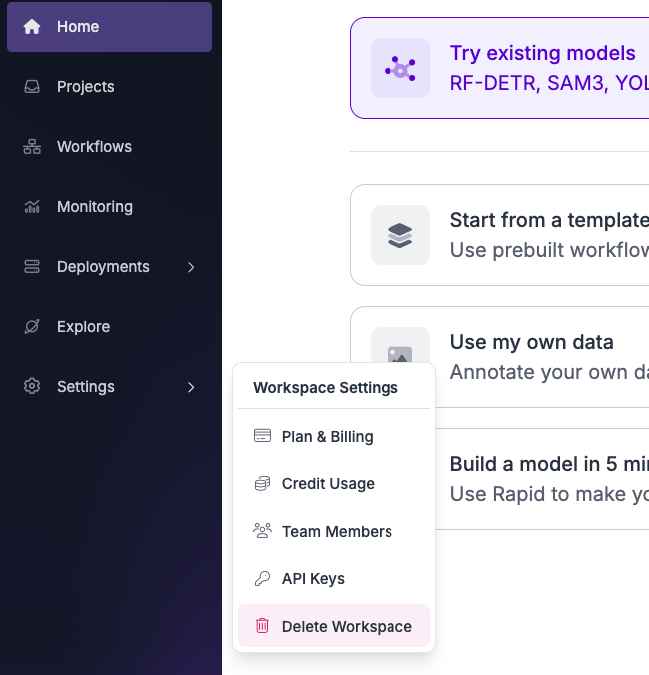
अपना वर्कस्पेस हटाने के लिए, बाएँ साइडबार में "Settings" बटन पर क्लिक करें और फिर "Delete Workspace" पर क्लिक करें।
{% hint style="warning" %}
आप केवल non-default वर्कस्पेसेज़ हटा सकते हैं।
{% endhint %}
{% hint style="info" %}
एंटरप्राइज़ प्लान वाले वर्कस्पेसेज़ को Settings से नहीं हटाया जा सकता। "Delete Workspace" बटन छिपा रहता है, और API 403 त्रुटि लौटाता है। एंटरप्राइज़ वर्कस्पेस हटाने के लिए से संपर्क करें।
{% endhint %}
प्रत्येक उपयोगकर्ता को डिफ़ॉल्ट वर्कस्पेस मिलता है, जिसे मैन्युअल रूप से हटाया नहीं जा सकता। आप अपना खाता भी इसमें हटा सकते हैं [app.roboflow.com/settings/account](https://app.roboflow.com/settings/account)जो आपके खाते और आपके खाते से लिंक डिफ़ॉल्ट वर्कस्पेस, दोनों को हटा देगा।