> For the complete documentation index, see [llms.txt](https://docs.roboflow.com/llms.txt). Markdown versions of documentation pages are available by appending `.md` to page URLs; this page is available as [Markdown](https://docs.roboflow.com/get-started/ja/purattofmu/workspaces/delete-a-workspace.md).
# ワークスペースを削除
設定から、デフォルト以外のRoboflowワークスペースを削除する方法。
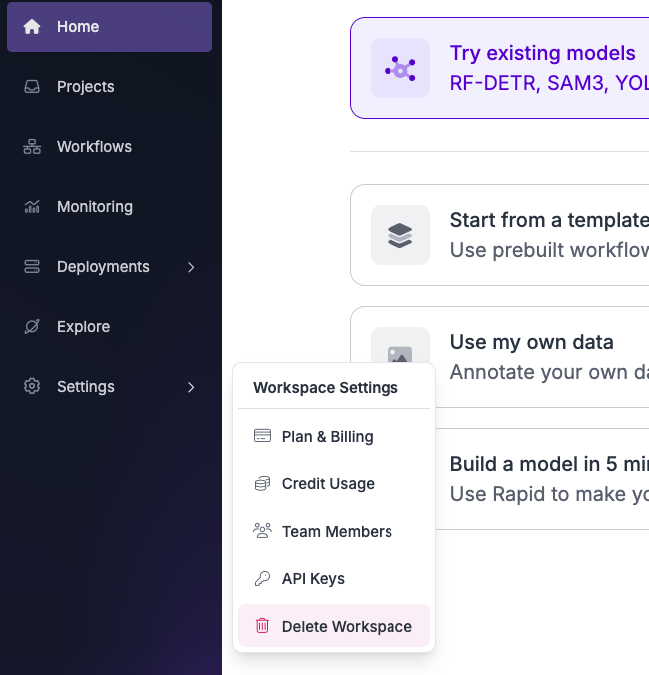
ワークスペースを削除するには、左側のサイドバーにある「Settings」ボタンをクリックし、次に「Delete Workspace」をクリックしてください。
{% hint style="warning" %}
削除できるのは、デフォルト以外のワークスペースのみです。
{% endhint %}
{% hint style="info" %}
Enterpriseプランのワークスペースは、Settingsから削除できません。「Delete Workspace」ボタンは非表示になり、APIは403エラーを返します。Enterpriseワークスペースを削除するには、 までご連絡ください。
{% endhint %}
各ユーザーには、手動で削除できないデフォルトのワークスペースが付与されます。アカウントも次の場所から削除できます [app.roboflow.com/settings/account](https://app.roboflow.com/settings/account)、これにより、アカウントと、アカウントにリンクされているデフォルトのワークスペースの両方が削除されます。