> For the complete documentation index, see [llms.txt](https://docs.roboflow.com/llms.txt). Markdown versions of documentation pages are available by appending `.md` to page URLs; this page is available as [Markdown](https://docs.roboflow.com/guides/run-a-model-locally.md).
# Run a Model Locally
Run Roboflow models on your own hardware with a Docker inference server, in five minutes.
[Roboflow Inference](https://docs.roboflow.com/deployment/self-hosted/self-hosted) is the free, open-source engine behind Roboflow's hosted models. You can run the same models on your own computer: start the inference server in a Docker container, then send it images over HTTP or with the Python [Inference SDK](https://docs.roboflow.com/reference/inference/inference-sdk). Running it yourself keeps your images on your own machine and gives you full control over your setup. Local inference does not use credits.
## Run a model on your machine
{% tabs %}
{% tab title="HTTP (Python)" icon="webhook" %}
{% stepper %}
{% step %}
### Start the inference server
`inference server start` launches the [Inference Server](https://docs.roboflow.com/deployment/self-hosted/inference-server) in a Docker container and picks the right version for your hardware: CPU, NVIDIA GPU, or Jetson. [Docker](https://docs.docker.com/get-docker/) must be installed and running.
```bash
pip install inference-cli && inference server start
```
The server listens on `http://localhost:9001`. For device-specific setup and troubleshooting, see the [Inference install guide](https://docs.roboflow.com/deployment/self-hosted/inference-server/install).
{% endstep %}
{% step %}
### Install the dependencies
`supervision` draws the results and brings in `cv2` and `numpy`:
```bash
pip install -U supervision
```
{% endstep %}
{% step %}
### Run the model
Send the image to your local server and run a ready-made [RF-DETR](https://docs.roboflow.com/models/supported-models/rf-detr) model. RF-DETR is Apache 2.0, so you can self-host it in a commercial product with no license fee. Ready-made models like this one don't need an API key:
```python
import base64
import cv2
import requests
import supervision as sv
image = sv.load_image_from_url("https://media.roboflow.com/quickstart/cars.jpg")
image_b64 = base64.b64encode(content).decode("utf-8")
result = requests.post(
"http://localhost:9001/coco/38", # coco/38 == rfdetr-nano
data=image_b64, # raw base64 in the body
headers={"Content-Type": "application/x-www-form-urlencoded"},
).json()
detections = sv.Detections.from_inference(result)
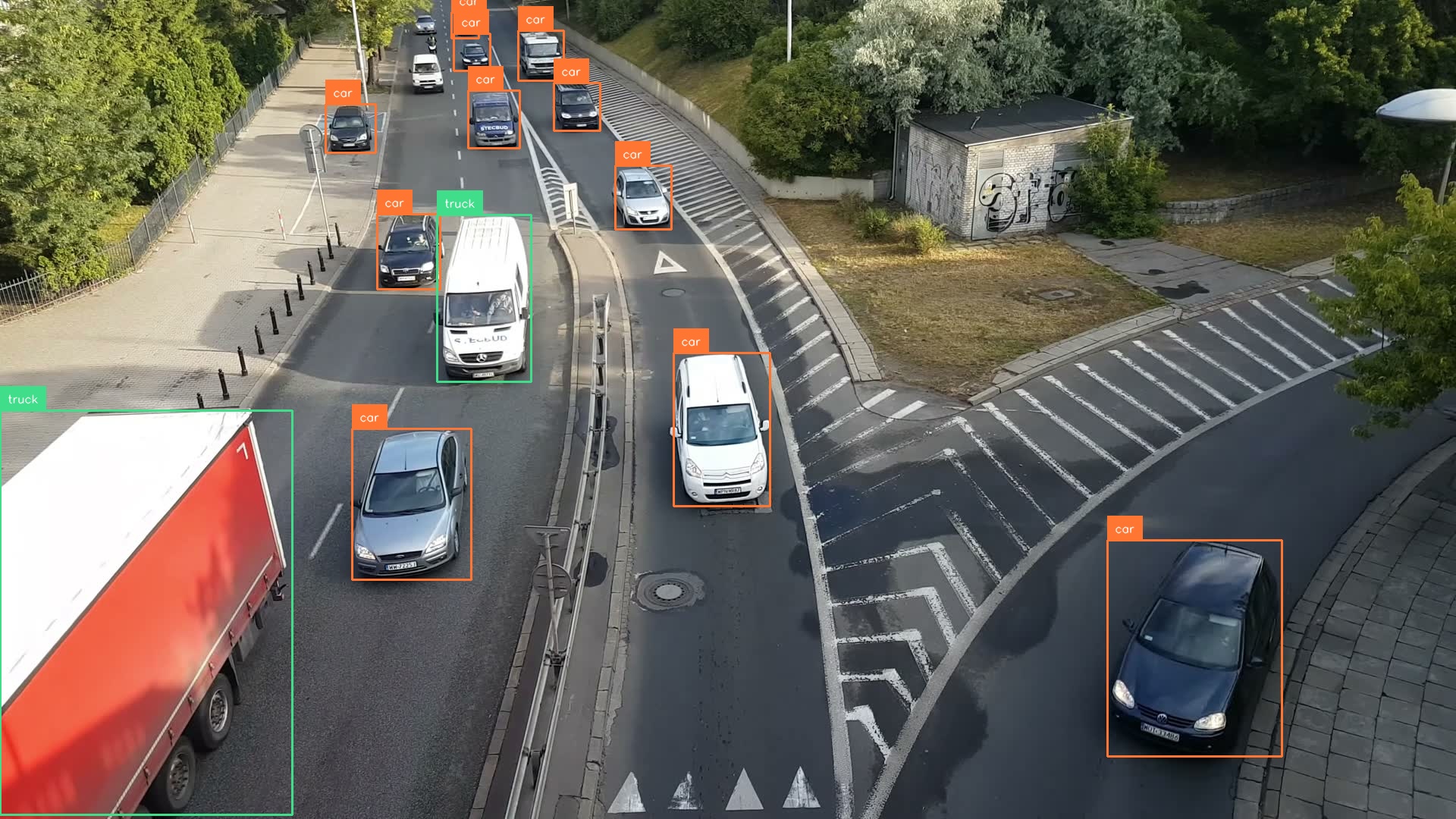
print(f"Found {len(detections)} objects")
annotated = sv.BoxAnnotator().annotate(image.copy(), detections)
annotated = sv.LabelAnnotator().annotate(annotated, detections)
cv2.imwrite("output.jpg", annotated)
```
{% endstep %}
{% endstepper %}
{% endtab %}
{% tab title="SDK (Python)" icon="python" %}
{% stepper %}
{% step %}
### Start the inference server
`inference server start` launches the [Inference Server](https://docs.roboflow.com/deployment/self-hosted/inference-server) in a Docker container and picks the right version for your hardware: CPU, NVIDIA GPU, or Jetson. [Docker](https://docs.docker.com/get-docker/) must be installed and running.
```bash
pip install inference-cli && inference server start
```
The server listens on `http://localhost:9001`. For device-specific setup and troubleshooting, see the [Inference install guide](https://docs.roboflow.com/deployment/self-hosted/inference-server/install).
{% endstep %}
{% step %}
### Install the SDK
`supervision` draws the results and brings in `cv2` and `numpy`:
```bash
pip install -U inference-sdk supervision
```
{% endstep %}
{% step %}
### Run the model
Point the client at your local server and run a ready-made [RF-DETR](https://docs.roboflow.com/models/supported-models/rf-detr) model. RF-DETR is Apache 2.0, so you can self-host it in a commercial product with no license fee. Ready-made models like this one don't need an API key:
```python
import cv2
import supervision as sv
from inference_sdk import InferenceHTTPClient
image = sv.load_image_from_url("https://media.roboflow.com/quickstart/cars.jpg")
client = InferenceHTTPClient(api_url="http://localhost:9001")
result = client.infer(image, model_id="rfdetr-nano")
detections = sv.Detections.from_inference(result)
print(f"Found {len(detections)} objects")
annotated = sv.BoxAnnotator().annotate(image.copy(), detections)
annotated = sv.LabelAnnotator().annotate(annotated, detections)
cv2.imwrite("output.jpg", annotated)
```
{% endstep %}
{% endstepper %}
{% endtab %}
{% endtabs %}
The first request downloads the model, so it can take a few seconds. Later requests are fast.
RF-DETR detections from the local inference server
## Process a video
To run a model on a video, open a WebRTC session with the server and receive processed frames plus predictions as the video plays. If your computer cannot keep up, the server skips frames to stay in real time. The same SDK can stream one model or a [Workflow](https://docs.roboflow.com/workflows).
{% hint style="info" %}
You can also run a model on a video over HTTP by sending one frame at a time, the same way as the image example above (no streaming add-on needed). This is slower: each frame has to be sent, processed, and drawn before the next one starts, so there's a lot of waiting in between. The SDK streams the whole video and works on several frames at once, so it keeps up much better.
{% endhint %}
{% stepper %}
{% step %}
### Install the SDK
Streaming video needs the `webrtc` add-on:
```bash
pip install "inference-sdk[webrtc]"
```
{% endstep %}
{% step %}
### Run the model on a video
```python
import cv2
from inference_sdk import InferenceHTTPClient
from inference_sdk.webrtc import VideoFileSource
import supervision as sv
client = InferenceHTTPClient.init(api_url="http://localhost:9001")
# Download+cache video
source = VideoFileSource("https://media.roboflow.com/quickstart/cars.mp4")
# Uses webrtc for optimized video streaming
session = client.webrtc.stream(
source=source,
model_id="rfdetr-nano"
)
# on_frame runs on the main thread, so cv2.imshow is safe
@session.on_frame
def show(frame, data):
det = sv.Detections.from_inference(data)
img = sv.BoxAnnotator().annotate(frame, det)
img = sv.LabelAnnotator().annotate(img, det)
cv2.imshow("RF-DETR", img)
if cv2.waitKey(1) == ord("q"):
session.close()
session.run()
cv2.destroyAllWindows()
```
{% endstep %}
{% endstepper %}
{% embed url="" %}
Build richer pipelines (tracking, filtering, zones, notifications) visually in the [Workflows editor](https://docs.roboflow.com/workflows/build/create-a-workflow), then run them through the same WebRTC client. See [Video processing with Workflows](https://docs.roboflow.com/workflows/deploy/video-processing).
## Other options
* Prefer a managed endpoint without running hardware? Use a [Dedicated Deployment](https://docs.roboflow.com/deployment/roboflow-cloud/dedicated-deployments) or the [Serverless Cloud API](https://docs.roboflow.com/deployment/roboflow-cloud/serverless-api).
* Need on-premises, air-gapped, or Kubernetes deployment? See [Enterprise Deployment](https://docs.roboflow.com/deployment/self-hosted/enterprise).
* Compare every option in [Deploy a Model or Workflow](https://docs.roboflow.com/deployment).