> For the complete documentation index, see [llms.txt](https://docs.roboflow.com/llms.txt). Markdown versions of documentation pages are available by appending `.md` to page URLs; this page is available as [Markdown](https://docs.roboflow.com/guides/run-model-serverless-api.md).
# Use a Model API Endpoint
Run a model on Roboflow's cloud GPUs in five minutes, with no hardware to set up.
The [Serverless Cloud API](https://docs.roboflow.com/deployment/roboflow-cloud/serverless-api) runs models and Workflows on GPUs in Roboflow's cloud. You send an image and get results back. There is no hardware to set up and no server to keep running.
This guide takes you from zero to running a model in five minutes. You will find objects in an image just by naming them, detect everyday objects with a ready-made model, and run your own models, all against the same Serverless Cloud API endpoint.
## Find objects by naming them
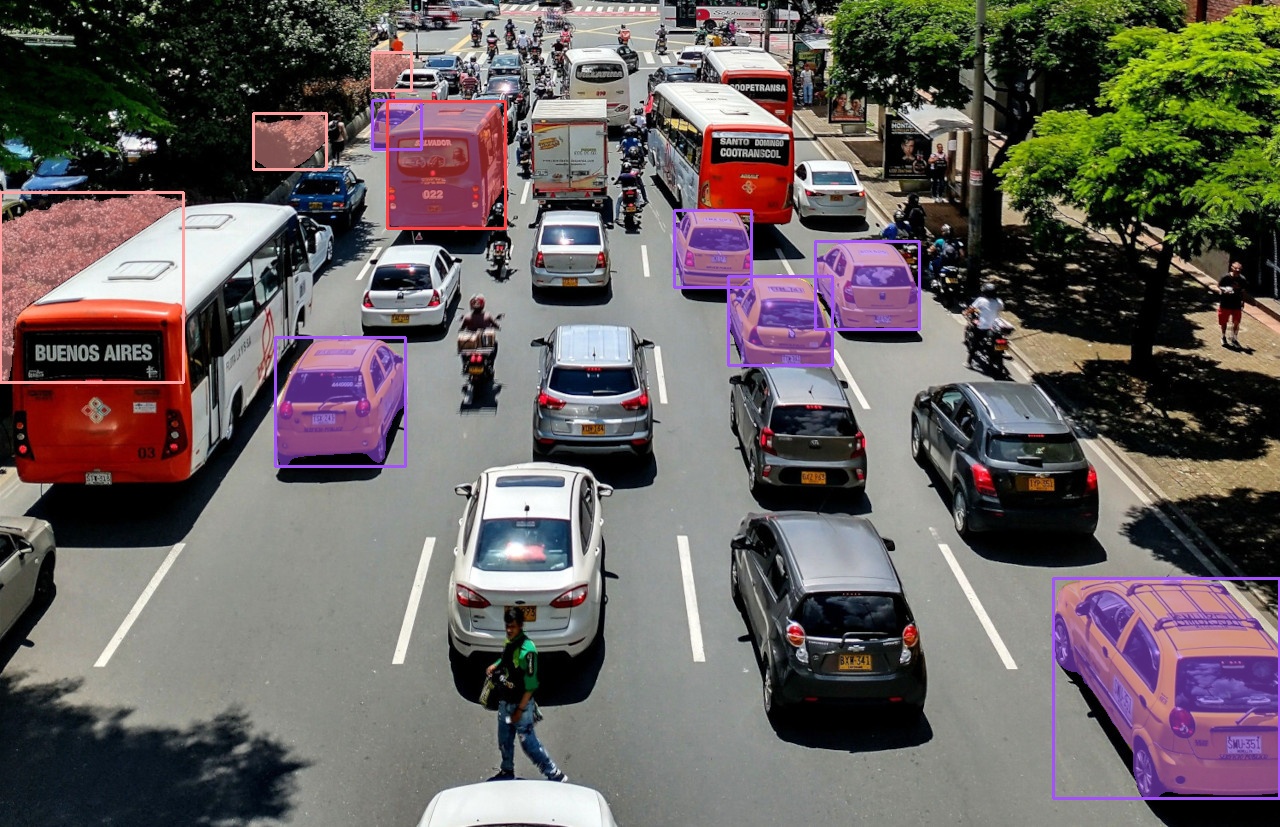
Give the model a few words like `"taxi"`, `"blue bus"`, or `"bush"` and it outlines every matching object in the image. There is nothing to set up or train first. This runs [SAM3](https://docs.roboflow.com/models/supported-models/sam3).
{% tabs %}
{% tab title="HTTP (Python)" icon="webhook" %}
{% stepper %}
{% step %}
### Get your API Key
Create a Roboflow account, find your key on the [Roboflow API settings page](https://app.roboflow.com/settings/api) and make it available to your shell:
```bash
export ROBOFLOW_API_KEY="your-key-here"
```
{% endstep %}
{% step %}
### Install the dependencies
`supervision` brings in `cv2` and `numpy`:
```bash
pip install -U supervision
```
{% endstep %}
{% step %}
### Run the model
Send a POST request to `/sam3/concept_segment` to run the model. `sv.Detections.from_sam3` turns those results into a form [`supervision`](https://supervision.roboflow.com) can draw:
```python
import os
import base64
import cv2
import requests
import supervision as sv
image = sv.load_image_from_url("https://media.roboflow.com/quickstart/traffic.jpg")
image_b64 = base64.b64encode(content).decode("utf-8")
h, w = image.shape[:2]
response = requests.post(
"https://serverless.roboflow.com/sam3/concept_segment",
headers={"Authorization": f"Bearer {os.environ['ROBOFLOW_API_KEY']}"},
json={
"image": {"type": "base64", "value": image_b64},
"prompts": [
{"type": "text", "text": "taxi"},
{"type": "text", "text": "blue bus"},
{"type": "text", "text": "bush"},
],
},
)
detections = sv.Detections.from_sam3(response.json(), (w, h))
annotated = sv.MaskAnnotator().annotate(image.copy(), detections)
cv2.imwrite("sam3.jpg", annotated)
```
{% endstep %}
{% endstepper %}
{% endtab %}
{% tab title="SDK (Python)" icon="python" %}
{% stepper %}
{% step %}
### Get your API Key
Create a Roboflow account, find your key on the [Roboflow API settings page](https://app.roboflow.com/settings/api) and make it available to your shell:
```bash
export ROBOFLOW_API_KEY="your-key-here"
```
{% endstep %}
{% step %}
### Install the dependencies
These two packages call the model and draw its results:
```bash
pip install -U inference-sdk supervision
```
{% endstep %}
{% step %}
### Run the model
The [Inference SDK](https://docs.roboflow.com/reference/inference/inference-sdk) sends your image to the cloud and returns the results. `sv.Detections.from_sam3` turns those results into a form [`supervision`](https://supervision.roboflow.com) can draw:
```python
import os
import cv2
import supervision as sv
from inference_sdk import InferenceHTTPClient, InferenceConfiguration
image = sv.load_image_from_url("https://media.roboflow.com/quickstart/traffic.jpg")
h, w = image.shape[:2]
client = InferenceHTTPClient(
api_url="https://serverless.roboflow.com",
api_key=os.environ["ROBOFLOW_API_KEY"],
).configure(InferenceConfiguration(api_key_transport="header"))
data = client.sam3_concept_segment(
image,
prompts=[
{"type": "text", "text": "taxi"},
{"type": "text", "text": "blue bus"},
{"type": "text", "text": "bush"},
],
)
detections = sv.Detections.from_sam3(data, (w, h))
annotated = sv.MaskAnnotator().annotate(image.copy(), detections)
annotated = sv.BoxAnnotator().annotate(annotated, detections)
cv2.imwrite("sam3.jpg", annotated)
```
{% endstep %}
{% endstepper %}
{% endtab %}
{% endtabs %}
The response lists the outlines found for each prompt, with a confidence score for each one. `sv.Detections.from_sam3` reads all of that for you.
Objects outlined from the text prompts
For the full SAM3 API, including visual prompts, exemplar boxes, and RLE output, see the [SAM3 documentation](https://docs.roboflow.com/models/supported-models/sam3).
## Detect everyday objects with a ready-made model
{% tabs %}
{% tab title="HTTP (Python)" icon="webhook" %}
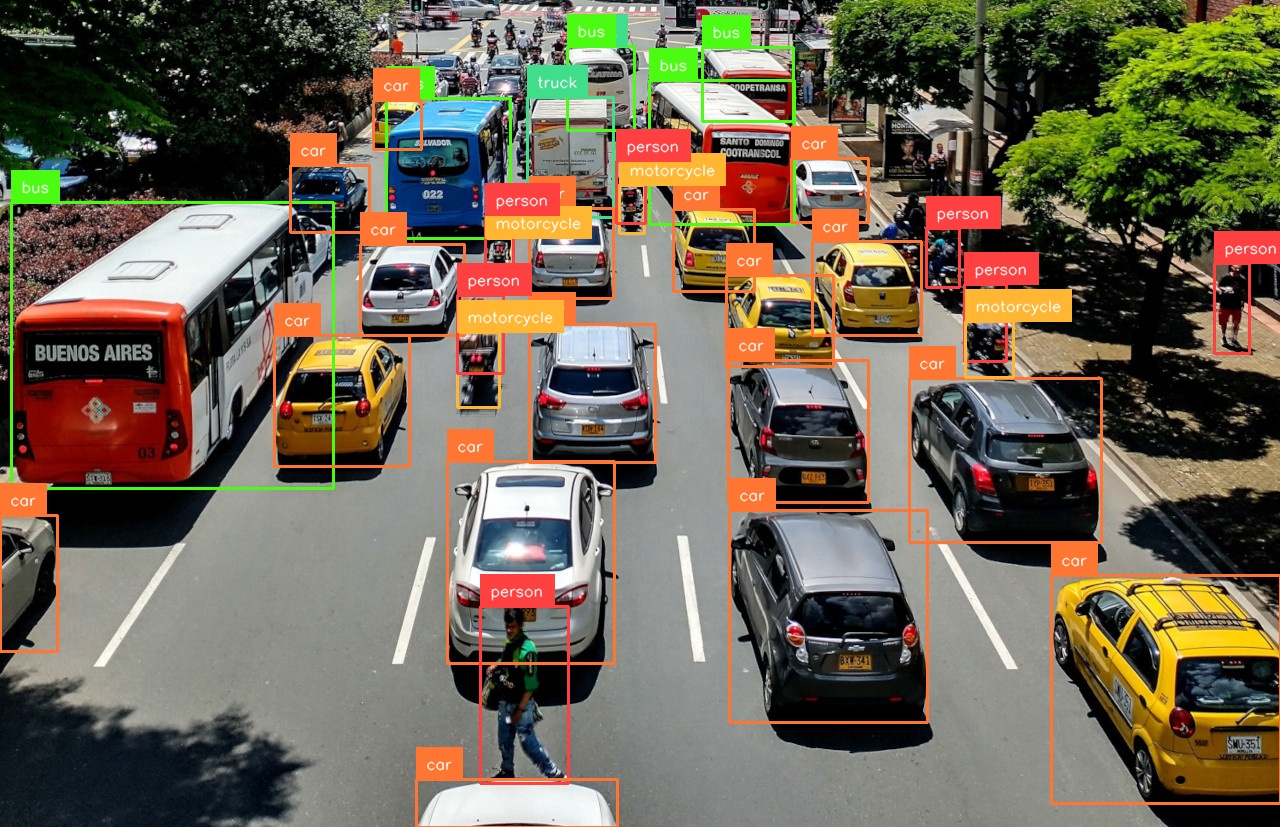
To draw boxes around common objects instead of outlining named ones, call `POST /{project}/{version}` with a model ID instead of `POST /sam3/concept_segment`. This example uses a ready-made [RF-DETR](https://docs.roboflow.com/models/supported-models/rf-detr) model, which can detect common objects like vehicles, people, and pets. RF-DETR is Apache 2.0, so it's free for commercial use:
```python
result = requests.post(
"https://serverless.roboflow.com/coco/40", # coco/40 is the rfdetr-medium alias
data=image_b64, # raw base64 in the body, not JSON
headers={
"Authorization": f"Bearer {os.environ['ROBOFLOW_API_KEY']}",
"Content-Type": "application/x-www-form-urlencoded",
},
).json()
detections = sv.Detections.from_inference(result)
print(f"Found {len(detections)} objects")
annotated = sv.BoxAnnotator().annotate(image.copy(), detections)
annotated = sv.LabelAnnotator().annotate(annotated, detections)
cv2.imwrite("rf-detr.jpg", annotated)
```
{% endtab %}
{% tab title="SDK (Python)" icon="python" %}
To draw boxes around common objects instead of outlining named ones, call `client.infer()` with a model ID instead of `client.sam3_concept_segment()`. This example uses a ready-made [RF-DETR](https://docs.roboflow.com/models/supported-models/rf-detr) model, which can detect common objects like vehicles, people, and pets. RF-DETR is Apache 2.0, so it's free for commercial use:
```python
result = client.infer(image, model_id="rfdetr-medium")
detections = sv.Detections.from_inference(result)
print(f"Found {len(detections)} objects")
annotated = sv.BoxAnnotator().annotate(image.copy(), detections)
annotated = sv.LabelAnnotator().annotate(annotated, detections)
cv2.imwrite("rf-detr.jpg", annotated)
```
{% endtab %}
{% endtabs %}
RF-DETR detects the cars, buses, people, and motorcycles
## Run your own or another model
The same `client.infer()` or `POST /{project}/{version}` call runs any model by its `model_id`:
* A model you trained in Roboflow. Copy its model ID (formatted as `{project}/{version}`) from your project in the [Roboflow app](https://app.roboflow.com)
* A public model from [Roboflow Universe](https://docs.roboflow.com/datasets/universe/universe/what-is-roboflow-universe)
* A ready-made [pretrained model](https://docs.roboflow.com/models/pretrained-aliases) by alias, such as `rfdetr-nano`, `rfdetr-seg-medium`, or `yolo26l-640` (only for inference SDK). RF-DETR is Apache 2.0; YOLO26 is AGPL-3.0, with a commercial license included when you deploy on Roboflow. See [Model Licenses](https://docs.roboflow.com/models/model-licenses)
## Where to go next
You are running a model in the cloud. From here you can:
* Run the same models on your own hardware. See [Run a Model Locally](/guides/run-a-model-locally.md)
* Get a private, single-tenant endpoint for large models and steady traffic with [Dedicated Deployments](https://docs.roboflow.com/deployment/roboflow-cloud/dedicated-deployments)
* Chain models and logic into an application with [Workflows](https://docs.roboflow.com/workflows)
* Understand what each request costs on the [Serverless pricing page](https://docs.roboflow.com/deployment/roboflow-cloud/serverless-api/pricing)