> For the complete documentation index, see [llms.txt](https://docs.roboflow.com/llms.txt). Markdown versions of documentation pages are available by appending `.md` to page URLs; this page is available as [Markdown](https://docs.roboflow.com/models/ja/supported-models/qwen3-vl.md).
# Qwen3-VL
Alibaba の Qwen3-VL 視覚言語モデルを Serverless Cloud API 経由で使用します
Qwen3-VL は Alibaba の視覚言語モデルです。画像とテキストプロンプトを受け取り、テキスト応答を返します。私たちは Qwen3-VL を当社の [Serverless Cloud API](https://docs.roboflow.com/deployment/roboflow-cloud/serverless-api), [専用デプロイ](https://docs.roboflow.com/deployment/roboflow-cloud/dedicated-deployments)、 [self-hosted Inference](https://docs.roboflow.com/deployment/self-hosted/self-hosted).
## Qwen3-VL API
{% stepper %}
{% step %}
### APIキーを取得する
Roboflow アカウントを作成し、 [Roboflow API 設定ページ](https://app.roboflow.com/settings/api) でキーを見つけ、シェルで利用できるようにします。
```bash
export ROBOFLOW_API_KEY="your-key-here"
```
{% endstep %}
{% step %}
### 依存関係をインストールする
以下をインストールします [Inference SDK](https://docs.roboflow.com/deployment/self-hosted/self-hosted):
```bash
pip install -U inference-sdk supervision
```
{% endstep %}
{% step %}
### モデルを実行する
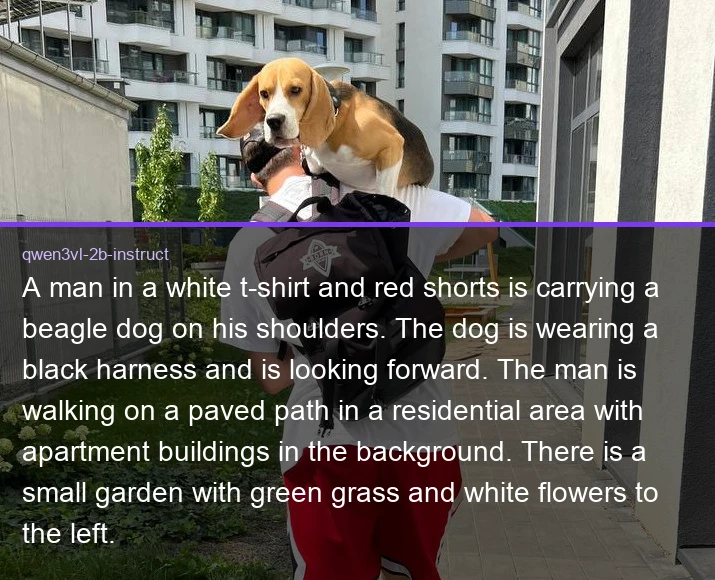
このサンプルは、 `qwen3vl-2b-instruct` チェックポイントに画像の説明を求め、応答を出力します。
```python
import os
import supervision as sv
from inference_sdk import InferenceHTTPClient, InferenceConfiguration
image = sv.load_image_from_url("https://media.roboflow.com/quickstart/dog.jpeg")
client = InferenceHTTPClient(
api_url="https://serverless.roboflow.com",
api_key=os.environ["ROBOFLOW_API_KEY"],
).configure(InferenceConfiguration(api_key_transport="header"))
result = client.infer_lmm(
image,
model_id="qwen3vl-2b-instruct",
prompt="この画像を簡単に説明してください。",
max_new_tokens=128,
)
print(result["response"] )
```
{% endstep %}
{% endstepper %}
上記のコードは、モデルの応答をターミナルに出力します:
```
白いTシャツと赤いショーツを着た男性が、肩にビーグル犬を乗せて運んでいます。犬は黒いハーネスを着けており、前方を見ています。男性は住宅街の舗装された道を歩いており、背景には集合住宅の建物があります。左側には緑の芝生と白い花のある小さな庭があります。
```
 ## Qwen3-VL の推論速度
次で測定したレイテンシー [Roboflow Inference](https://docs.roboflow.com/deployment/self-hosted/self-hosted) 1 台の NVIDIA L4、バッチサイズ 1、固定プロンプトから greedy decoding でちょうど 128 トークンを生成した条件で測定。レイテンシは出力長に比例するため、他の長さの見積もりには tokens/sec を使用してください。
## Qwen3-VL の推論速度
次で測定したレイテンシー [Roboflow Inference](https://docs.roboflow.com/deployment/self-hosted/self-hosted) 1 台の NVIDIA L4、バッチサイズ 1、固定プロンプトから greedy decoding でちょうど 128 トークンを生成した条件で測定。レイテンシは出力長に比例するため、他の長さの見積もりには tokens/sec を使用してください。
| 別名 | レイテンシ、128トークン(ms) | トークン/秒 |
|---|
qwen3vl-2b-instruct | 4057 | 32 |
qwen25-vl-7b | 5603 | 23 |
`qwen25-vl-7b` は以前の Qwen2.5-VL チェックポイントです。これはこの別名の名前空間を共有し、同じブロックを通じて実行されるため、ここに記載されています。
{% hint style="info" %}
設定する `api_url` をデプロイ先に合わせます:
* `https://serverless.roboflow.com` サーバーレスクラウドAPI用。
* `http://localhost:9001` ローカルの [Inference](https://docs.roboflow.com/deployment/self-hosted/self-hosted) サーバー用。
* あなたの [Dedicated Deployment](https://docs.roboflow.com/deployment/roboflow-cloud/dedicated-deployments) プライベートエンドポイント用のURL。
{% endhint %}
Roboflow で独自の Qwen3-VL チェックポイントを学習し、モデルごとの `{workspace}/{model-slug}` IDに置き換えてください( [バージョン、トレーニング、モデル](/models/ja/versions-trainings-and-models.md)).