> For the complete documentation index, see [llms.txt](https://docs.roboflow.com/llms.txt). Markdown versions of documentation pages are available by appending `.md` to page URLs; this page is available as [Markdown](https://docs.roboflow.com/models/supported-models/roboflow-3.md).
# Roboflow 3.0
Use the Roboflow 3.0 model family as a self-hosted model or through our Serverless Cloud API.
## Roboflow 3.0 Object Detection
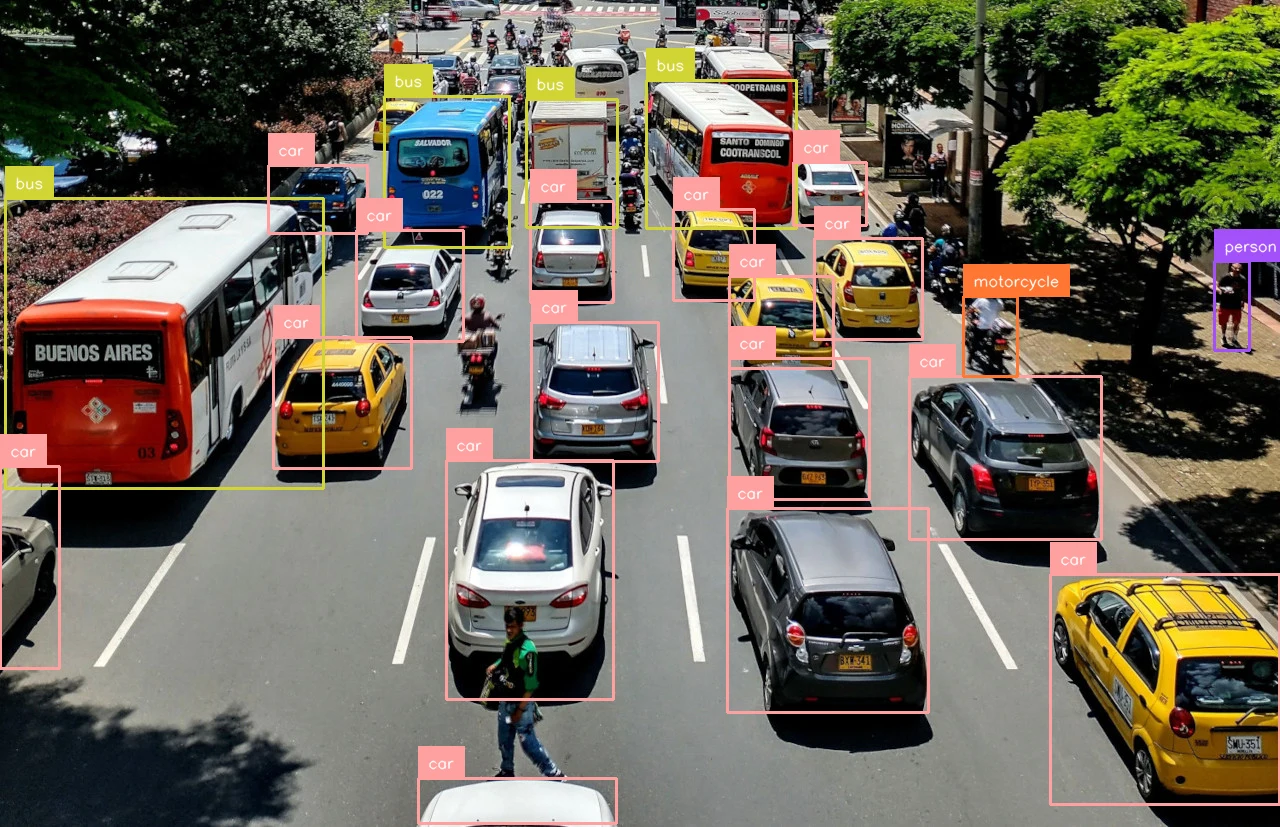
Roboflow 3.0 is Roboflow's in-house model architecture. You train Roboflow 3.0 models on the Roboflow platform and deploy them through the [Serverless Cloud API](https://docs.roboflow.com/deployment/roboflow-cloud/serverless-api). The sample below runs Roboflow's public [COCO model](https://universe.roboflow.com/microsoft/coco) (`coco/3`) so you can try it immediately. For self-hosted deployment, see [Roboflow Inference](https://docs.roboflow.com/deployment/self-hosted/self-hosted).
### Roboflow 3.0 Object Detection API
{% stepper %}
{% step %}
**Get your API Key**
Create a Roboflow account, find your key on the [Roboflow API settings page](https://app.roboflow.com/settings/api) and make it available to your shell:
```bash
export ROBOFLOW_API_KEY="your-key-here"
```
{% endstep %}
{% step %}
**Install the dependencies**
Install the [Inference SDK](https://docs.roboflow.com/deployment/self-hosted/self-hosted) and [supervision](https://supervision.roboflow.com/):
```bash
pip install -U inference-sdk supervision
```
{% endstep %}
{% step %}
**Run the model**
Run detection on a sample image and annotate boxes and labels:
```python
import os
import cv2
import supervision as sv
from inference_sdk import InferenceHTTPClient, InferenceConfiguration
image = sv.load_image_from_url("https://media.roboflow.com/quickstart/traffic.jpg")
client = InferenceHTTPClient(
api_url="https://serverless.roboflow.com",
api_key=os.environ["ROBOFLOW_API_KEY"],
).configure(InferenceConfiguration(api_key_transport="header"))
result = client.infer(image, model_id="coco/3")
detections = sv.Detections.from_inference(result)
annotated = sv.BoxAnnotator().annotate(image.copy(), detections)
annotated = sv.LabelAnnotator().annotate(annotated, detections)
cv2.imwrite("output.png", annotated)
```
{% endstep %}
{% endstepper %}
{% hint style="info" %}
Set `api_url` to match your deployment target:
* `https://serverless.roboflow.com` for the Serverless Cloud API.
* `http://localhost:9001` for a local [Inference](https://docs.roboflow.com/deployment/self-hosted/self-hosted) server.
* Your [Dedicated Deployment](https://docs.roboflow.com/deployment/roboflow-cloud/dedicated-deployments) URL for a private endpoint.
{% endhint %}
## Roboflow 3.0 Instance Segmentation
Train a Roboflow 3.0 instance segmentation model, then replace `your-project/1` with your own `{workspace}/{model-slug}` ID (see [Versions, Trainings, and Models](/models/versions-trainings-and-models.md)). Set your API key and install the dependencies as shown above.
### Roboflow 3.0 Instance Segmentation API
```python
import os
import cv2
import supervision as sv
from inference_sdk import InferenceHTTPClient
image = sv.load_image_from_url("https://media.roboflow.com/quickstart/traffic.jpg")
client = InferenceHTTPClient(
api_url="https://serverless.roboflow.com",
api_key=os.environ["ROBOFLOW_API_KEY"],
)
# No pretrained aliases: train your own model and replace "your-project/1" with your model ID.
result = client.infer(image, model_id="your-project/1")
detections = sv.Detections.from_inference(result)
annotated = sv.MaskAnnotator().annotate(image.copy(), detections)
annotated = sv.LabelAnnotator().annotate(annotated, detections)
cv2.imwrite("output.png", annotated)
```
## Roboflow 3.0 Keypoint Detection
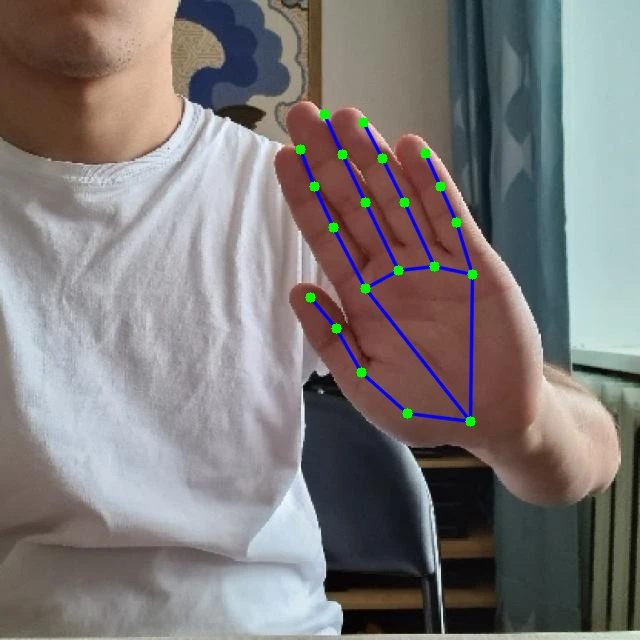
This example runs the public [rf-handpose](https://universe.roboflow.com/erik-pe6au/rf-handpose) hand keypoint model, then draws the 21-point hand skeleton. Swap in your own `{workspace}/{model-slug}`. Set your API key and install the dependencies as shown above.
### Roboflow 3.0 Keypoint Detection API
```python
import os
import cv2
import supervision as sv
from inference_sdk import InferenceHTTPClient
image = sv.load_image_from_url("https://media.roboflow.com/docs/hand.jpg")
client = InferenceHTTPClient(
api_url="https://serverless.roboflow.com",
api_key=os.environ["ROBOFLOW_API_KEY"],
)
result = client.infer(image, model_id="rf-handpose/1")
key_points = sv.KeyPoints.from_inference(result)
# Hand skeleton: wrist (0), thumb (1-4), index (5-8), middle (9-12), ring (13-16), pinky (17-20)
hand_edges = [
(0, 1), (1, 2), (2, 3), (3, 4),
(0, 5), (5, 6), (6, 7), (7, 8),
(5, 9), (9, 10), (10, 11), (11, 12),
(9, 13), (13, 14), (14, 15), (15, 16),
(13, 17), (17, 18), (18, 19), (19, 20), (0, 17),
]
annotated = image.copy()
vertices = key_points.xy[0].astype(int)
for start, end in hand_edges:
cv2.line(annotated, tuple(vertices[start]), tuple(vertices[end]), (255, 0, 0), 2)
annotated = sv.VertexAnnotator(color=sv.Color.GREEN, radius=5).annotate(annotated, key_points)
cv2.imwrite("output.png", annotated)
```
## Roboflow 3.0 Classification
Classification responses contain a list of class predictions with confidences, so visualization is not applicable. Read the top class directly from the response. Replace `your-project/1` with your trained model ID, and set your API key and install the dependencies as shown above.
### Roboflow 3.0 Classification API
```python
import os
import supervision as sv
from inference_sdk import InferenceHTTPClient
image = sv.load_image_from_url("https://media.roboflow.com/quickstart/traffic.jpg")
client = InferenceHTTPClient(
api_url="https://serverless.roboflow.com",
api_key=os.environ["ROBOFLOW_API_KEY"],
)
# No pretrained aliases: train your own model and replace "your-project/1" with your model ID.
result = client.infer(image, model_id="your-project/1")
print(f"Top class: {result['top']} ({result['confidence']:.4f})")
```