> For the complete documentation index, see [llms.txt](https://docs.roboflow.com/llms.txt). Markdown versions of documentation pages are available by appending `.md` to page URLs; this page is available as [Markdown](https://docs.roboflow.com/models/supported-models/yolo-world.md).
# YOLO-World
Use YOLO-World open-vocabulary object detection through our Serverless Cloud API
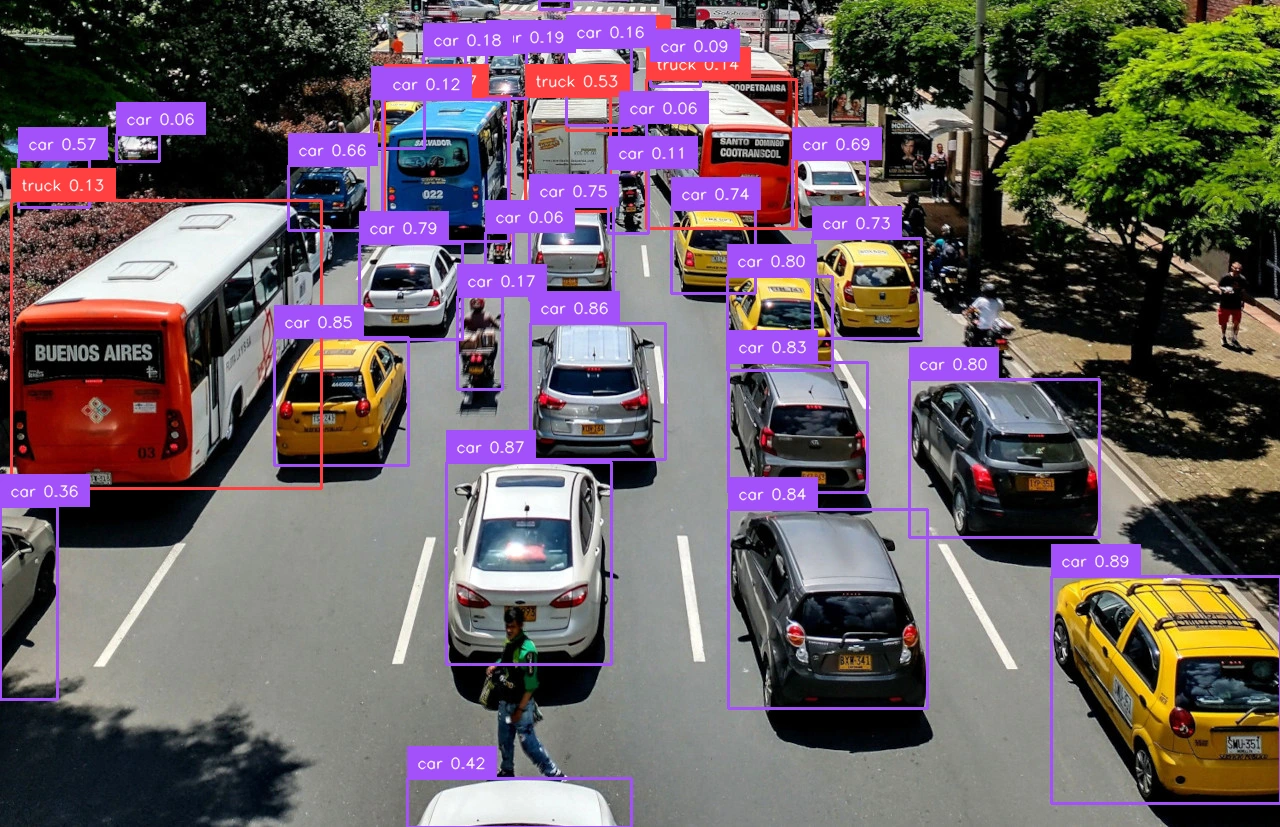
YOLO-World is an open-vocabulary object detection model that detects objects from arbitrary text class names without training. We support YOLO-World inferencing via our [Serverless Cloud API](https://docs.roboflow.com/deployment/roboflow-cloud/serverless-api).
For more details on running YOLO-World, see the [Inference docs](https://docs.roboflow.com/deployment/self-hosted/self-hosted).
## YOLO-World API
Run YOLO-World through the HTTP endpoint directly with `curl`, or with the [`inference-sdk`](https://docs.roboflow.com/reference/inference/inference-sdk) wrapper.
{% tabs %}
{% tab title="HTTP (curl)" icon="webhook" %}
{% stepper %}
{% step %}
### Get your API Key
Create a Roboflow account, find your key on the [Roboflow API settings page](https://app.roboflow.com/settings/api) and make it available to your shell:
```bash
export ROBOFLOW_API_KEY="your-key-here"
```
{% endstep %}
{% step %}
### Run the model
Call the `/yolo_world/infer` endpoint with `curl`:
```bash
curl --location 'https://serverless.roboflow.com/yolo_world/infer' \
--header 'Content-Type: application/json' \
--header "Authorization: Bearer $ROBOFLOW_API_KEY" \
--data '{
"image": {"type": "url", "value": "https://media.roboflow.com/quickstart/traffic.jpg"},
"text": ["car", "truck"],
"yolo_world_version_id": "v2-s",
"confidence": 0.05
}'
```
{% endstep %}
{% endstepper %}
{% endtab %}
{% tab title="SDK (Python)" icon="python" %}
{% stepper %}
{% step %}
### Get your API Key
Create a Roboflow account, find your key on the [Roboflow API settings page](https://app.roboflow.com/settings/api) and make it available to your shell:
```bash
export ROBOFLOW_API_KEY="your-key-here"
```
{% endstep %}
{% step %}
### Install the dependencies
Install the SDK and [supervision](https://supervision.roboflow.com/):
```bash
pip install -U inference-sdk supervision
```
{% endstep %}
{% step %}
### Run the model
Run YOLO-World with custom class names, then decode and visualize the predictions with supervision.
```python
import os
import cv2
import supervision as sv
from inference_sdk import InferenceHTTPClient, InferenceConfiguration
image = sv.load_image_from_url("https://media.roboflow.com/quickstart/traffic.jpg")
client = InferenceHTTPClient(
api_url="https://serverless.roboflow.com",
api_key=os.environ["ROBOFLOW_API_KEY"],
).configure(InferenceConfiguration(api_key_transport="header"))
results = client.infer_from_yolo_world(
inference_input=image,
class_names=["car", "truck"],
model_version="v2-s",
confidence=0.05,
)
detections = sv.Detections.from_inference(results[0])
labels = [
f"{name} {conf:.2f}"
for name, conf in zip(detections.data["class_name"], detections.confidence)
]
annotated = sv.BoxAnnotator().annotate(image.copy(), detections)
annotated = sv.LabelAnnotator().annotate(annotated, detections, labels=labels)
cv2.imwrite("annotated.png", annotated)
```
{% endstep %}
{% endstepper %}
{% endtab %}
{% endtabs %}
The `class_names` argument accepts any list of class names. Available `model_version` values: `v2-s`, `v2-m`, `v2-l`, `v2-x`, `s`, `m`, `l`, `x`.
## YOLO-World inference speed
Latency measured with [Roboflow Inference](https://docs.roboflow.com/deployment/self-hosted/self-hosted) on 1x NVIDIA L4, batch size 1, mean after warmup.
Model
Latency (ms)
yolo-world
12.4
Measured on the `v2-s` variant with two classes. Setting the class list runs a text encoder once, and is excluded from this figure since it is not repeated per frame.
{% hint style="info" %}
Set `api_url` to match your deployment target:
* `https://serverless.roboflow.com` for the Serverless Cloud API.
* `http://localhost:9001` for a local [Inference](https://docs.roboflow.com/deployment/self-hosted/self-hosted) server.
* Your [Dedicated Deployment](https://docs.roboflow.com/deployment/roboflow-cloud/dedicated-deployments) URL for a private endpoint.
{% endhint %}
## Run YOLO-World with self-hosted Inference
YOLO-World also runs on your own hardware, either loaded in-process with the [`inference`](https://docs.roboflow.com/deployment/self-hosted/self-hosted) package or served by a local Inference server. On capable hardware (for example a V100 GPU) it runs in real time, which makes it a practical choice for video.
{% tabs %}
{% tab title="Inference (native)" icon="server" %}
```bash
pip install "inference[yolo-world]" supervision
```
```python
import cv2
import supervision as sv
from inference.models.yolo_world.yolo_world import YOLOWorld
image = cv2.imread("image.jpeg")
model = YOLOWorld(model_id="yolo_world/l")
classes = ["person", "backpack", "dog"]
results = model.infer("image.jpeg", text=classes, confidence=0.03)[0]
detections = sv.Detections.from_inference(results)
labels = [classes[class_id] for class_id in detections.class_id]
annotated = sv.BoxAnnotator().annotate(scene=image, detections=detections)
annotated = sv.LabelAnnotator().annotate(
scene=annotated, detections=detections, labels=labels
)
sv.plot_image(annotated)
```
{% endtab %}
{% tab title="Local Inference server" icon="docker" %}
```bash
pip install inference inference-sdk
inference server start # serves http://localhost:9001
```
```python
import os
from inference_sdk import InferenceHTTPClient
client = InferenceHTTPClient(
api_url="http://127.0.0.1:9001",
api_key=os.environ["ROBOFLOW_API_KEY"],
)
results = client.infer_from_yolo_world(
inference_input=["https://media.roboflow.com/dog.jpeg"],
class_names=["person", "backpack", "dog"],
model_version="l",
confidence=0.1,
)[0]
```
{% endtab %}
{% tab title="Video" icon="video" %}
Add the YOLO-World block to a Workflow and set the classes you want to detect. Then stream a webcam, camera feed, or video file through that Workflow with the [Inference SDK WebRTC client](https://docs.roboflow.com/workflows/deploy/video-processing).
{% endtab %}
{% endtabs %}
In the native package, YOLO-World checkpoints are identified as `yolo_world/`, where `` is one of `s`, `m`, `l`, `x`, `v2-s`, `v2-m`, `v2-l`, `v2-x`. The `v2-` checkpoints are newer and score better on evaluation metrics.
{% hint style="info" %}
Like most zero-shot detectors, YOLO-World is strongest on common objects (cars, people, dogs) and weaker on narrow, fine-grained categories. Experiment with prompt wording to find what works for your scene.
{% endhint %}
## License
YOLO-World is released under GPL-3.0 (the Ultralytics port is AGPL-3.0). What that means for commercial use:
* **On Roboflow cloud:** a commercial license is included for every user, including the free plan.
* **Self-hosted:** you need the Enterprise license add-on, or you must open-source your application under the same license.
See [Roboflow's Ultralytics licensing](https://roboflow.com/ultralytics) for details.