> For the complete documentation index, see [llms.txt](https://docs.roboflow.com/llms.txt). Markdown versions of documentation pages are available by appending `.md` to page URLs; this page is available as [Markdown](https://docs.roboflow.com/models/supported-models/yolo26.md).
# YOLO26
## YOLO26 Object Detection
YOLO26 object detection runs through the [Serverless Cloud API](https://docs.roboflow.com/deployment/roboflow-cloud/serverless-api), pretrained on COCO. For self-hosted deployment, see [Roboflow Inference](https://docs.roboflow.com/deployment/self-hosted/self-hosted).
### YOLO26 Object Detection API
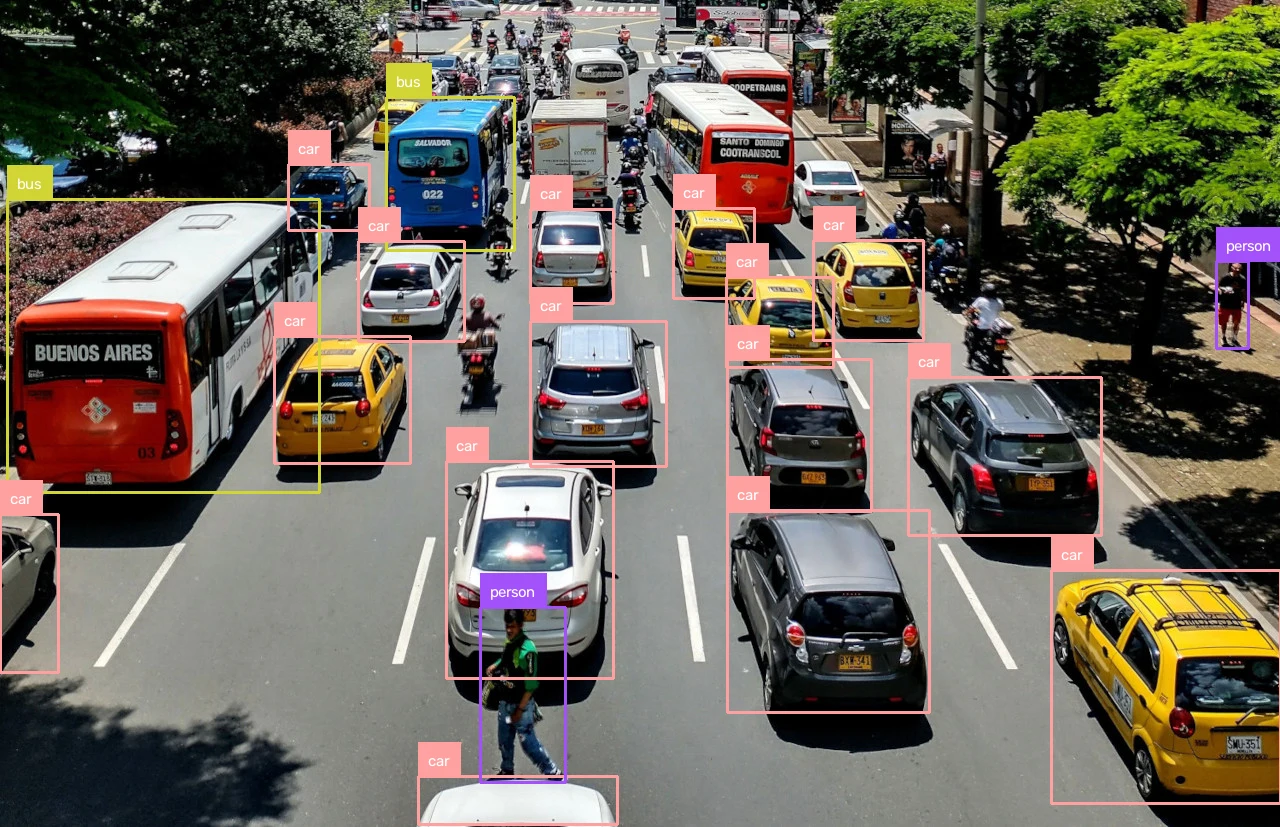
This sample downloads a test image, runs inference through `inference-sdk`, decodes the response with `supervision`, and writes an annotated PNG to disk.
{% stepper %}
{% step %}
**Get your API Key**
Create a Roboflow account, find your key on the [Roboflow API settings page](https://app.roboflow.com/settings/api) and make it available to your shell:
```bash
export ROBOFLOW_API_KEY="your-key-here"
```
{% endstep %}
{% step %}
**Install the dependencies**
Install the SDK and the [supervision](https://supervision.roboflow.com/) library for annotation:
```bash
pip install -U inference-sdk supervision opencv-python
```
{% endstep %}
{% step %}
**Run the model**
Run `yolo26n-640` on a sample image and annotate boxes and labels:
```python
import os
import cv2
import supervision as sv
from inference_sdk import InferenceHTTPClient, InferenceConfiguration
image_url = "https://media.roboflow.com/quickstart/traffic.jpg"
image = sv.load_image_from_url(image_url)
client = InferenceHTTPClient(
api_url="https://serverless.roboflow.com",
api_key=os.environ["ROBOFLOW_API_KEY"],
).configure(InferenceConfiguration(api_key_transport="header"))
result = client.infer(image, model_id="yolo26n-640")
detections = sv.Detections.from_inference(result)
annotated = sv.BoxAnnotator().annotate(image.copy(), detections)
annotated = sv.LabelAnnotator().annotate(annotated, detections)
cv2.imwrite("traffic-annotated.png", annotated)
```
{% endstep %}
{% endstepper %}
{% hint style="info" %}
Set `api_url` to match your deployment target:
* `https://serverless.roboflow.com` for the Serverless Cloud API.
* `http://localhost:9001` for a local [Inference](https://docs.roboflow.com/deployment/self-hosted/self-hosted) server.
* Your [Dedicated Deployment](https://docs.roboflow.com/deployment/roboflow-cloud/dedicated-deployments) URL for a private endpoint.
{% endhint %}
### YOLO26 Object Detection models and benchmarks
Pass any of these aliases as the `model_id`. The `inference-sdk` resolves each alias to its pretrained Roboflow Universe model client-side; the `yolov26*` prefix variants resolve to the same models.
Alias
Input Size
mAP50-95
ONNX latency (ms)*
TensorRT FP16 (ms)*
yolo26n-640
640x640
40.9
3.5
2.2
yolo26s-640
640x640
48.6
4.7
3.0
yolo26m-640
640x640
53.1
8.4
4.4
yolo26l-640
640x640
55.0
10.7
5.6
yolo26x-640
640x640
57.5
18.4
8.0
## YOLO26 Instance Segmentation
YOLO26 instance segmentation runs through the [Serverless Cloud API](https://docs.roboflow.com/deployment/roboflow-cloud/serverless-api), pretrained on COCO. For self-hosted deployment, see [Roboflow Inference](https://docs.roboflow.com/deployment/self-hosted/self-hosted).
### YOLO26 Instance Segmentation API
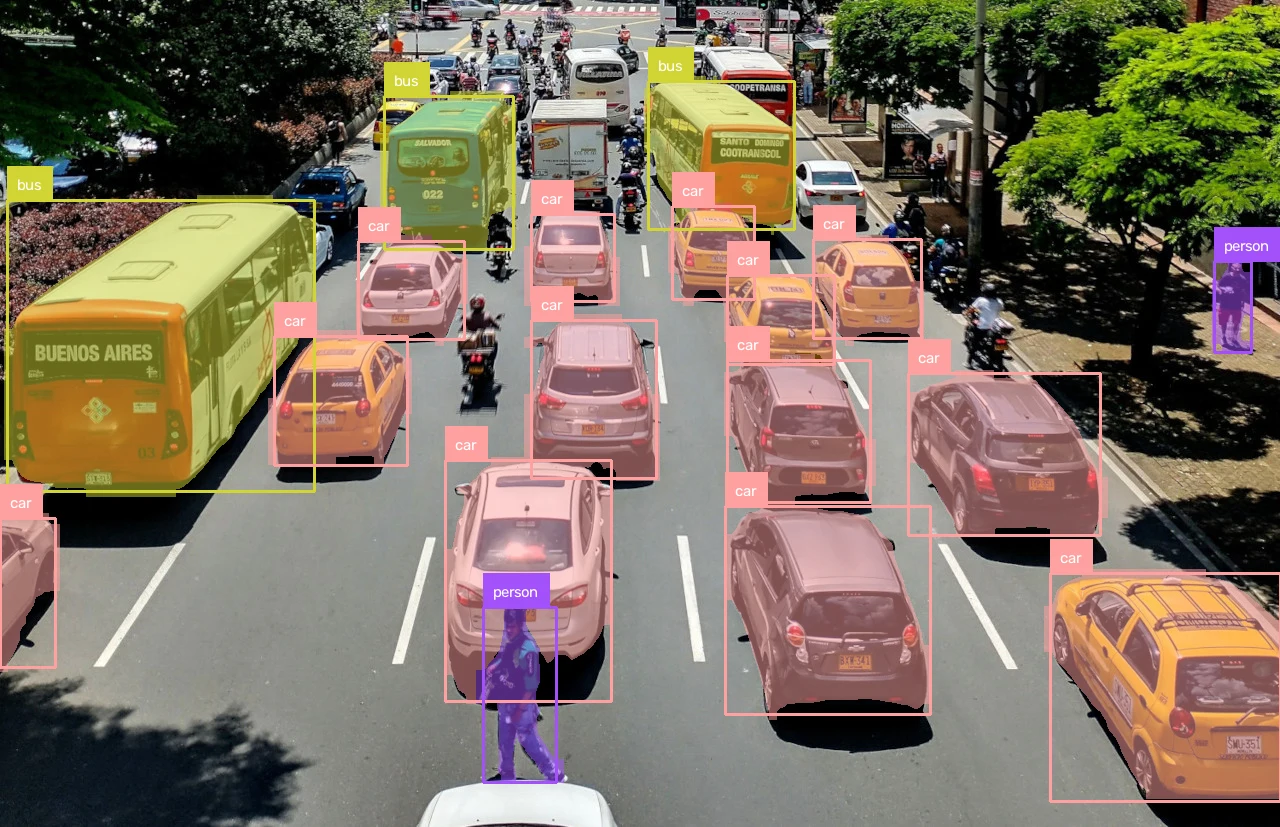
Set your API key and install the dependencies as shown above, then run `yolo26n-seg-640` and annotate masks and labels:
```python
import os
import cv2
import supervision as sv
from inference_sdk import InferenceHTTPClient
image_url = "https://media.roboflow.com/quickstart/traffic.jpg"
image = sv.load_image_from_url(image_url)
client = InferenceHTTPClient(
api_url="https://serverless.roboflow.com",
api_key=os.environ["ROBOFLOW_API_KEY"],
)
result = client.infer(image, model_id="yolo26n-seg-640")
detections = sv.Detections.from_inference(result)
annotated = sv.MaskAnnotator().annotate(image.copy(), detections)
annotated = sv.BoxAnnotator().annotate(annotated, detections)
annotated = sv.LabelAnnotator().annotate(annotated, detections)
cv2.imwrite("traffic-annotated.png", annotated)
```
### YOLO26 Instance Segmentation models and benchmarks
Pass any of these aliases as the `model_id`; the `yolov26*` prefix variants resolve to the same models. Box and mask mAP are end-to-end (NMS-free) COCO `val` values.
Alias
Input Size
Box mAP50-95
Mask mAP50-95
ONNX latency (ms)*
TensorRT FP16 (ms)*
yolo26n-seg-640
640x640
39.6
33.9
8.3
6.8
yolo26s-seg-640
640x640
47.3
40.0
10.8
8.5
yolo26m-seg-640
640x640
52.5
44.1
16.4
11.9
yolo26l-seg-640
640x640
54.4
45.5
18.4
12.8
yolo26x-seg-640
640x640
56.5
47.0
28.9
15.7
## YOLO26 Keypoint Detection
YOLO26 keypoint/pose detection runs through the [Serverless Cloud API](https://docs.roboflow.com/deployment/roboflow-cloud/serverless-api), pretrained on COCO. For self-hosted deployment, see [Roboflow Inference](https://docs.roboflow.com/deployment/self-hosted/self-hosted).
### YOLO26 Keypoint Detection API
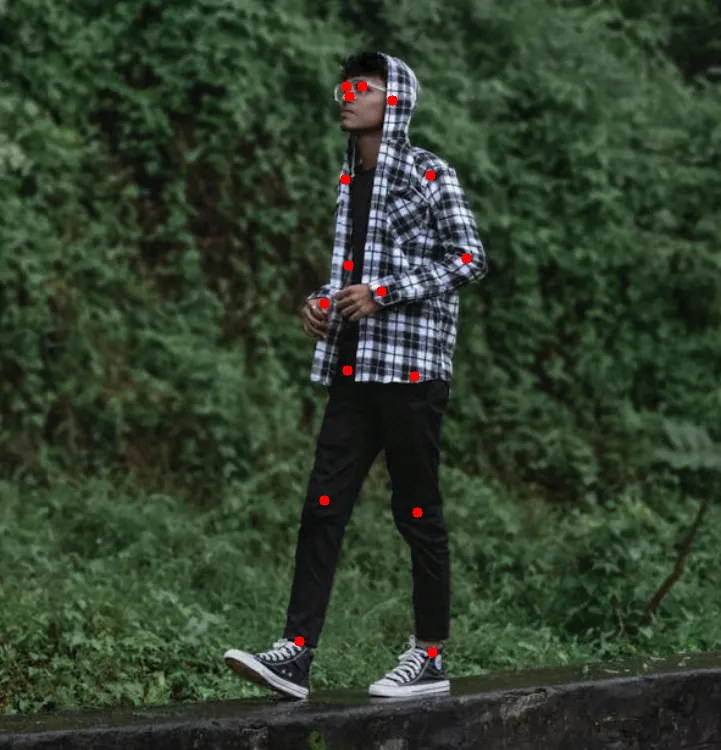
Set your API key and install the dependencies as shown above, then run `yolo26n-pose-640` and annotate keypoints:
```python
import os
import cv2
import supervision as sv
from inference_sdk import InferenceHTTPClient
image_url = "https://media.roboflow.com/notebooks/examples/person-walking.png"
image = sv.load_image_from_url(image_url)
client = InferenceHTTPClient(
api_url="https://serverless.roboflow.com",
api_key=os.environ["ROBOFLOW_API_KEY"],
)
result = client.infer(image, model_id="yolo26n-pose-640")
key_points = sv.KeyPoints.from_inference(result)
annotated = sv.VertexAnnotator(color=sv.Color.RED, radius=5).annotate(image.copy(), key_points)
cv2.imwrite("person-walking-annotated.png", annotated)
```
### YOLO26 Keypoint Detection models and benchmarks
Pass any of these aliases as the `model_id`; the `yolov26*` prefix variants resolve to the same models. mAP is the end-to-end (NMS-free) COCO `val` value.
Alias
Input Size
mAP50-95
ONNX latency (ms)*
TensorRT FP16 (ms)*
yolo26n-pose-640
640x640
57.2
3.8
2.3
yolo26s-pose-640
640x640
63.0
5.1
3.3
yolo26m-pose-640
640x640
68.8
9.0
4.6
yolo26l-pose-640
640x640
70.4
11.2
5.8
yolo26x-pose-640
640x640
71.6
19.1
8.3
## YOLO26 Semantic Segmentation
YOLO26 semantic segmentation (`yolo26-sem`) is the recommended architecture for semantic segmentation on Roboflow. It uses Cityscapes pretrained weights and trains at a default resolution of 1024x1024. Available in five sizes: n, s, m, l, x.
To train a YOLO26-SEM model, create a semantic segmentation Project and select YOLO26 as your architecture. You can also [upload custom-trained weights](/models/model-weights/upload-custom-weights.md) for YOLO26-SEM models.
The Cityscapes pretrained models (19 classes) are also available as public models you can run in a [Workflow](https://docs.roboflow.com/workflows) without training.
### YOLO26 Semantic Segmentation models and benchmarks
Pass any of these Cityscapes-pretrained aliases as the `model_id`; the `yolov26*` prefix variants resolve to the same models. They run on the ONNX backend only; no prebuilt TensorRT engine is published.
Alias
Input Size
ONNX latency (ms)*
yolo26n-sem-1024
1024x1024
23.3
yolo26s-sem-1024
1024x1024
25.9
yolo26m-sem-1024
1024x1024
34.6
yolo26l-sem-1024
1024x1024
35.8
yolo26x-sem-1024
1024x1024
53.2
***
\* Latency is measured with [Roboflow Inference](https://docs.roboflow.com/deployment/self-hosted/self-hosted) on 1x NVIDIA L4, batch size 1, mean of 1,000 inferences (100 warmup). The default `inference-gpu` install runs ONNX on the CUDA execution provider; adding the `inference-models[trt10]` extra selects a prebuilt TensorRT FP16 engine automatically. FP16 matches FP32 accuracy within 0.1 mAP on COCO `val2017`. Accuracy is the published COCO `val` spec ([source](https://docs.ultralytics.com/models/yolo26/)).
## License
YOLO26 is released under AGPL-3.0. What that means for commercial use:
* **On Roboflow cloud:** a commercial license is included for every user, including the free plan.
* **Self-hosted:** you need the Enterprise license add-on, or you must open-source your application under AGPL-3.0.
* **Permissive alternative:** [RF-DETR](/models/supported-models/rf-detr.md) is Apache 2.0, free for commercial use anywhere.
See [Roboflow's Ultralytics licensing](https://roboflow.com/ultralytics) for details.