> For the complete documentation index, see [llms.txt](https://docs.roboflow.com/llms.txt). Markdown versions of documentation pages are available by appending `.md` to page URLs; this page is available as [Markdown](https://docs.roboflow.com/platform/billing-and-plans/credits/purchase-prepaid-credits.md).
# Purchase Prepaid Credits
How to buy prepaid credit packs at volume discounts and verify them on your Plan & Billing page.
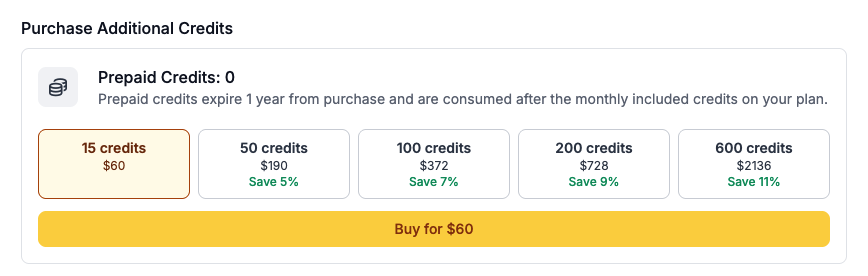
Prepaid credits are one-time purchases, separate from Core's recurring monthly credit packs. Larger prepaid packs include a volume discount, so the more credits you buy in a single pack, the lower the effective price per credit.
To purchase prepaid credits, go to your workspace's [Plan & Billing page](https://app.roboflow.com/settings/plan) and navigate to the section for Prepaid Credits. You can also access the purchase flow directly at `app.roboflow.com/get-more-credits`.
## Choose a Credit Pack
Select one of the available packs. Each pack displays the number of credits in the pack, the total price, and the volume discount (if any) versus the base per-credit rate.
If you're purchasing through a usage recommendation, the platform will pre-select the smallest pack that covers your recent overage.
For the exact prices and discount percentages available to your workspace, see the pack cards on your Plan & Billing page.
## Complete Checkout
Click the pack you want to purchase, then continue through the checkout page and provide your payment details.
After your payment has been approved, you'll see a confirmation screen.
## Verify Your Prepaid Credits
Back on the Plan & Billing page you can verify that the credits were added to your account by looking at the prepaid credit quantity. The full number of credits from the pack you purchased will be added to your prepaid balance.
.png?alt=media)
.png?alt=media)