> For the complete documentation index, see [llms.txt](https://docs.roboflow.com/llms.txt). Markdown versions of documentation pages are available by appending `.md` to page URLs; this page is available as [Markdown](https://docs.roboflow.com/roboflow/roboflow-hi/deploy/batch-processing/troubleshooting.md).
# Troubleshooting
यह पृष्ठ Batch Processing के लिए ज्ञात समस्याएँ, सीमाएँ, और workarounds सूचीबद्ध करता है। यदि आपको यहाँ सूचीबद्ध नहीं की गई कोई समस्या मिले, तो कृपया इसे हमारे माध्यम से रिपोर्ट करें [सपोर्ट चैनलों](https://github.com/roboflow/inference/issues).
## ज्ञात सीमाएँ
* ऐसे कुछ Workflow blocks जो environment variables और local storage तक पहुँच की आवश्यकता रखते हैं (जैसे File Sink और Environment Secret Store) ब्लॉक कर दिए जाते हैं और निष्पादित नहीं होंगे।
* यह सेवा केवल उन Workflows के साथ काम करती है जो एक **एकल** input image parameter परिभाषित करते हैं।
## तकनीकी विवरण
* Data Staging में डेटा को एक के साथ संग्रहीत किया जाता है **7-दिन की समाप्ति अवधि**.
* प्रत्येक batch processing job में कई stages होते हैं (आमतौर पर `प्रोसेसिंग` और `एक्सपोर्ट`)। प्रत्येक stage एक output batch बनाता है। हम उपयोग करने की अनुशंसा करते हैं `एक्सपोर्ट` stage outputs का, क्योंकि तेज़ transfer के लिए उन्हें संपीड़ित किया जाता है।
* में चल रहा job `प्रोसेसिंग` stage को UI और CLI दोनों का उपयोग करके abort किया जा सकता है।
* एक aborted या failed job को पुनः शुरू किया जा सकता है।
* सेवा स्वचालित रूप से data को shards में विभाजित करती है और उन्हें parallel में process करती है:
* data volume के आधार पर machines की संख्या स्वचालित रूप से scale होती है (कुछ workloads के लिए throughput 500k–1M images/hour तक पहुँच सकता है)।
* प्रत्येक machine data chunks को process करने वाले कई workers चलाती है। यह configurable है और speed तथा cost को संतुलित करने के लिए tune किया जाना चाहिए।
* image jobs के लिए, यदि एक ही shard में बहुत सारी images fail हो जाती हैं, तो वह shard abort कर दिया जाता है जबकि job का बाकी हिस्सा चलता रहता है। आप यह threshold प्रति job configure कर सकते हैं (देखें [Per-Shard Image Failure Tolerance](#per-shard-image-failure-tolerance) नीचे)।
## Job का समय समाप्त हो गया
### समस्या
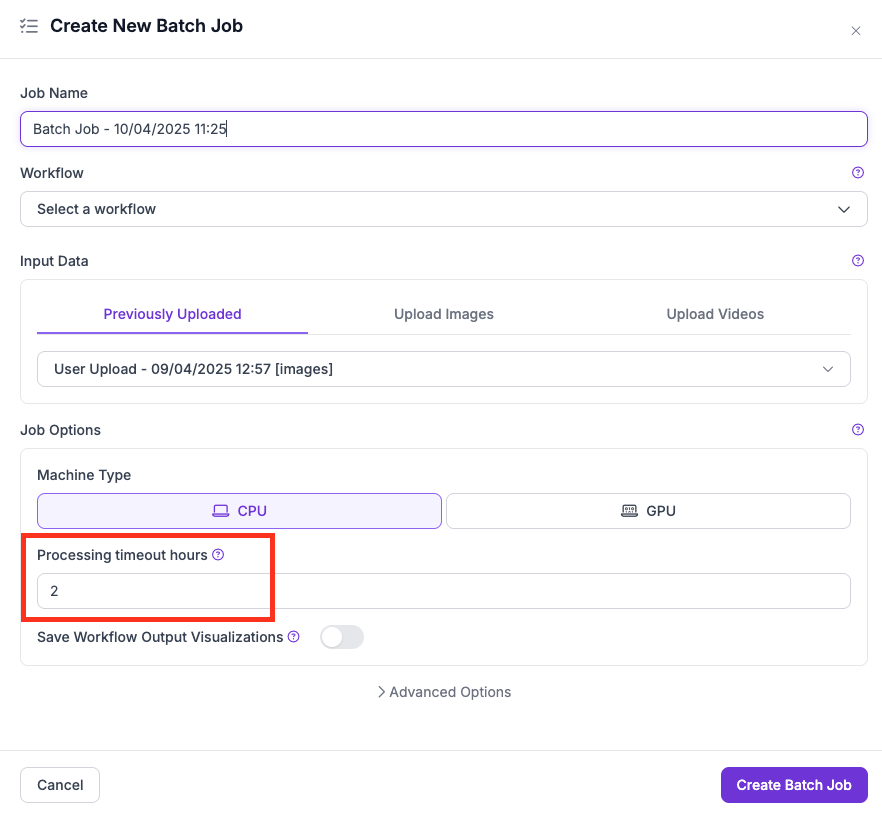
Batch jobs समय से पहले समाप्त हो जाते हैं यदि **Processing Timeout Hours** job के आकार या जटिलता की तुलना में बहुत कम सेट किया गया हो।
UI में Processing Timeout सेटिंग
### विवरण
timeout सेटिंग (UI) या `--max-runtime-seconds` (CLI) परिभाषित करता है **सभी parallel workers के बीच अधिकतम संचयी machine runtime**.
* **कुल compute time:** यदि सीमा 2 घंटे है और job 2 machines शुरू करता है, तो प्रत्येक अधिकतम 1 घंटे तक चल सकता है (2 machines x 1 hour = 2 hours total)।
* **chunk के अनुसार विभाजित:** Parallelism सक्षम करने के लिए jobs को processing chunks में विभाजित किया जाता है। Timeout chunks में बाँटा जाता है — बहुत सारे chunks के साथ छोटा timeout प्रति chunk बहुत कम समय छोड़ सकता है।
* **Machine type मायने रखता है:** CPU पर जटिल Workflows चलाने से processing time काफी बढ़ जाता है। जहाँ उपयुक्त हो, GPU का उपयोग करें।
### अनुशंसाएँ
* बड़े datasets या multi-stage Workflows के लिए उदार timeout (जैसे, 4–6 घंटे) से शुरुआत करें।
* भविष्य की timeout settings को दिशा देने के लिए वास्तविक job runtimes की निगरानी करें।
* तेज़ processing के लिए chunk count कम करने या video frame sub-sampling का उपयोग करने पर विचार करें।
## SAHI के साथ Workflow बहुत लंबा चलता है
### समस्या
SAHI का उपयोग करने वाले jobs — विशेष रूप से high-resolution inputs और instance segmentation के साथ — अपेक्षा से कहीं अधिक समय ले सकते हैं।
### कारण और अनुशंसाएँ
**slices की अत्यधिक संख्या:** SAHI detection के लिए images को छोटे slices में विभाजित करता है। डिफ़ॉल्ट settings और high-resolution inputs के साथ, इसका मतलब प्रति image दर्जनों या सैकड़ों inferences हो सकता है।
* Image Slicer block configuration जाँचें। Workflow में पहले Resize Image block का उपयोग करके slices कम करें या inputs को downscale करें।
**SAHI के बजाय बड़े model input size पर विचार करें:** बड़े input dimensions के साथ model training करने से SAHI की आवश्यकता पूरी तरह समाप्त हो सकती है। पहले छोटे sample पर परीक्षण करें।
**Instance segmentation bottleneck:** जब SAHI का उपयोग instance segmentation के साथ किया जाता है, तो Detections Stitch block (विशेष रूप से NMS के साथ) एक बड़ा bottleneck बन सकता है — एक single frame को stitch करने में दर्जनों सेकंड लग सकते हैं।
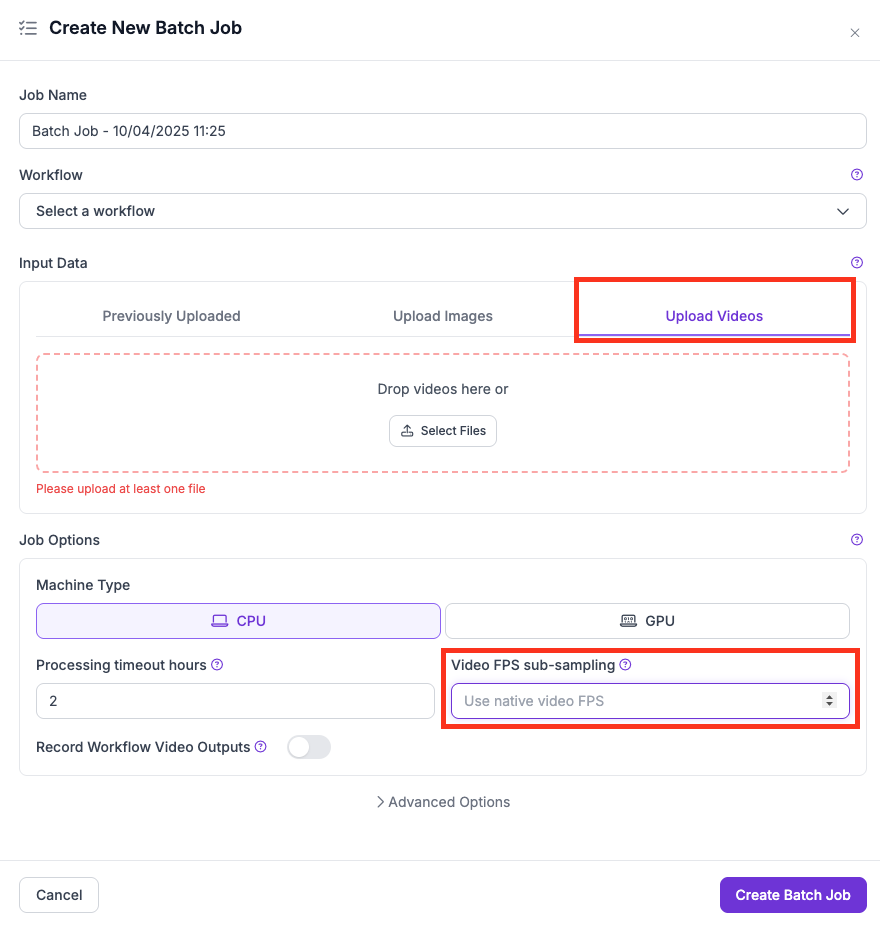
**SAHI के साथ Video jobs:** frames छोड़ने के लिए FPS sub-sampling का उपयोग करें:
* UI में, उपयोग करें **Video FPS sub-sampling** ड्रॉपडाउन.
* CLI में, उपयोग करें `--max-video-fps` flag.
UI में FPS sub-sampling सेटिंग
## Out of Memory (OOM) त्रुटियाँ
### समस्या
जब Workflow उपलब्ध RAM या VRAM से अधिक उपयोग करता है, तो jobs OOM त्रुटियों के कारण fail हो जाते हैं।
### सामान्य कारण
* **SAHI + Instance Segmentation:** यह संयोजन अत्यधिक memory-intensive है। SAHI inference calls को गुणा करता है, और instance segmentation बड़े outputs (masks, scores) उत्पन्न करता है, जिससे अक्सर crashes होते हैं।
* **प्रति machine बहुत अधिक workers:** Multiple workers हल्के Workflows के लिए cost और speed को optimize करते हैं, लेकिन भारी Workflows (कई बड़े models, जटिल post-processing) उपलब्ध memory से अधिक हो जाएंगे।
### अनुशंसाएँ
* बड़े models, SAHI, या high-resolution inputs वाले Workflows के लिए प्रति machine कम workers (जैसे 1 या 2) का उपयोग करें।
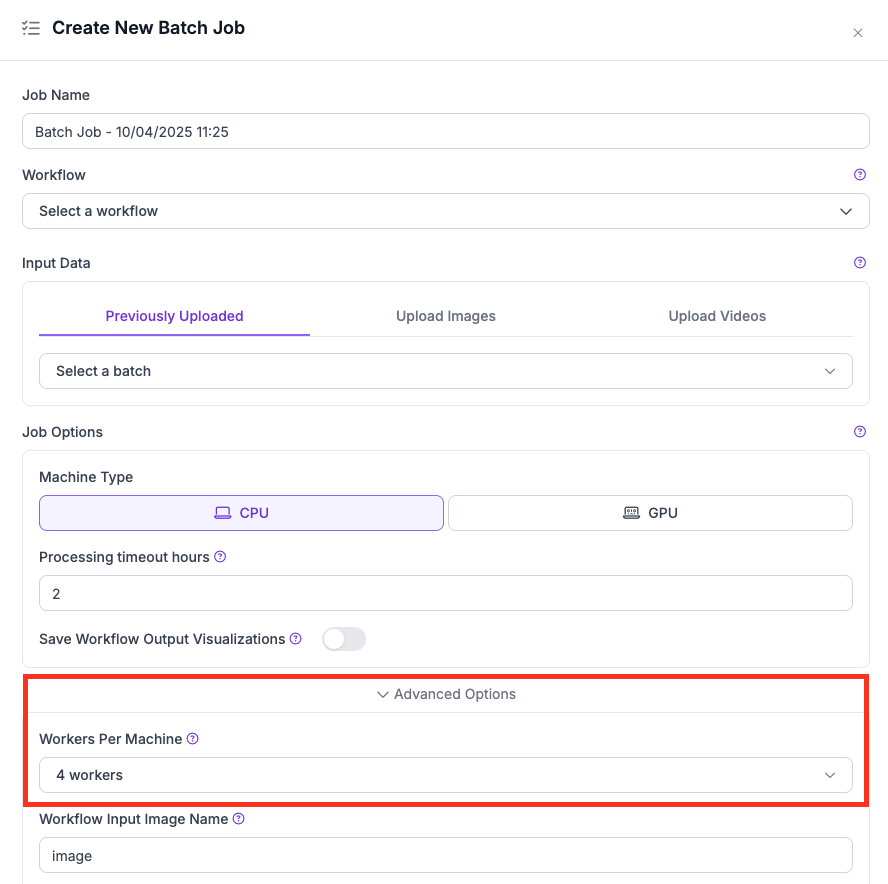
* कम करें **Workers Per Machine** मान को Advanced Options के अंतर्गत।
* यदि आपके model को अधिक memory throughput की आवश्यकता है, तो CPU से GPU पर स्विच करें।
* बड़े batches चलाने से पहले अपने Workflow को छोटे dataset पर परीक्षण करें।
* input resolution कम करें या अनावश्यक blocks हटाकर Workflow को सरल करें।
UI में workers per machine सेटिंग
## Per-Shard Image Failure Tolerance
### यह कैसे काम करता है
Image batch jobs को shards में विभाजित किया जाता है जो parallel में चलते हैं। प्रत्येक shard यह ट्रैक करता है कि processing के दौरान कितनी images fail हुईं। यदि एक shard के भीतर failure rate एक threshold से अधिक हो जाता है, तो वह shard abort कर दिया जाता है। job का बाकी हिस्सा बिना प्रभावित हुए चलता रहता है।
डिफ़ॉल्ट रूप से, platform एक fixed failure threshold लागू करती है। आप इसे प्रति job override कर सकते हैं `maxImageFailureRate` को job creation request body में सेट करके। मान एक float है `0.0` और `1.0`:
* `0.0` इसका अर्थ शून्य सहिष्णुता है (पहली विफलता पर shard abort करें)।
* `1.0` इसका अर्थ है कि shard कभी abort नहीं होगा, चाहे कितनी भी images fail हों।
* फ़ील्ड को छोड़ दें या इसे सेट करें `null` platform default का उपयोग करने के लिए।
यह parameter केवल image jobs पर लागू होता है। Video jobs इसे support नहीं करते।
### API के माध्यम से सेट करना
शामिल करें `maxImageFailureRate` job creation payload में:
```json
{
"type": "simple-image-processing-v1",
"maxImageFailureRate": 0.1,
...
}
```
failed या aborted job को restart करते समय भी इसे restart parameters override में शामिल करके override किया जा सकता है।